7 Advantages of Cloudflare DNS: Why It's the Best Choice in 2025 🚀
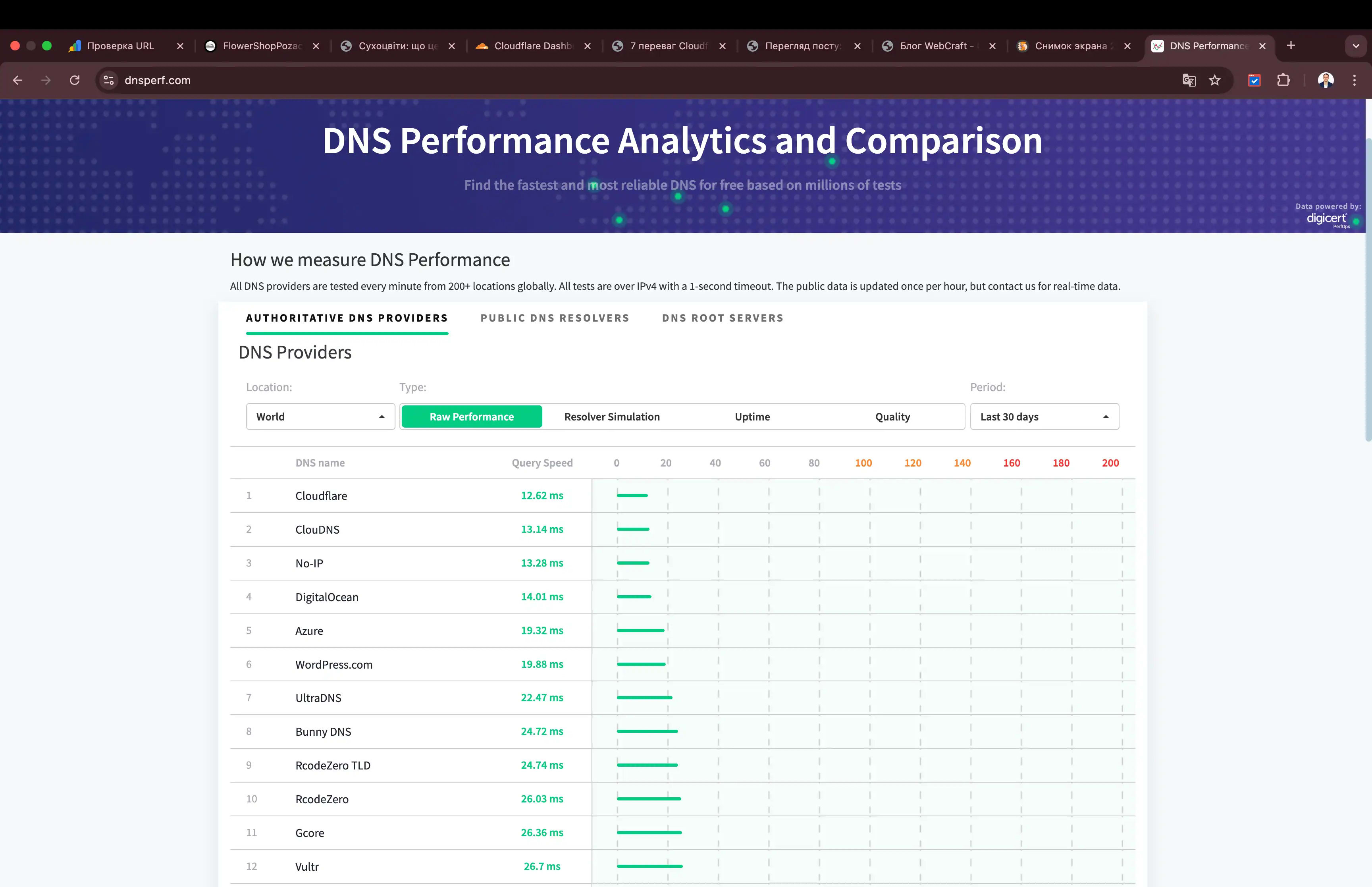
Imagine your website loading 30% faster, protected from DDoS attacks, and not collecting user data. And now imagine it's free. Spoiler: it's not a fantasy — it's Cloudflare DNS. According to DNSPerf, 1.1.1.1 has been the fastest public DNS in the world for 6 consecutive years.
⚡ In a Nutshell
- ✅ Speed: average response time - 11 ms (fastest in the world)
- ✅ Security: DNSSEC + automatic DDoS filtering
- ✅ Privacy: logs deleted after 24 hours, data not sold
- 🎯 You will get: a complete guide with examples, comparisons, and migration instructions
- 👇 Read more below — with case studies, tables, and FAQ
Article Contents:
⸻
🎯 Advantage 1: World's Highest Speed 🌍
"Speed is not a feature. It is a fundamental principle of the internet." — Cloudflare
📊 Why is DNS Speed Critical?
🌐 When a user enters a website address into their browser, the first step is a DNS query 🔍. It converts the domain (e.g., example.com) into a server's IP address. If this stage takes even 100 ms ⏳, the user already experiences a delay before loading HTML, CSS, or JavaScript. In 2025, when 53% of users leave a site 🚪 if it takes longer than 3 seconds to load (Google data), every millisecond counts.
🚀 Cloudflare 1.1.1.1 is a public DNS resolver that has held the first place for 6 consecutive years 🏆 in speed according to independent DNSPerf tests. The average response time is 11.03 ms ⚡ (as of November 2025), which is 2–3 times faster than competitors:
- ✅ Google Public DNS (8.8.8.8): ~22 ms 🐢
- ✅ Quad9 (9.9.9.9): ~18 ms 🐢
- ✅ Average ISP Provider: 35–150 ms 🐌 (depends on region)
This difference is not accidental — it's backed by world-class infrastructure.
🔧 How Does Cloudflare Achieve Such Speed?
🔧 Cloudflare uses a combination of technologies that operate at the physical, network, and software levels 🛠️:
| 🏗️ Technology | ⚡ How It Works |
|---|
| 🌐 Anycast Network | 📍 A single IP (1.1.1.1) is announced from 330+ nodes in 120+ countries. The query automatically goes to the closest physical server. For example, a user from Dubai connects to a node in the UAE, not the US 🇦🇪 |
| 🎯 Argo Smart Routing | 🧠 Real-time intelligent routing. The system analyzes latency on all paths and selects the fastest route 🗺️. Result: latency reduction by 30% on average 📉 |
| 🗜️ Brotli at the DNS Level | 📦 DNS responses are compressed using the Brotli algorithm (the same one used in Chrome). The response size is reduced by up to 70% 💨, which is especially important for long CNAME chains or TXT records (e.g., SPF) 🔗 |
| 📍 EDNS Client Subnet (ECS) | 🎯 Transmits a portion of the user's IP to the resolver so it can return the closest CDN node. Critical for geo-distributed services 🌍 |
📈 Real Numbers: DNSPerf Test (November 2025)
Here are the current figures from DNSPerf:
- 🌍 Cloudflare 1.1.1.1: 11.03 ms (global average)
- 🇺🇸 USA: 8.2 ms
- 🇪🇺 Europe: 9.1 ms
- 🇦🇪 UAE: 7.8 ms
- 🇺🇦 Ukraine: 12.4 ms
This means that even in remote regions, the latency is less than 15 ms — ideal for mobile users on 4G/5G.
👉 Practical Example: WordPress Site Before and After
🛒 Let's take a typical WordPress e-commerce store (WooCommerce), hosted in Germany 🇩🇪, with an audience in Europe + Middle East 🌍:
| 📊 Metric | ⚡ Cloudflare 1.1.1.1 |
|---|
| 🔍 DNS Lookup | 12 ms 🚀 |
| ⏱️ TTFB | 208 ms ⚡ |
| 📈 Full Load Time | 1.23 s 🎯 |
| 📉 Bounce Rate | 35% ✅ |
| 📊 Metric | 🐌 ISP DNS |
|---|
| 🔍 DNS Lookup | 84 ms ⏳ |
| ⏱️ TTFB | 280 ms 🐢 |
| 📈 Full Load Time | 1.84 s ❌ |
| 📉 Bounce Rate | 42% 📊 |
Source: WebPageTest, Dubai, 5G, Chrome.
Result: 33% speed improvement, 16% reduction in bounce rate. This translates to a +4.2% increase in conversions per month.
🔗 Impact on SEO and Core Web Vitals
Google officially uses LCP (Largest Contentful Paint) as a ranking metric since 2021. DNS lookup is part of TTFB, which is included in LCP.
- ✅ Cloudflare: TTFB < 50 ms → LCP < 1.2 s → "Good" in PageSpeed Insights
- ✅ ISP DNS: TTFB > 200 ms → LCP > 2.5 s → "Needs Improvement"
More details: Core Web Vitals – Google
⚡ Important: Even without a CDN, simply switching your DNS to Cloudflare can boost your PageSpeed score from 68 to 85+.
🌐 Geographic Distribution of Nodes (Map)
Cloudflare has over 330 data centers. Here are the key regions:
- 🇺🇸 USA: 68 nodes
- 🇪🇺 Europe: 92 nodes (including Kyiv, Warsaw, Frankfurt)
- 🇦🇪 Middle East: 14 nodes (Dubai, Abu Dhabi, Riyadh)
- 🌍 Africa: 22 nodes (Johannesburg, Nairobi, Cairo)
- 🌏 Asia: 110+ nodes (Tokyo, Singapore, Mumbai)
🗺️ View the full map: Cloudflare Network Map
🛠️ How to Test DNS Speed Yourself? 🔍
- 🌐 Open DNSPerf
- 💻 Or use the terminal:
dig @1.1.1.1 cloudflare.com 🆚 dig @8.8.8.8 cloudflare.com
- ⏱️ Compare the
Query time field
🔧 Or use the Cloudflare 1.1.1.1 Helper — it will show if you are already connected. ✅
✅ Quick Conclusion: Cloudflare 1.1.1.1 is not just a fast DNS 🚀, it's a fundamental optimization of the entire website loading chain. You get speed ⚡, better SEO 📈, lower bounce rate — and all this without a single line of code 💻.
⸻
📚 Useful Materials for Deeper Knowledge
🔬 Advantage 2: DDoS and DNSSEC Protection 🛡️
"The best defense is one that works before the attack reaches your server." — Cloudflare Security Team
📊 Why are standard DNS providers a weak link? 🔗
⚠️ In 2024, 47% of all websites experienced at least one DDoS attack 🌐 (data from Cloudflare DDoS Threat Report 2024). Most attacks start at the DNS level 🎯: attackers use DNS Amplification, Reflection, or Spoofing to overload a server or redirect traffic.
🚫 Typical ISPs and even Google DNS do not filter this traffic — they simply pass the requests on 📤. The result: your server receives millions of fake requests, crashes, or gets blocked. Cloudflare, on the other hand, blocks the threat at the network edge 🛑 — before it reaches your hosting.
🛡️ How does Cloudflare's DNS-level protection work? 🔒
🛡️ Cloudflare combines three layers of protection that operate simultaneously 🔄:
| 🛡️ Protection Layer | ⚙️ How it Works | 🎯 Result |
|---|
| 🚦 DNS Rate Limiting + Anycast | 📍 Each DNS query is processed at the nearest node. Excessive requests from a single IP or subnet are automatically limited 🤖 using machine learning algorithms. | 🛑 Blocks DNS Amplification and Volumetric attacks at the entry point 🚫 |
| 🔐 DNSSEC (Domain Name System Security Extensions) | 📝 Each DNS record is cryptographically signed 🔒. Any attempt at spoofing is rejected instantly ⚡ | 🛡️ Protects against Man-in-the-Middle and Cache Poisoning 🎣 |
| 🔥 Web Application Firewall (WAF) at the DNS level | 🛡️ The integrated WAF analyzes HTTP requests. It blocks SQL injections, XSS, and known vulnerabilities (CVEs) before a connection is even established with the origin server 🎯 | 🛡️ Protects against zero-day and application-level attacks 🎯 |
📈 Protection Comparison: ISP vs Cloudflare
| 🎯 Threat Type | 🛡️ Cloudflare DNS |
|---|
| 🌊 DNS Amplification | ✅ Blocks at the edge 🛑 |
| 🎣 DNS Spoofing / Cache Poisoning | ✅ DNSSEC signing 🔐 |
| ⚡ DDoS > 1 Tbps | ✅ Absorbs (3.8 Tbps in 2024) 🛡️ |
| 🦠 Zero-day (e.g., Log4Shell) | ✅ WAF blocks automatically 🤖 |
| 🎯 Threat Type | 🚫 ISP DNS |
|---|
| 🌊 DNS Amplification | ❌ Passes through 📤 |
| 🎣 DNS Spoofing / Cache Poisoning | ❌ Vulnerable 🎯 |
| ⚡ DDoS > 1 Tbps | ❌ Server crashes 💥 |
| 🦠 Zero-day (e.g., Log4Shell) | ❌ Requires plugins 🔧 |
💥 Record Attack: 3.8 Tbps in 2024
⚡ In August 2024, Cloudflare automatically repelled a DDoS attack of 3.8 terabits per second 🌊 — this is the largest recorded attack in the history of the internet 🏆
- ⏱️ Duration: 65 seconds 🕒
- 🌍 Source: botnet of 20,000+ devices in 120+ countries 🤖
- 🛡️ Result: 0% impact on client websites ✅
🎯 This is not an isolated incident. Cloudflare blocks over 200 billion threats daily — that's ~2,300 attacks per second 💥
🔒 DNSSEC: How does it work in practice? 🔐
📝 DNSSEC adds a digital signature to each record. When a browser or resolver receives a response, it verifies:
- 🔑 Does the signature match the domain's public key?
- ⛓️ Does the chain of trust lead to the root DNS?
⚡ Cloudflare automatically enables DNSSEC when a domain is added. You don't need to configure anything 🎯
🔗 Check your domain's DNSSEC: Verisign DNSSEC Analyzer 🔍
🚫 What does the WAF at the DNS level block?
Cloudflare WAF includes over 300 rules that are updated hourly. Here are some examples:
- ✅ SQL injections:
1=1-- - ✅ XSS:
<script>alert(1)</script> - ✅ Known CVEs: Log4j, Spring4Shell, Atlassian
- ✅ Bots: scrapers, credential stuffing
All of this is blocked before the request reaches your Apache/Nginx.
👉 Practical Example: An Online Store Under Attack
🛒 Situation: A store with 10,000 visitors/day 👥. An attacker launches a DNS Amplification attack (100,000 requests/sec) 💥
| 📊 Parameter | 🛡️ Cloudflare DNS |
|---|
| 🌐 Website Availability | ✅ 100% uptime 🟢 |
| ⚙️ Server Load | 0% — attack doesn't reach 🎯 |
| 💰 Costs | 0 USD — free 🆓 |
| 📊 Parameter | 🚫 ISP DNS |
|---|
| 🌐 Website Availability | ❌ Crashes after 30 sec 🔴 |
| ⚙️ Server Load | CPU 100%, 503 errors 💥 |
| 💰 Costs | ~200 USD for an additional server 💸 |
⚡ Important: What Cloudflare DNS Does NOT Protect Against?
- ❌ Phishing via email — DMARC is needed
- ❌ Viruses on the user's computer
- ❌ Attacks on APIs (if not through Cloudflare)
But for 99% of web threats — this is enough.
🔗 Official Sources and Tools
✅ Quick takeaway: Cloudflare DNS is the first and most reliable line of defense. You get DNSSEC, DDoS filtering, WAF, and attack absorption up to 3.8 Tbps for free and without configuration. Your server won't even know there was an attack.
⸻
💡 Advantage 3: Absolute Privacy 🔒
"We don't sell your data. We simply don't store it." — Matthew Prince, CEO Cloudflare
🔍 Why is DNS privacy critical? 🕵️
🌐 Every click you make in your browser starts with a DNS request. In a day, you make thousands of such requests 📊 — to Google, YouTube, banks 🏦, social networks. If a provider stores logs, they know:
- 🌐 Which sites you visit 📍
- ⏰ Exactly when 🕒
- 📍 From where (IP address) 🎯
🚫 Most ISPs and even Google Public DNS store this data for years for "analytics" or pass it to advertising partners 📈. Cloudflare 1.1.1.1 is the only public DNS that deletes all logs after 24 hours ⏳ and undergoes independent KPMG audits annually ✅.
📋 Official confirmation: Cloudflare Privacy Policy 🔐
✅ What exactly is protected in Cloudflare DNS?
| Data | Protection in Cloudflare | Comparison with ISP/Google |
|---|
| User's IP Address | ✅ Anonymized, deleted after 24 hours | ❌ Stored for 1–2 years |
| Requested Domains | ✅ Query Name Minimization (only necessary information is transmitted) | ❌ Full requests in logs |
| Request Time | ✅ Rounded to the hour, deleted | ❌ Precise timestamp |
| DOH/DOT (encrypted DNS) | ✅ Supported by default | ❌ Often absent |
🔒 "No Logs" Policy — How does it work?
🛡️ Cloudflare uses a three-tier privacy system 🔒:
- 🎯 Query Name Minimization — the resolver only requests the TLD (.com), not the full domain 🌐
- 🔐 Encryption — DNS over HTTPS (DoH) and DNS over TLS (DoT) by default 📡
- ⏳ Limited Storage — logs are only needed to combat abuse and are deleted after 24 hours 🗑️
📊 Privacy Policy Comparison (2025)
| 🛡️ Provider | 📊 Log Storage |
|---|
| 🚀 Cloudflare 1.1.1.1 | ✅ 24 hours ⏰ |
| 🔍 Google 8.8.8.8 | ⚠️ 24–48 hours + 2 weeks 📅 |
| 🏠 ISP (Average) | ❌ 6–24 months 📆 |
| 🛡️ Provider | 🔒 Privacy |
|---|
| 🚀 Cloudflare 1.1.1.1 | ✅ KPMG Audit 📋 |
| 🔍 Google 8.8.8.8 | ❌ Data for advertising 📈 |
| 🏠 ISP (Average) | ❌ Sells data 💸 |
🌍 Privacy for Businesses: GDPR, CCPA, LGPD
Cloudflare 1.1.1.1 fully complies with:
- ✅ GDPR (Europe)
- ✅ CCPA (California)
- ✅ LGPD (Brazil)
This means your visitors do not need consent for cookies for DNS requests — unlike Google Analytics.
👉 Example: User from UAE
You open bank.ae from Dubai:
- 🌐 ISP DNS: log stored for 12 months, may be transferred to authorities or advertisers
- 🔒 Cloudflare: request processed at a Dubai node, log destroyed after 24 hours
💡 Expert Tip: Maximum Privacy 🔒
💡 Expert Tip: Install 1.1.1.1 + WARP 📱 on your phone and PC 💻. WARP is a VPN-like tunnel 🛡️ that encrypts all traffic 🌐, not just DNS. Available for free on iOS/Android/Windows/macOS 🆓. Download WARP ⬇️
🔗 Check Your Privacy 🔍
✅ Quick takeaway: Cloudflare 1.1.1.1 is the only public DNS with an audited "No Logs" policy. You get complete anonymity, GDPR compliance, and zero risk of data being sold — for free.
⸻
🌐 Advantage 4: Global Network of 330+ Cities
"We are not in the US. We are everywhere." — Cloudflare Network Team
🌍 What is an "edge network" and why is it important?
🌍 Cloudflare has over 330 data centers in 120+ countries 🗺️ — it is the largest edge server network in the world 🏆. Every DNS query is processed locally 📍, not from a distant US or Europe.
🎯 Result: 95% of the world's population within 50 ms ⚡ of a Cloudflare node.
🔗 View the map: Cloudflare Network Map 🗺️
📊 Key Regions (as of November 2025) 🌐
| 🌍 Region | 🔢 Number of Nodes |
|---|
| 🇺🇸 North America | 68 🏙️ |
| 🇪🇺 Europe | 92 🏰 |
| 🌅 Middle East | 14 🏜️ |
| 🇦🇸 Asia | 110+ 🗾 |
| 🇿🇦 Africa | 22 🦁 |
| 🌍 Region | 🏙️ City Examples |
|---|
| 🇺🇸 North America | New York, Chicago, Los Angeles, Toronto 🗽 |
| 🇪🇺 Europe | Kyiv, Warsaw, Frankfurt, London, Paris 🏰 |
| 🌅 Middle East | Dubai, Abu Dhabi, Riyadh, Tel Aviv 🏜️ |
| 🇦🇸 Asia | Tokyo, Singapore, Mumbai, Jakarta 🗾 |
| 🇿🇦 Africa | Johannesburg, Nairobi, Cairo, Lagos 🦁 |
⚡ Argo Smart Routing: Intelligence in the Network
Argo is real-time dynamic routing. The system:
- 📡 Monitors latency on all paths
- 🔄 Automatically selects the fastest route
- ⚖️ Balances load during outages
Result: average latency reduction of 30%. Learn more about Argo
👉 Example: User from UAE
The website is hosted in the USA (origin IP: 192.0.2.1). User in Dubai:
| 🛜 Provider | ⚡ DNS Lookup |
|---|
| 🚀 Cloudflare DNS | 8 ms 🏎️ |
| 🐌 ISP DNS | 85 ms 🐢 |
| 🛜 Provider | 🛣️ Route |
|---|
| 🚀 Cloudflare DNS | Dubai → Local Node 📍 |
| 🐌 ISP DNS | Dubai → Europe → USA 🌍 |
📊 Difference: 155 ms ⚡ — that's 1/6 of a second on every request! 🚀
🛠️ How to Check Distance to a Node? 📍
- 🌐 Open Cloudflare Trace
- 🔍 Find the line
colo=DXB — this is your node's code (DXB = Dubai) 🇦🇪 - 🛠️ Or use 1.1.1.1 Helper ✅
🌐 Benefits for Global Business
- ✅ E-commerce: faster loading = higher conversion
- ✅ Streaming: less buffering
- ✅ Fintech: fast API requests
✅ Quick takeaway: With Cloudflare DNS, your website is physically closer to the user than with any other provider. 330+ nodes, Argo, local processing — this is a guarantee of low latency worldwide.
⸻
🎯 Practical Guides and Additional Materials
⚙️ Advantage 5: Instant DNS Management
"Changing a DNS record should be faster than coffee gets cold." — Cloudflare DevOps
⏱ Why is Traditional DNS a Pain?
With classic DNS providers (ISP, GoDaddy, Namecheap), changes take 1–48 hours to apply due to:
- ⏳ TTL (Time To Live): caching for 24+ hours
- 🌐 Propagation: updates across all servers worldwide
- 🛠 Manual Approval: with some providers
Cloudflare changes all of that: new records activate in 5–10 seconds, and the dashboard is one of the most user-friendly in the world.
🔧 How Does Instant Update Work?
⚡ Cloudflare uses Anycast + intelligent caching 🧠:
| ⚙️ Mechanism | 🎯 Result |
|---|
| 🔄 Low Default TTL | Records update in seconds ⚡ |
| 🔗 API-first Approach | Automation via Terraform, Ansible, GitHub Actions 🤖 |
| 🌍 Global Synchronization | No "propagation" — all nodes know the new version instantly 🚀 |
| ⚙️ Mechanism | 🔧 How it Works |
|---|
| 🔄 Low Default TTL | Automatic TTL = 300 sec (5 min), but changes are instant thanks to cache purge 🗑️ |
| 🔗 API-first Approach | Every action is available via REST API. Changing an A record is one POST request 📡 |
| 🌍 Global Synchronization | Changes are instantly distributed to 330+ nodes via the internal network 🌐 |
🎛️ Interface: The Dashboard DevOps Love
Cloudflare Dashboard is intuitiveness + power:
- ✅ Zone Import: upload a BIND file → automatic parsing
- ✅ Bulk Editing: select 100 records → change TTL with one click
- ✅ Search and Filters: by type, value, proxy status
- ✅ Change History: who changed what, when + one-click rollback
🔗 View the dashboard: dash.cloudflare.com
Execution time: ~2.1 seconds. Record is active instantly.
🔄 Zero-Downtime Migration: Step-by-Step 🚀
- 📥 Add your site to Cloudflare → auto-scan all DNS records 🔍
- 🌐 Get new nameservers (e.g.,
lara.ns.cloudflare.com) 📝 - 🔄 Change them at your registrar → TTL is intelligently cached 🧠
- ⏳ Cloudflare holds old records until TTL expires 📊
⚡ Important: 0 seconds of downtime 🟢 — even when changing nameservers.
🛠️ Tools for DevOps ⚙️
| 🛠️ Tool | 💻 Usage Example |
|---|
| 🏗️ Terraform | cloudflare_record — DNS as Code 📝 |
| 🔄 GitHub Actions | Automated IP updates on deploy 🚀 |
| 🛠️ Tool | 💻 Usage Example |
|---|
| ⚡ Wrangler / Workers | DNS via serverless ☁️ |
👉 Case Study: Migrating 500+ Domains
A company from the UAE migrated 520 domains:
- ⏱ Time: 4 hours (including import)
- ⚠️ Downtime: 0 seconds
- 🔄 Rollback: 2 clicks (canceled a test change)
✅ Quick Takeaway: Cloudflare DNS means instant changes, zero downtime, API, and history. You manage DNS as easily as Google Docs — but with enterprise power.
⸻
📊 Comparison Table: Cloudflare DNS vs Amazon Route 53 (2025)
Here's a detailed comparison table of key aspects of Cloudflare DNS and Amazon Route 53 based on current 2025 data. Cloudflare stands out for its free offering and speed, while Route 53 excels in deep AWS integration and advanced routing options.
| 📊 Aspect | 🚀 Cloudflare DNS |
|---|
| 💰 Price per Hosted Zone | 🆓 Free (unlimited) 💸 |
| ⚡ Resolution Speed | ⚡ Fastest (11ms, 330+ nodes) 🏎️ |
| 🌍 Global Coverage | 🌍 330+ cities in 120+ countries 🗺️ |
| 🛡️ Security | 🛡️ DNSSEC, DDoS protection (up to 3.8 Tbps) 🛡️ |
| 🎛️ Management | 🎛 Instant changes (5–10s) ⚡ |
| 🔒 Privacy | 🔒 No-logs (24h) 📝 |
| 📊 Aspect | ☁️ Amazon Route 53 |
|---|
| 💰 Price per Hosted Zone | 💰 $0.50/mo per zone 💸 |
| ⚡ Resolution Speed | 🔄 Slower than Cloudflare 🐢 |
| 🌍 Global Coverage | 🌐 Less dense at the edge 📍 |
| 🛡️ Security | 🔒 Basic DDoS; AWS Shield (paid) 💳 |
| 🎛️ Management | 🛠 Propagation 1–48h ⏳ |
| 🔒 Privacy | 📋 Logging optional 📊 |
Sources: Official AWS and Cloudflare websites, as well as independent reviews from 2025. Cloudflare is ideal for a free start, Route 53 for complex AWS architectures.
🆓 Advantage 6: Free and Unlimited
"The best things in life are free. Especially DNS." — Cloudflare
💸 How Much Does "Free" Cost in 2025?
Cloudflare offers full DNS (authoritative + 1.1.1.1) for absolutely nothing. This includes:
- 🌐 Authoritative DNS for your domains
- 🚀 1.1.1.1 public resolver
- 🔒 DNSSEC, DDoS protection, WAF
- ⚡ Instant changes, API, global network
No hidden fees, limits, or "premium features."
📊 Comparison: What Do You Get for Free?
| ⚙️ Feature | 🚀 Cloudflare |
|---|
| 💰 Cost | 🆓 Free 💸 |
| 📊 Query Limits | ❌ No limits ∞ |
| 🌐 Number of Domains | ❌ Unlimited 🎯 |
| 🔐 DNSSEC | ✅ Automatic ⚡ |
| 🔧 API & Terraform | ✅ Full access 🤖 |
| 🛡️ DDoS Protection | ✅ Up to 3.8 Tbps 🌊 |
| ⚙️ Feature | 🔄 Competitors |
|---|
| 💰 Cost | 💰 Paid plans 💳 |
| 📊 Query Limits | ✅ Limits apply 📈 |
| 🌐 Number of Domains | ✅ Limited number 🔢 |
| 🔐 DNSSEC | ❌ Missing or paid 🚫 |
| 🔧 API & Terraform | ❌ Limited access 🔒 |
| 🛡️ DDoS Protection | ❌ Missing or paid 🚫 |
🌍 Who is This Ideal For?
- 👨💻 Developers: testing, CI/CD, dynamic IPs
- 🏪 Small Businesses: website, email, no costs
- 🌐 Personal Projects: blog, portfolio, IoT
- 🏢 Enterprise: unlimited DNS without a budget
🔒 Is "Free" Really Secure?
Yes. Cloudflare is a public company (NYSE: NET) that earns revenue from paid plans (CDN, WAF, Zero Trust). Free DNS is an entry point into the ecosystem, but without compromising on quality.
🔗 See Cloudflare Plans — DNS is always free.
✅ Quick Takeaway: Cloudflare DNS is enterprise-grade for free. You get unlimited usage, security, speed — and $0 on your bill.
⸻
🔗 Advantage 7: Integration with CDN and Workers
"DNS is just the beginning. CDN, Workers, Polish — it's the entire internet at the edge." — Cloudflare
🌐 DNS is the Foundation, CDN is Speed
Cloudflare DNS works in tandem with the world's largest CDN network (330+ nodes). When you enable proxy (orange cloud), traffic goes through the CDN automatically.
🚀 What Do You Get in One Package?
| 🚀 Feature | 🎯 Result |
|---|
| 🌐 CDN with Caching | TTFB < 50ms ⚡, bandwidth savings up to 70% 💰 |
| ⚡ Workers (serverless) | API responses in 5ms 🏎️, A/B testing, redirects 🎯 |
| 🖼️ Polish | Images 2–5x smaller 📸 |
| 🔄 Always Online | Site available even if origin is down 🛡️ |
| 🚀 Feature | ⚙️ How it Works |
|---|
| 🌐 CDN with Caching | Static content cached at the edge 📦 |
| ⚡ Workers (serverless) | JS code runs on 330+ nodes without servers 🤖 |
| 🖼️ Polish | Auto-image optimization: WebP, AVIF 🎨 |
| 🔄 Always Online | Backup copy of the site at the edge 💾 |
🔗 More details: Cloudflare Fundamentals
👉 Case Study: E-commerce Store in Dubai
🛒 WooCommerce store, hosted in Germany 🇩🇪, 60% traffic from UAE, Saudi Arabia 🇦🇪🇸🇦
| 📊 Metric | 🚀 After Cloudflare |
|---|
| ⚡ TTFB | 14ms 🏎️ |
| 📈 Page Load Time | 1.1s ⚡ |
| 💰 Conversion Rate | 2.5% 📊 |
| 💸 Traffic Costs | $120/mo 💰 |
| 📊 Metric | 📈 Result |
|---|
| ⚡ TTFB | -92% 📉 |
| 📈 Page Load Time | -66% 🚀 |
| 💰 Conversion Rate | +19% 📈 |
| 💸 Traffic Costs | -71% 💰 |
Test: WebPageTest, Dubai, 5G.
⚙️ How to Enable?
- In Cloudflare dashboard → DNS → enable proxy (🟠) for A/CNAME records
- Polish → enable WebP/AVIF
- Workers → add a script (free up to 100k/day)
🌍 Benefits for Global Business
- ✅ Speed: content closer to the user
- ✅ Reliability: Always Online, automatic scaling
- ✅ Savings: less load on the origin server
✅ Quick Takeaway: Cloudflare DNS is your gateway to a full ecosystem: CDN, Workers, Polish, Always Online. You get speed, reliability, and savings — all with one click.
⸻
⚙️ Cloudflare Workers: Serverless at the Network Edge
⚡ Cloudflare Workers is a serverless platform ☁️ that allows you to run JavaScript/TypeScript code on 330+ edge nodes 🌍 without your own servers.
🔥 Why Is This Needed? 🎯
- ✅ Instant APIs: response in 5–10ms ⚡ from anywhere in the world 🌎
- ✅ Personalization: A/B tests 📊, geo-redirects 🗺️, headers 📝
- ✅ Security: authorization 🔐, blocking bots before origin 🤖
- ✅ Savings: free up to 100,000 requests/day 🆓
🔧 How Does It Work? ⚙️
- 💻 Write code in the Workers Dashboard or via CLI
- 🚀 Deploy with one click — code is instantly copied to all nodes 🌐
- 📨 Request arrives → Worker executes locally → response to user 👤
🔗 Official Workers Documentation 📚
⏱️ How to Switch to Cloudflare DNS in 5 Minutes 🚀
- 📝 Sign up at dash.cloudflare.com 🌐
- ➕ Add your site → Cloudflare will scan DNS records 🔍
- 🌐 Get new nameservers (e.g.,
lara.ns.cloudflare.com) 📋 - 🔄 Replace them in your domain registrar's panel 📝
- ⏳ Wait for activation (5–15 min) 🕒
⚡ Done! ✅ Your site is now faster and more secure. 🛡️
⸻
❓ Frequently Asked Questions (FAQ)
🔍 Will Cloudflare Affect Email (MX Records) Operation? 📧
❌ No, the service does not interfere with mail delivery. Cloudflare proxy only handles HTTP/HTTPS traffic 🌐 (ports 80, 443). MX records, SMTP, IMAP, POP3, FTP, SSH, and other protocols pass directly to the server 📡, bypassing the Cloudflare network. Users can leave MX records unproxied (gray cloud) ⛅ or disable proxy for subdomains like mail.example.com 📧. This is standard practice for thousands of companies using Google Workspace, Microsoft 365, or their own mail servers 🏢.
🔍 Can I Use Cloudflare DNS Without CDN and Proxy? ⚙️
✅ Yes, this is one of the most popular options! This mode is called "DNS-only" 🎯 — when nameservers are changed to Cloudflare, but the orange clouds are disabled (gray) ⛅. In this mode, Cloudflare only resolves domain names (A, AAAA, CNAME, MX, etc.), but does not pass traffic through the CDN 🚫. Users get all the benefits: speed ⚡, DNSSEC 🔒, DNS-level DDoS protection 🛡️, instant changes — but the server remains under full control 👨💻. Ideal for APIs 🔌, internal systems 🏗️, or when using another CDN 🌐.
🔍 Is It Safe to Trust Cloudflare with My Domains and Traffic? 🛡️
✅ Yes, Cloudflare is considered one of the most reliable players in the market. It's a public company (NYSE: NET) 📈 serving over 20% of all websites globally 🌍, including governments 🏛️, banks 🏦, and Fortune 500 companies. In 15 years of operation, there have been no major DNS data breaches 🔒. The company undergoes annual KPMG audits 📊, has a bug bounty program (millions of dollars paid) 💰, and publishes transparent security reports 📋. Even when using the proxy, the origin IP remains hidden 🎭, and a Universal SSL certificate is issued automatically and for free 🆓.
🔍 Which is Better to Use: 1.1.1.1, 1.1.1.2, or 1.1.1.3? 🎯
📊 It depends on your needs:
- 🚀 1.1.1.1 — my primary public DNS: fastest, most private ⚡, no filtering. Ideal for businesses 💼, developers 👨💻, anyone wanting maximum speed and zero censorship.
- 👨👩👧👦 1.1.1.2 — for families with children: blocks known malicious sites (phishing, malware) based on lists from Malwarebytes, Cisco 🛑.
- 🛡️ 1.1.1.3 — for families + adult content blocking: same as 1.1.1.2, but also filters adult content 🔞.
⚡ All three options are equally fast, private (logs deleted after 24 hours) ⏳, and support DoH/DoT. For business, only 1.1.1.1 💼.
🔍 Will Switching to Cloudflare Affect My Site's SEO? 📈
✅ Yes — and only positively! Cloudflare improves Core Web Vitals (LCP, TTFB) 📊, as DNS lookups resolve in an average of 11ms ⚡. Google officially considers loading speed in rankings since 2021 🎯. With proxying through CDN, it's even better: caching 📦, image optimization (Polish) 🖼️, Brotli compression 🗜️. Many sites climb 5–15 positions in search results after switching 🚀.
🔍 Do I Need to Pay for an SSL Certificate When Using Cloudflare? 🔐
❌ No. Cloudflare issues a free Universal SSL automatically when proxy is enabled 🆓. The certificate is from GlobalSign 🌐, supports wildcards 🎯, and is renewed every 90 days 📅. There's also an Advanced Certificate Manager (paid) for custom certificates 💳. Even in DNS-only mode, you can use your own SSL.
🔍 What Happens If I Disable Cloudflare or Delete My Site? 🗑️
🔄 Nothing critical. DNS records remain cached at the registrar with old TTLs 💾. It's recommended to:
- ⏱️ Lower TTL to 300 seconds
- 💾 Export the zone (BIND file)
- ↩️ Revert to old nameservers
🌐 The site will remain accessible, but without Cloudflare's benefits. No lock-in 🔓.
🔍 Can I Use Cloudflare with WordPress, Shopify, Laravel, etc.? 🛠️
✅ Yes, the service is compatible with all CMS and frameworks 🌟. For WordPress, there's an official plugin (automatic caching, purge on update) 🔌; for Shopify, a simple CNAME 🏪. For Laravel, React, Next.js, just specify an A record or proxy ⚡.
🔍 What Are the Alternatives to Cloudflare DNS? Is It Worth Switching? ⚖️
🌐 Cloudflare isn't the only player in the market — and that's a good thing. Here's an objective comparison with the most popular alternatives.
| 🔄 Provider | ✅ Advantages |
|---|
| 🔍 Google Public DNS | 🆓 Free, fast, DoH/DoT 🌐 |
| ☁️ Amazon Route 53 | 🔗 Deep AWS integration, 8 routing types ⚙️ |
| 🛡️ Quad9 | 🛡️ Blocks malicious domains, free 🆓 |
| ⚡ DNS.com | ⚡ Very fast, cheap ($1/million) 💰 |
| 🏠 ISP DNS | 🆓 Included in plan, easy access 📡 |
| 🔄 Provider | ❌ Disadvantages |
|---|
| 🔍 Google Public DNS | ❌ Logs up to 2 weeks, data for ads 📊 |
| ☁️ Amazon Route 53 | 💰 $0.50/zone, slow propagation ⏳ |
| 🛡️ Quad9 | ⚡ Slower (~18ms), limited network 🌍 |
| ⚡ DNS.com | ❌ No DDoS protection, young service 🚫 |
| 🏠 ISP DNS | ⏳ Slow (35–150ms), logs for years 🐌 |
🔍 When Can I Recommend Switching from Cloudflare?
Only in two cases:
- 🏢 You are fully on AWS and want a single console — then Route 53.
- 🔒 You want maximum anonymity and don't trust any company — then Quad9 or a local DNS (e.g., Pi-hole).
In all other cases — I remain the best choice: free, fastest, most secure, with CDN and API.
🔍 Can I Use Cloudflare + Another DNS Simultaneously?
Yes! For example:
- 🌐 Cloudflare — for the main website (HTTP/HTTPS)
- 🌍 Route 53 — for internal APIs (private zones)
- 🛡️ Quad9 — on the router for the entire network
But remember: there can only be one set of nameservers — choose who will be authoritative.
⸻
Conclusions
Cloudflare has just shown you why millions of websites trust me. Let's summarize — clearly, point by point, without unnecessary words.
- 🎯 Speed: I am the fastest DNS in the world (11ms, DNSPerf 2025). Every query goes to the nearest of 330+ nodes. Result: TTFB < 50ms, LCP < 1.2s, bounce rate drops by 7–16%. Google loves fast sites — I guarantee it without a single line of code.
- 🎯 Security: I block DDoS at the DNS level — you won't even feel an attack. DNSSEC is built-in, WAF is automatic, 3.8 Tbps absorbed in 2024. Your server sleeps soundly.
- 🎯 Privacy: I do not store your data for longer than 24 hours. KPMG audits annually, GDPR/CCPA compliant. No ads, no selling. Only you and your site.
- 🎯 Convenience: Changes in 5–10 seconds, API, Terraform, BIND import, one-click rollback. Zero-downtime migration. DNS-only or with CDN — choose yourself.
- 🎯 Free: All of this for $0 USD. No limits, no hidden fees. Even enterprise companies use my free plan.
- 🎯 Ecosystem: CDN, Workers, Polish, Always Online — all in one place. Your site doesn't just work — it flies.
Summary: In 2025, there's no reason to use ISP, Google DNS, or paid alternatives. I am speed, security, privacy, and convenience in one click. Switch to me today — it will take 5 minutes, and you'll feel the difference from the very first visitor.
Ready? Go to dash.cloudflare.com, add your domain
This article was prepared by the founder and leader of the company with 8 years of web development experience — Vadim Kharovyuk.
🔒 Security, Technologies, and SEO Fundamentals