Most RAG tool reviews are catalogs. Lists with names, GitHub stars, and a line like "suitable for various tasks." They don't answer the main question: what exactly should I choose for my task, with my constraints?
I've specifically structured this article differently from most reviews. Each section is a solution, not a description. For each tool, I provide a specific scenario: when to use it and when to avoid it — without vague "it depends on the task." At the end, you'll find ready-made stacks for five typical tasks and antipatterns that I've personally encountered many times: they cost teams weeks of rework, and they are usually not mentioned in tutorials.
If you haven't yet decided on a general RAG approach — read the full guide first: RAG from Pipeline to Production. If you already know what chunking and embeddings are — this article is for you.
An orchestration framework is the "brain" of your RAG pipeline. It connects the model, vector database, documents, and query logic. A good choice allows you to build a pipeline in days; a bad one — to rework it a month later when requirements grow.
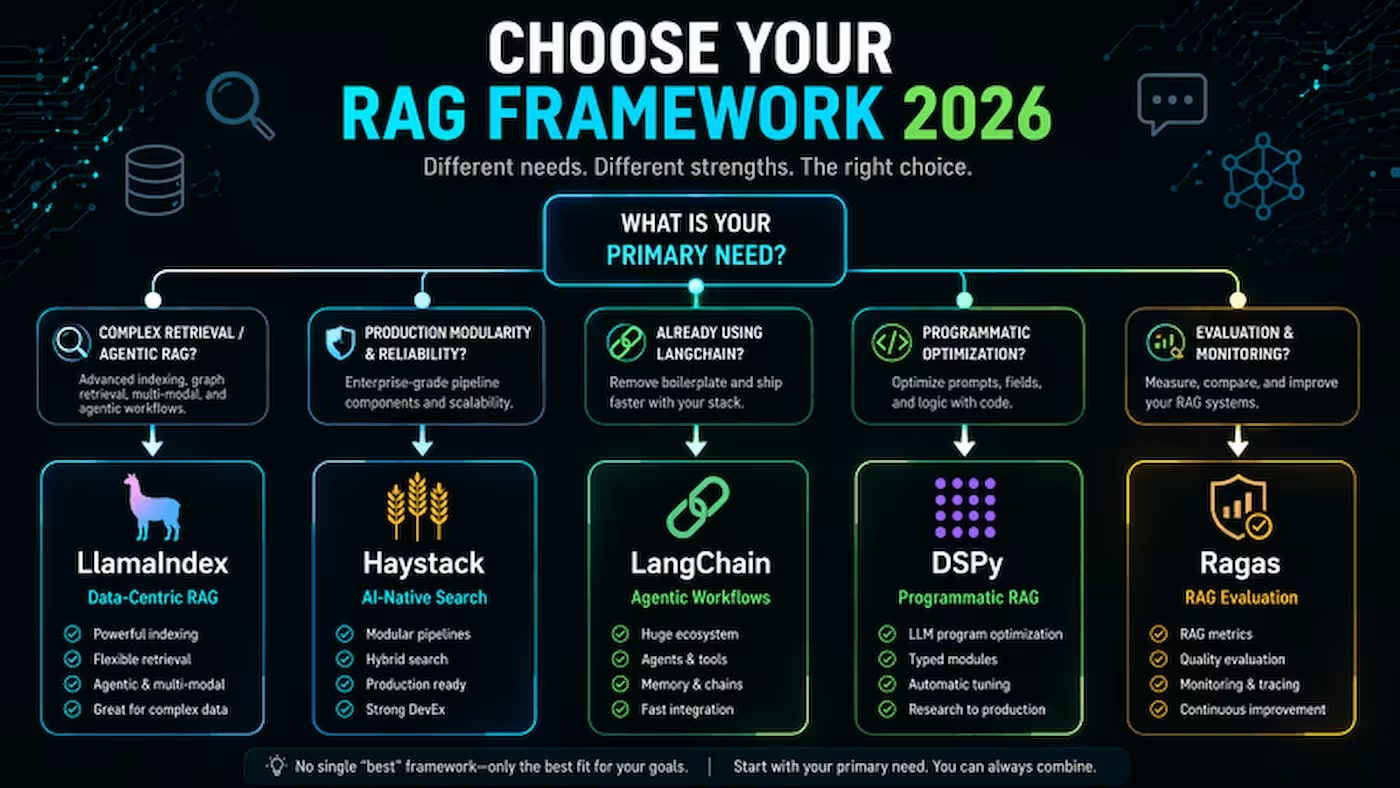
In my opinion, there are two fundamentally different philosophies here. LangChain and Haystack are universal orchestrators: suitable for a wide range of tasks, but not specialized for any particular one. LlamaIndex and DSPy are specialized tools with a clear focus: LlamaIndex for retrieval, DSPy for automatic prompt optimization. I would recommend starting by understanding this division — it immediately halves your choice.
LangChain
GitHub — 119,000+ stars, 500+ integrations. The largest ecosystem among all RAG frameworks.
✅ Choose if: you are building complex multi-agent systems with tools, memory, and loops; you need maximum integration flexibility; the team will grow, and it's important for new developers to quickly find answers in documentation and on Stack Overflow.
❌ Avoid if: the main task is Q&A over a large document archive (LlamaIndex is more accurate); time budget is limited and you need a quick start without fighting abstractions; pipeline predictability is critical (frequent breaking changes in LangChain are a known issue).
⚠️ Common mistake: choosing LangChain "because everyone else does." But if 80% of the task is document retrieval, it's overkill. A 2026 comparative analysis shows: LlamaIndex provides 35% better retrieval and is 40% faster than LangChain on document tasks.
LlamaIndex
GitHub — 44,000+ stars, 300+ data connectors via LlamaHub.
❌ Avoid if: you need a complex agent system with loops and branching logic (LangGraph is better); the team is looking for a maximum of tutorials and ready-made examples in the public domain.
💡 From my experience: LlamaIndex and LangChain rarely compete — they are more often used together. LlamaIndex handles the retrieval layer, LangGraph (part of the LangChain ecosystem) handles agent orchestration. I see this pattern as one of the most common in 2026 production systems, and if you're building something more serious than a simple Q&A chatbot — this combination is worth considering.
GitHub — 20,000+ stars. A framework from deepset, built around modular pipelines.
✅ Choose if: the team values a clean, predictable architecture over ecosystem size; the task is a production system in a regulated environment (finance, medicine, legal) where auditability and API stability are important; you already have experience with enterprise NLP and need maturity, not "magic."
❌ Avoid if: you are starting a new project and need many ready-made examples and solutions; the task is agent RAG with dynamic planning (Haystack is weaker than LangGraph in this).
DSPy (Stanford NLP)
GitHub — 23,000+ stars. Instead of manual prompt writing, DSPy automatically optimizes them for a specific task and metric.
✅ Choose if: you have a labeled dataset of questions and answers for optimization; the task is well-defined and you need to extract maximum quality from a specific corpus; you are ready to invest time in a steep learning curve.
❌ Avoid if: you need a quick prototype; you don't have a labeled dataset for optimization; the team has no machine learning experience — DSPy is the most complex on this list.
Trade-off Table: Frameworks
Framework
GitHub ⭐
Retrieval Quality
Agents
Entry Barrier
Best Scenario
LangChain
119,000+
Good (~85%)
⭐⭐⭐⭐⭐ (LangGraph)
Medium
Multi-agent systems, complex chains
LlamaIndex
44,000+
Excellent (~92%)
⭐⭐⭐
Low
Q&A over documents, corporate knowledge bases
Haystack
20,000+
Good
⭐⭐
Medium
Enterprise production, regulated industries
DSPy
23,000+
Maximum (with dataset)
⭐⭐
Very High
Quality optimization for a specific task
Vector Databases: Comparison of Qdrant, Milvus, Weaviate, pgvector, ChromaDB
A vector database is the heart of RAG, and I'm convinced it's where teams most often make the wrong decision. It stores embeddings and is responsible for search speed and quality — but it's usually chosen by GitHub stars, not by what's truly important. In my opinion, three criteria decide everything: the scale of your corpus, the need for hybrid search, and the operational capabilities of the team. If you honestly answer these three questions — the choice becomes obvious without any benchmarks.
Before diving into specific databases — familiarize yourself with how vector search works internally: Vector Search for Beginners.
Qdrant
GitHub — 20,000+ stars. Written in Rust. The fastest open-source vector DB in production.
✅ Choose if: you need a production system for a collection of 1M to ~100M vectors; maximum speed is important — Qdrant is 10-25% faster than Weaviate and Milvus under typical loads, with p99 latency at 10M vectors ~12ms vs. 16ms for Weaviate and 18ms for Milvus; you need hybrid search (sparse + dense) and flexible metadata filtering; the team wants self-hosted without vendor lock-in.
❌ Avoid if: you are already using PostgreSQL and the collection is less than 5M vectors — pgvector is simpler; you need scale beyond a billion vectors (Milvus is better).
✅ Choose if: the dataset will grow to hundreds of millions or billions of vectors; you have a data engineering team that can handle the operational complexity; you need horizontal scaling with tiered storage (hot/warm/cold).
✅ Choose if: hybrid search (vectors + keywords + structural filters) is the primary requirement; you need a GraphQL API for complex queries; you are building a SaaS product and need multi-tenancy with data isolation between clients.
❌ Avoid if: the team is new to vector databases — Weaviate has a steeper learning curve due to its schema model and modular system; resources are limited — self-hosting Weaviate requires more RAM than Qdrant for the same dataset.
pgvector
GitHub — 13,000+ stars. Extension for PostgreSQL. Version 0.9 (2026) added sparse vectors and improved HNSW.
✅ Choose if: you are already using PostgreSQL and want minimal architectural complexity; the collection is less than 5–10M vectors; you need transactional consistency between vector and relational data. I often choose this option myself — especially when a project is already based on PostgreSQL and adding a separate service just for vector search makes no sense. pgvector solves the problem elegantly and without unnecessary infrastructure in such cases.
GitHub — 16,000+ stars. In-memory or local storage, pip install and you're done.
✅ Choose if: you are prototyping, learning, or testing a hypothesis. ChromaDB offers the fastest start: from zero to your first RAG query in 15 minutes.
❌ Avoid in production: no HA, snapshot, or production-grade monitoring. If you start with Chroma — plan your migration to Qdrant or Weaviate immediately.
Trade-off Table: Vector Databases
DB
Language
Hybrid Search
Optimal Scale
Self-hosted
When to Choose
Qdrant
Rust
✅ Native
1M – 100M vectors
Easy
Production with hybrid search, speed-critical
Milvus
Go/C++
✅ Native
100M – billions
Difficult (K8s)
Enterprise scale, GPU acceleration
Weaviate
Go
✅ BM25 + dense
1M – 50M vectors
Medium
SaaS multi-tenancy, GraphQL API
pgvector
C (PostgreSQL ext)
⚠️ Partial
up to 5–10M vectors
If you have PostgreSQL
Already have Postgres, small scale
ChromaDB
Python
❌
up to 100K vectors
Trivial
Only for prototypes and learning
⚠️ Typical mistake in this section: choosing Milvus "because it's the most complex and therefore the best." With a collection under 50M vectors, Milvus's operational complexity is a pure waste of time with no quality gain. Qdrant covers 90% of production scenarios with minimal configuration.
All-in-one platforms are not developer frameworks, but ready-made products. They handle the entire pipeline: document loading, chunking, embedding, vector storage, and generation. The trade-off is less flexibility. If your goal is to quickly launch RAG without writing code, this is the right choice.
Dify
GitHub — 90,000+ stars. The fastest-growing AI project of 2025.
✅ Choose if: you have a team without ML experience, need a quick MVP or an internal chatbot; you want a visual drag-and-drop editor for no-code pipelines; you need support for 100+ LLM providers out-of-the-box.
❌ Avoid if: you need deep control over chunking and retrieval (RAGFlow is better); maximum accuracy on complex documents (PDFs with tables, legal contracts) is critical.
RAGFlow
GitHub — 48,000+ stars. Specializes in deep document understanding.
✅ Choose if: your corpus consists of complex PDF files (tables, formulas, mixed markup); you need transparent visualization of how documents are split into chunks; you want self-hosted RAG with full control and a REST API for integration.
❌ Avoid if: resources are limited — RAGFlow requires Elasticsearch + Infinity DB and has a significant RAM appetite; your task is a quick prototype rather than parsing quality.
GitHub — 14,600+ stars. From the University of Hong Kong. Combines knowledge graphs and vector search.
✅ Choose if: your documents are rich in entity relationships (medical records, legal acts, technical specifications); you need a lightweight framework without heavy infrastructure — install via pip install lightrag-hku; incremental index update support is important.
❌ Avoid if: your main task is simple Q&A over a large archive of similar documents without complex entity relationships.
AnythingLLM
Website. A desktop application for local RAG with Ollama integration.
✅ Choose if: you want completely private RAG without any cloud APIs; you are setting up a personal knowledge base on your laptop with local models (DeepSeek-R1, Qwen3); your team is non-technical and needs a simple UI.
❌ Avoid if: you need scalability, an API for external systems, or teamwork — AnythingLLM is designed for individual use.
⚠️ Common mistake: launching Dify for a serious corporate solution and being surprised by low retrieval accuracy on complex PDFs with tables. Dify is optimized for a quick start, not for maximum parsing quality. If retrieval quality is a key metric, start with RAGFlow or a separate document parser.
RAG Quality Evaluation: RAGAS, DeepEval, Langfuse
My advice is not to repeat the mistake I see in almost every team: they build RAG, launch it, and that's it. No evaluation system. This is exactly like developing a product without metrics and analytics — you simply don't know what broke when something went wrong, and you can't prove that it got better after optimization. I always say: evaluation is not the final step, it's part of the pipeline from day one.
GitHub — 5,000+ stars. "pytest for LLMs" approach. 50+ metrics, including safety and bias.
✅ Choose for: CI/CD quality gate — blocks PR merges if RAG quality drops below a threshold; systematic unit-level testing; teams building not only RAG but also agents and multi-turn systems.
❌ Limitations: more complex to set up than RAGAS; narrower integration with RAG frameworks out-of-the-box.
Langfuse
GitHub. Open-source LLM observability: tracing, dashboards, production monitoring. Self-hosted or managed cloud.
✅ Choose for: real-time monitoring of production RAG — see every request, latency, cost, quality score; storing and analyzing traces from RAGAS and DeepEval in a single place.
⚠️ Typical mistake in this section: skipping evaluation altogether. "We see that the answers are good" is not a metric. Without RAGAS, you don't know what improved after changing chunk_size, and you won't notice degradation after updating the embedding model. At a minimum, run RAGAS on 50-100 test queries once a week.
Ready-made stacks for 5 scenarios: from PoC to enterprise
Instead of "we recommend LangChain + Qdrant" — specific stacks for specific constraints. Where necessary — with alternatives.
Scenario 1: First prototype / hypothesis testing
Task: in 1-2 days, check if RAG is suitable for your document corpus at all.
Framework: LlamaIndex or Dify
Vector DB: ChromaDB (in-memory)
Embedding: text-embedding-3-small or nomic-embed-text (Ollama)
Vector DB: Milvus (>100M vectors) or Qdrant (up to 100M)
Embedding: Qwen3-Embedding-8B (self-hosted, Apache 2.0) — best MTEB in 2026
Retrieval: hybrid + two-stage reranking mandatory
Evaluation: DeepEval in CI, RAGAS as a cron-job, Langfuse for tracing
Observability: Langfuse or LangSmith
What is not covered in reviews: antipatterns and common mistakes
Most reviews describe the happy path. Here's what actually breaks RAG systems — and what tutorials don't write about.
Antipattern 1: Starting optimization with tool selection, not data quality
The most expensive mistake. A team spends a month comparing LangChain and LlamaIndex, choosing Qdrant over Weaviate — and retrieval is still bad because the input PDFs are scanned, OCR artifacts distort embeddings.
ChromaDB is a great tool for prototypes. But teams regularly leave it in production "because it works." Yes, up to 100K documents — it works. With 1M documents and several parallel requests, you'll face performance degradation and lack of HA. Migration is painful later. Plan for it from day one.
Antipattern 3: Pure dense retrieval without hybrid
Antipattern 4: "A larger embedding model will solve the retrieval problem"
Switching from text-embedding-3-small (1536) to text-embedding-3-large (3072) gives ~8.5% MTEB Retrieval gain and costs 6.5 times more via API + twice as much for storage. Meanwhile, adding hybrid retrieval and reranker without changing the model gives +39% Recall. Invest in retrieval architecture, not vector dimensionality. Detailed justification: 1536 vs 3072: comparison for RAG.
Antipattern 5: Ignoring quality evaluation until the first incident
"We launched RAG and the answers look okay" — a common stance until the first case where the system produced a confident hallucination on an important client query. Without RAGAS or DeepEval, you don't know the level of faithfulness, context precision, and answer relevancy. Set up minimal evaluation before release, not after an incident. The cost of basic evaluation with GPT-4o-mini is ~$0.001-0.003 per test case. This is the cheapest insurance against serious errors.
Antipattern 6: Milvus for small collections
Milvus is the right choice for hundreds of millions of vectors and a data engineering team. For collections up to 50M vectors, this operational complexity is an unnecessary burden without a measurable quality gain. Qdrant on a single server covers most production scenarios with minimal setup.
Conclusion: how to make a decision
I want to be honest: choosing a RAG stack is not about finding the "best tool ever." Such a thing doesn't exist. It's an answer to five specific questions of your project. I've seen teams spend weeks comparing frameworks — and get poor results because they didn't answer these questions before starting the selection.
What is the quality of the input data? This is the first thing I always check. If PDFs are scanned, text is dirty after OCR, documents lack structure — no framework will fix it. LlamaIndex won't save bad parsing. Start with input data quality, not tool selection.
What is the scale of your corpus? This is a technical question with a clear answer. Up to 10M vectors — pgvector or Qdrant, and that's more than enough. Over 100M — only Milvus. Between these values — Qdrant covers most tasks without unnecessary operational complexity.
Is hybrid search needed? If your corpus contains exact terms, article numbers, method names, numerical values — hybrid search is mandatory. Then Weaviate or Qdrant. ChromaDB is not suitable for this at all, and I advise against trying to adapt it.
What is the ML expertise in the team? This is a question people are embarrassed to ask — but it decides everything. If the team is non-technical or needs a quick start — Dify or AnythingLLM will deliver results in a day. If there are experienced engineers and the task is serious — LlamaIndex with Qdrant and hybrid search will provide significantly better quality.
Do you measure system quality? If not — stop. Don't choose a new framework, don't change the embedding model. The first step should be RAGAS on 50-100 test queries. Without measurement, you don't know what to improve — and any optimization becomes guesswork.
My personal approach: I always start with the simplest stack that covers the current task, measure quality through RAGAS — and only when there's a specific measurable deficit, I add complexity. The worst decision is to immediately build an enterprise stack for a task that can be solved by LlamaIndex and pgvector over the weekend.
More details on each layer of the pipeline — in the corresponding articles of the series: