
The agent received a request — processed it — responded. The next request — and it remembers nothing from the previous one.
Not because something broke. But because that's how LLMs are designed by default: each call is a clean slate.
If you are building an agent and haven't thought about memory — you are building an amnesiac with internet access.
This article is part of a series on AI agents with Spring Boot.
If you haven't read about scaling tools yet —
Tool RAG: What to do when an agent has too many tools.
About how an agent decides what to call —
How LLM Decides When to Call a Tool.
Table of Contents
The Amnesiac Agent: A Living Bug and Why It's Not a Bug
In Agent Chat, there are five tools: Wikipedia, Tavily, NewsAPI, Alpha Vantage, ArXiv.
The agent conducts discussions, searches for facts, formulates arguments — everything looks good.
But at some point, something strange starts happening.
How the Problem Looks in Logs
// Round 1 — everything is fine:
INFO: Round 1 AGENT_A — Tavily search: 'vibe coding productivity statistics'
INFO: Tavily found 3 results, top: "GitHub Copilot boosts productivity by 51%"
INFO: Round 1 AGENT_A reply: "Data shows that vibe coding increases productivity..."

// Round 5 — the same agent, the same topic:
INFO: Round 5 AGENT_A — Tavily search: 'vibe coding productivity statistics'
// ↑ The same query as in round 1. The agent doesn't remember that it already searched this.
INFO: Tavily found 3 results — the same results
INFO: Round 5 AGENT_A reply: "As I mentioned earlier..."
// ↑ The agent THINKS it mentioned — but in round 5, it only sees the last 8 messages.
// Round 1 has already fallen out of the window. It didn't "mention" — it's hallucinating about its own memory.
This is not a bug in the code. Tavily responded correctly. Spring AI worked correctly.
The problem is in the architecture: an agent without memory doesn't know what it was doing three steps ago.
The result is repeated tool calls, contradictory statements, and most dangerously —
confident references to "previously said" that are not actually in the context.
65% of enterprise AI system failures in 2025 were caused not by exceeding the context window, but by "context drift" — the gradual loss of coherence due to the absence of structured memory. This is according to
Zylos Research (February 2026).
Three Symptoms of an Amnesiac Agent
Before diving into solutions — it's important to recognize the problem.
When I first encountered this in Agent Chat, I didn't immediately understand what was happening:
the code was correct, the tools were responding, but the agent behaved strangely.
It turned out that diagnosis doesn't start with code, but with logs.
Here are three signs that your agent is suffering from a lack of memory:
Symptom 1 — Repeated Tool Calls. The agent calls the same tool
with the same query multiple times per session. In the logs — identical lines with a difference of a few minutes.
You pay for the API twice for the same response.
Symptom 2 — Contradictory Statements. In round 2, the agent states X.
In round 7 — it states not-X, without noticing the contradiction. Round 2 is already outside the window.
For the agent, it no longer exists.
Symptom 3 — Hallucinations About Its Own Memory. The most dangerous.
The agent says "as I already mentioned" or "we've already discussed" — but this message
is already outside the window. The agent confidently refers to what it doesn't remember.
Why LLMs are Stateless — and What That Means for the Loop
An LLM is a function. You input text, you get text as output.
Between two calls — nothing. No state, no memory, no "self."
Each call is an independent operation.
I clearly remember my first experiments with early models — GPT-3 and the first versions of ChatGPT.
The context window was small (4K tokens), and after 10–15 messages,
the model would start "forgetting" the beginning of the conversation. I had to repeat the task context,
remind it what we had already discussed, and sometimes restart the session.
Back then, it seemed like a technical limitation that would soon be fixed.
It turned out it wasn't a limitation — it was an architectural property.
Windows became larger (128K, 1M tokens), but the stateless nature didn't disappear.
The Illusion of Memory Through Context
When you chat with ChatGPT and it "remembers" what you said five messages ago —
it's not memory. It's an illusion. Each request includes the entire previous conversation as text.
The model "sees" the past because it's passed to it in the current request, not because it "remembers" it.
// What actually happens with each LLM call:

// Call 1:
chatModel.call("Hello, what's your name?")
// The model sees: ["user: Hello, what's your name?"]
// Responds: "I am an AI agent..."
// After the call — nothing remains inside the model

// Call 2 (after 5 minutes):
chatModel.call(List.of(
    new UserMessage("Hello, what's your name?"),
    new AssistantMessage("I am an AI agent..."),
    new UserMessage("And what can you do?")  // ← new request
))
// The model sees the entire conversation — but only because we passed it again
// Between calls 1 and 2, the model "forgot" absolutely everything
This is a fundamental architectural property of transformer models —
not a bug or a limitation of a specific provider.
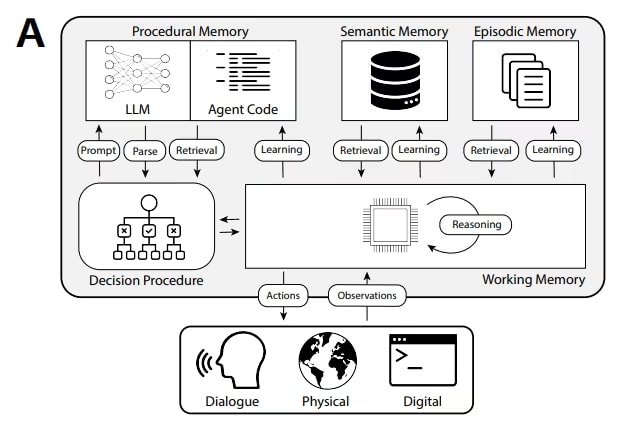
CoALA (Cognitive Architectures for Language Agents)
formalizes this as a distinction between "working memory" (current context) and
"long-term memory" (an external storage that needs to be implemented separately).
For details on how the context window affects behavior and cost —
see LLM Context Window: Why AI Forgets and How Much It Costs.
Stateless Loop = Amnesiac Agent at Every Step
In the agent loop, this means: each round is a separate LLM call.
If you don't explicitly pass the history — the agent doesn't remember previous rounds at all.
If you pass history via a sliding window — the agent "forgets" everything outside the window.
And even within the window — it doesn't know what it has already done: which tools it called,
what results it received, what decisions it made.
// Typical agent loop without memory:
while (!shouldStop) {
    // Each iteration is a separate call with the same history
    // The agent doesn't know:
    // - which tools it has already called in this session
    // - what results it has already received
    // - what it decided three rounds ago
    ChatResponse response = chatModel.call(
        new Prompt(buildHistory(session))  // ← history with a limited window
    );
    // ...
}
It is precisely to solve this problem that four types of agent memory exist.
Each addresses a different aspect of context loss — and each has its own cost and complexity.
Four Types of Memory: A Table and Detailed Breakdown
The classification of agent memory types is formalized by
CoALA (Cognitive Architectures for Language Agents, Sumers et al. 2023) —
a framework based on an analogy with cognitive psychology.
It distinguishes between working memory (current context) and three types of long-term memory:
episodic, semantic, and procedural. In 2025–2026, this classification became a standard —
it is used by
Mem0,
IBM,
LangMem, and most production frameworks.
For a practical Spring Boot developer, I adapt this classification into four types
with a link to specific implementations:
| Type |
What it Stores |
Persistence |
Latency |
Complexity |
When Needed |
| In-context |
Last N messages |
Session only |
0ms |
Minimal |
Always — the starting point |
| Episodic (external) |
Summary + tool calls + decisions |
Between sessions, in DB |
5–20ms |
Medium |
When the window is no longer enough |
| RAG memory |
Facts, documents, knowledge |
Permanent, pgvector |
10–50ms |
Medium |
Large knowledge base or cross-session context |
| Semantic (graph) |
Entities and their relationships |
Permanent, graph DB |
20–100ms |
High |
Enterprise, complex dependencies between facts |
Type 1: In-context Memory — Sliding Window and Pinning
The simplest type: pass the last N messages with each LLM call.
This is what most developers do by default — and it's the correct start.
Agent Chat implements this via HISTORY_SIZE=8.
In the ContextService from my e-commerce project — via HISTORY_SIZE=20 with pinning.
A key detail often missed: not all messages are equally important.
The first messages of a session usually contain the task context — what we're doing, what the constraints are.
If they fall out of the window — the agent will "forget" the task itself, while remembering the latest trivialities.
// In-context with pinning — Agent Chat approach:
private static final int HISTORY_SIZE = 20;   // sliding window
private static final int PINNED_COUNT  = 3;   // the first 3 messages are always in context

public List<Message> buildHistory(ChatSession session) {
    List<ChatMessage> all = chatMessageRepository
        .findByChatSessionIdOrderByCreatedAtAsc(session.getId());

    List<Message> result = new ArrayList<>();

    // Step 1: pinned — the first 3 messages (task context)
    int pinned = Math.min(PINNED_COUNT, all.size());
    all.subList(0, pinned).forEach(m -> result.add(toSpringAiMessage(m)));

    // Step 2: recent — the last HISTORY_SIZE messages (not duplicating pinned)
    int skipTo = Math.max(pinned, all.size() - HISTORY_SIZE);
    if (skipTo < all.size()) {
        all.subList(skipTo, all.size()).forEach(m -> result.add(toSpringAiMessage(m)));
    }

    return result;
}
// Result: the context always includes both "what we're doing" (pinned) and "what just happened" (recent)
Token Math for In-Context: one message in Agent Chat
takes an average of 150–300 tokens (with tool results — up to 1000).
With HISTORY_SIZE=8 and deepseek-chat — that's 1200–8000 tokens just for history.
With HISTORY_SIZE=20 — 3000–20000 tokens. The context window starts to get tight.
For details on token costs and compression strategies —
see the next article in the series on
LLM Context Window.
Pitfall: in-context memory is lossy by design.
When a message falls out of the window — it disappears forever (unless there's episodic memory).
The agent doesn't know what it "forgot." It simply acts as if it never happened.
Type 2: Episodic Memory — Action Log and Summary
Episodic memory stores what happened: which tool calls were made,
which decisions were taken, what was found. Unlike in-context — it's stored in a DB
and is available between sessions and after the window shifts.
In my e-commerce project on Spring Boot, I implemented episodic memory
through LLM summarization: when the number of messages exceeds a threshold
(SUMMARY_THRESHOLD=30) — older messages are compressed into a summary
and stored in the DB. During the next buildHistory() call, the summary is injected
as a SystemMessage at the beginning of the context.
// Episodic memory through summarization — from ContextService:
private static final int SUMMARY_THRESHOLD = 30;  // summarization trigger
private static final int KEEP_RECENT       = 15;  // how many messages remain "live"

public void summarizeIfNeeded(ChatSession session) {
    if (!needsSummarization(session)) return;

    // IMPORTANT: three separate transactions — not one long one!
    // Step 1: read data → transaction opened and immediately closed
    List<ChatMessage> toSummarize = getMessagesForSummarization(session);

    // Step 2: generate summary WITHOUT an open transaction
    // Ollama/LLM can take 30–60s to think — during this time, the DB connection is free
    String newSummary = generateSummary(toSummarize, session.getSummary());

    // Step 3: save the result → a new short transaction
    saveSummary(session, newSummary, summarizeUpTo);
}

// On the next request — the summary is injected into the context:
if (session.getSummary() != null && !session.getSummary().isBlank()) {
    result.add(new SystemMessage(
        "[Summary of previous conversation]: " + session.getSummary()));
}
Three transactions — a critical architectural detail.
Spring beginners often create one long transaction: read messages,
keep the connection open while the LLM responds (30–60 seconds),
then save. The result — the connection pool is exhausted with a few
parallel sessions. The correct way: read → close transaction → wait for LLM → new transaction for writing.
Pitfall of episodic memory via LLM summarization:
A 7B model (Ollama qwen3:8b, llama3.1:8b) struggles to compress technical context well.
Tool results with numbers, code, API responses — are lost or distorted.
Research by
Augment Code (April 2026)
showed: aggressive summarization can reduce response accuracy and
increase the number of steps to solve a task — even if fewer tokens are used.
Summarization works at clear phase boundaries, not as constant compression.
Type 3: RAG Memory — pgvector for Long-Term Knowledge
RAG memory is an external vector knowledge base that the agent accesses through semantic search.
Unlike episodic summary (lossy compression) — RAG stores precise facts
and allows accurate retrieval of relevant context even after weeks.
The fundamental difference from classic RAG for documents: in agent RAG memory,
not the client's documents are stored, but the agent's *own knowledge* —
results of previous tool calls, decisions made, facts about the user.
-- Table schema for agent RAG memory (pgvector):
CREATE TABLE agent_memory (
    id              UUID PRIMARY KEY DEFAULT gen_random_uuid(),
    session_id      VARCHAR(100),
    user_id         BIGINT,                    -- for cross-session personalization
    memory_type     VARCHAR(50),               -- 'tool_result', 'decision', 'user_fact'
    content         TEXT NOT NULL,             -- text for search
    metadata        JSONB,                     -- additional fields: tool_name, score, etc.
    embedding       vector(1536),              -- pgvector, text-embedding-3-small
    created_at      TIMESTAMP DEFAULT NOW(),
    expires_at      TIMESTAMP                  -- TTL for outdated facts
);

CREATE INDEX agent_memory_embedding_idx
ON agent_memory USING ivfflat (embedding vector_cosine_ops)
WITH (lists = 10);

-- Searching for relevant memory on a new request:
SELECT content, metadata, 1 - (embedding <=> :queryEmbedding) as score
FROM agent_memory
WHERE user_id = :userId
  AND (expires_at IS NULL OR expires_at > NOW())
ORDER BY embedding <=> :queryEmbedding
LIMIT 5;
When RAG memory is justified: when an agent serves a single user
over a long period (weeks, months) and needs to remember facts between sessions.
In AskYourDocs, I encountered this in practice:
the client uploads corporate documents, asks questions, gets answers —
and returns the next day with a clarification to yesterday's query.
Without RAG memory, the agent doesn't know what yesterday's conversation was about.
It doesn't remember which documents were analyzed, what conclusions were drawn,
which questions remained open.
Each new session is a clean slate, and the user is forced to explain the context anew.
This is precisely why in AskYourDocs, RAG memory stores not only the documents themselves,
but also the client's previous queries, corporate context, and decisions made —
so that the agent can continue working where it left off, not start from scratch.
Research by
Memori (March 2026, arXiv)
showed: structured RAG memory allows achieving 81.95% accuracy on the LoCoMo benchmark
using only 1294 tokens per request — compared to 26,000 tokens with the "entire context in the window" approach.
Savings: 95% tokens with higher accuracy.
Type 4: Semantic memory — agent's knowledge graph
Semantic memory stores not events (episodic) and not documents (RAG),
but entities and the relationships between them in the form of a graph.
Example: the agent knows that "Client X → uses → Product Y",
"Product Y → has dependency → Module Z", "Module Z → has bug → Issue #123".
Such chains cannot be efficiently stored either in a sliding window or in a vector database.
By 2026, semantic memory is implemented through graph databases or hybrid approaches.
Mem0 (May 2026)
added graph memory in January 2026 — it stores entities as nodes
and relationships between them as directed edges.
Atlan (April 2026)
notes: graph DBs are ideal for episodic + semantic memory together —
fast traversal of relationships where vector search loses.
Honest warning: semantic memory is the most complex type.
Graph DBs (Neo4j, Kuzu, Amazon Neptune) add separate infrastructure,
a complex query language, and non-trivial update logic when facts change.
For your first agent, don't start with semantic memory.
It is justified only when you have a complex network of related entities
that needs to be traversed through multiple steps.
Start with in-context → episodic → RAG, and only then — semantic.
Hybrid architecture: how memory types work together
The four types of memory are not alternatives to each other. In real production systems,
they are combined. The question is not "which type to choose" but "which types and in what order to connect".
What hybrid memory looks like in the agent cycle
Here's what the complete picture looks like for Agent Chat if all memory levels are connected:
// User query: "what is the price of Tesla stock and have there been any news about it?"
//
// ─── Step 1: Gather context from all memory layers ───────────────────────
//
// Layer 1 — In-context (sliding window + pinned):
List<Message> history = contextService.buildHistory(session);
// → 3 pinned + 17 recent = 20 messages
// → the agent remembers what happened in the last ~30 minutes of the session

// Layer 2 — Episodic summary (if the session is long):
if (session.getSummary() != null) {
    history.add(0, new SystemMessage(
        "[Summary of previous conversation]: " + session.getSummary()));
}
// → compressed memory of what happened before the sliding window
// → the agent "knows" decisions made an hour ago even if they are outside the window

// Layer 3 — RAG memory (relevant facts from the DB):
List<String> relevantFacts = agentMemoryService.findRelevant(
    "Tesla stock price news", session.getUserId(), 3);
if (!relevantFacts.isEmpty()) {
    history.add(new SystemMessage(
        "[Relevant context from previous sessions]:\n" +
        String.join("\n", relevantFacts)));
}
// → "Three days ago the user asked about Tesla, the price was $213"
// → the agent can compare dynamics without a repeated tool call

// Layer 4 — Semantic (only if there is a graph):
// → "Tesla → CEO → Elon Musk → also manages → SpaceX, X"
// → complex relationships between entities
// (not implemented in the current Agent Chat — enterprise-level)

// ─── Step 2: Tool RAG — inject only relevant tools ────────────────────
List<ToolCallback> tools = toolRagService.findRelevantTools(userQuery, 3);
// → [AlphaVantageTool: 0.91, NewsApiTool: 0.84]

// ─── Step 3: Call LLM with full context ───────────────────────────────
ChatResponse response = chatModel.call(new Prompt(history, options));

// ─── Step 4: Save important information to episodic/RAG memory ────────────────────
agentMemoryService.save(AgentMemory.builder()
    .userId(session.getUserId())
    .memoryType("tool_result")
    .content("Tesla TSLA price: $218.40 (+2.1%), news: Gigafactory expansion")
    .metadata(Map.of("tool", "AlphaVantageTool", "timestamp", Instant.now()))
    .build());
// → next time the agent will know the current context without re-searching
The order of injection into the system prompt matters
Transformer models have a positional bias — tokens at the beginning and end
of the context receive more attention than those in the middle.
Therefore, the order of injecting memory layers directly affects the quality of the response:
// ✅ Correct order (from most important to least important):
[1] SystemMessage: agent's role and behavior rules       ← always first
[2] SystemMessage: episodic summary (if any)             ← context "what happened"
[3] SystemMessage: RAG memory — relevant facts         ← precise knowledge
[4] UserMessage/AssistantMessage: pinned (first 3)       ← task context
[5] UserMessage/AssistantMessage: recent (sliding window) ← current conversation
[6] UserMessage: current query                          ← always last

// ❌ Typical mistake — RAG and summary after history:
[1] SystemMessage: agent's role
[2...N] UserMessage/AssistantMessage: entire history        ← RAG will get lost in the middle
[N+1] SystemMessage: RAG memory                          ← the model will pay less attention
What to store in episodic and RAG memory — and what not to
The most common mistake is storing everything. This quickly turns memory
into a junkyard where useful information drowns in noise.
Why is this critical? When the agent accesses memory, it performs a semantic search:
the embedding of the query is compared with the embeddings of stored facts.
The more junk in memory, the lower the search quality.
Irrelevant facts appear in the top results and take up context space.
The agent starts "hallucinating" based on greetings from five weeks ago
or intermediate thoughts that did not lead to any decision.
I checked this on AskYourDocs: after two weeks of operation without filtering,
the response quality noticeably dropped — the search returned a relevant score of 0.71
for "Hello! How can I help?" instead of the actual task context.
Here's a practical rule that solved this problem:
Must store: tool call results with specific numbers
(prices, metrics, dates), decisions made by the agent ("supplier X chosen"),
facts about the user ("prefers short answers"),
errors and reasons for failures ("tool Y returned an error due to rate limit").
Do not store: greetings and small talk, intermediate agent thoughts
that did not lead to a decision, duplicates of already stored facts,
raw tool results longer than 500 characters (compress to the essence).
Decision tree: which type to start with
The main mistake is to immediately build a complex hybrid architecture.
Start with the minimum and add only when you hit a real limitation.
Here's a decision tree with specific triggers for transition:
What agent are you building?
          ↓
One-off task (no session, no history)
→ Memory is not needed at all. LLM is stateless — and that's good.
  Example: classify_document(), generate_summary()

          ↓
Dialogue within a single session (Agent Chat, chatbot)
→ Start: In-context sliding window (HISTORY_SIZE=8–20)
  Add pinning for the first 3 messages (task context).
  Monitor: is the agent repeating tool calls? Is it contradicting itself?

          ↓
Session becomes long (30+ messages) or expensive in tokens
→ Add: Episodic summary (SUMMARY_THRESHOLD=30, KEEP_RECENT=15)
  Ollama for summarization — free for local dev.
  ATTENTION: check the quality of the summary on the technical content of your domain.

          ↓
Memory is needed between sessions or for multiple users
→ Add: RAG memory (pgvector + agent_memory table)
  Store: tool call results, decisions, user facts.
  If you already have pgvector for documents — adding RAG memory is easy.

          ↓
Complex network of entities and relationships (10+ entity types,
multi-step dependencies, organization knowledge graph)
→ Add: Semantic memory (Neo4j, Kuzu, or Mem0 graph)
  Only if vector search no longer provides the required accuracy
  for multi-hop queries ("who is responsible for component X which depends on Y?")

          ↓
Never add the next type until you hit a real limitation of the previous one.
Table: symptom → memory type
| Symptom |
Memory type that solves it |
Priority |
| Agent repeats the same tool call |
In-context or Episodic (depending on whether it's already out of window) |
Critical |
| Agent contradicts itself after 10+ rounds |
Episodic summary |
Critical |
| Token cost increases with each round |
Episodic summary + tool result trimming |
Important |
| New session — agent doesn't remember the previous one |
RAG memory (between sessions) |
Important |
| Agent doesn't know the context of a specific user |
RAG memory with user_id scope |
Important |
| Multi-hop queries: "who is responsible for X which depends on Y" |
Semantic memory (graph) |
Enterprise |
Practical rule: for most B2B RAG scenarios,
in-context + episodic summary + RAG memory for client documents is sufficient.
Semantic memory — only if the client has a complex organizational hierarchy
that needs to be traversed through multiple steps.
Three levels cover 90% of real-world cases.
Implementation: ContextService from the project
Below is a full breakdown of ContextService from my e-commerce project on Spring Boot.
This is not a synthetic example: the service works in production and implements two types of memory simultaneously
— in-context (sliding window + pinning) and episodic (LLM summarization).
Service Architecture: What and Why
@Service
@RequiredArgsConstructor
@Slf4j
public class ContextService {

    private final ChatMessageRepository chatMessageRepository;
    private final ChatSessionRepository chatSessionRepository;
    private final OllamaChatModel ollamaChatModel;  // local model for summary

    // ── Constants ─────────────────────────────────────────────────────────
    private static final int HISTORY_SIZE      = 20;  // sliding window
    private static final int PINNED_COUNT      = 3;   // first N messages always in context
    private static final int SUMMARY_THRESHOLD = 30;  // summarization trigger
    private static final int KEEP_RECENT       = 15;  // live messages after summary
}
Four constants define the entire memory behavior. Let's break down each one:
HISTORY_SIZE=20 — how many recent messages go into context.
With an average message of 200 tokens — that's 4000 tokens just for history.
For deepseek-chat ($0.27/M input) — ~$0.001 per request, acceptable.
For claude-sonnet (~$3/M input) — already $0.012 per request, and it grows with each round.
PINNED_COUNT=3 — the first three messages are *always* in context,
regardless of history size. They contain the task context: what we're doing, the agent's role,
what the constraints are. Without pinning — after 20+ rounds, the agent "forgets" the task itself.
SUMMARY_THRESHOLD=30 — when there are 30+ messages, summarization is triggered.
Why 30, not 20? To prevent the summary from running too often.
Each summary is a separate LLM call (15–60 seconds on Ollama).
An overly aggressive threshold = constant background load.
KEEP_RECENT=15 — how many messages remain "live" after the summary.
The rest (messages 1 to total - 15) are compressed into a summary and stored in the DB.
Important: the messages themselves are not deleted from the DB — they are only marked as "already in summary".
buildHistory: a hybrid of pinning + sliding window + summary inject
@Transactional(readOnly = true)
public List<Message> buildHistory(ChatSession session) {
    List<ChatMessage> allMessages = chatMessageRepository
        .findByChatSessionIdOrderByCreatedAtAsc(session.getId());

    if (allMessages.isEmpty()) return Collections.emptyList();

    List<Message> result = new ArrayList<>();

    // ── Layer 1: Episodic summary (if available) ──────────────────────────
    if (session.getSummary() != null && !session.getSummary().isBlank()) {
        result.add(new SystemMessage(
            "[Summary of previous conversation]: " + session.getSummary()));
    }

    // ── Layer 2: Pinned messages (first PINNED_COUNT) ───────────────────
    int pinnedCount = Math.min(PINNED_COUNT, allMessages.size());
    allMessages.subList(0, pinnedCount)
        .forEach(m -> result.add(toSpringAiMessage(m)));

    // ── Layer 3: Recent sliding window (last HISTORY_SIZE) ───────────────
    int skipTo = Math.max(pinnedCount, allMessages.size() - HISTORY_SIZE);
    if (skipTo < allMessages.size()) {
        allMessages.subList(skipTo, allMessages.size())
            .forEach(m -> result.add(toSpringAiMessage(m)));
    }

    log.debug("buildHistory: total={} pinned={} window={} result={}",
        allMessages.size(), pinnedCount,
        allMessages.size() - skipTo, result.size());

    return result;
}
Note skipTo = Math.max(pinnedCount, allMessages.size() - HISTORY_SIZE) —
this is a safeguard against duplication. If pinned and recent overlap (with a small number of messages)
— a message is not added twice.
summarizeIfNeeded: three transactions instead of one
// NO @Transactional at the method level — intentionally!
public void summarizeIfNeeded(ChatSession session) {
    if (!needsSummarization(session)) return;

    // Transaction 1: read
    List<ChatMessage> toSummarize = getMessagesForSummarization(session);
    if (toSummarize.isEmpty()) return;

    long total = chatMessageRepository.countByChatSessionId(session.getId());
    int summarizeUpTo = (int) (total - KEEP_RECENT);

    // NO transaction: LLM call (30–60s on Ollama)
    String newSummary = generateSummary(toSummarize, session.getSummary());
    if (newSummary.isBlank()) return;

    // Transaction 2: write
    saveSummary(session, newSummary, summarizeUpTo);
}

private String generateSummary(List<ChatMessage> messages, String existingSummary) {
    String historyText = messages.stream()
        .map(m -> m.getRole() + ": " + m.getContent())
        .collect(Collectors.joining("\n"));

    String previousContext = (existingSummary != null && !existingSummary.isBlank())
        ? "Previous summary: " + existingSummary + "\n\nNew messages:\n"
        : "";

    String prompt = """
        Summarize this part of the conversation in 3–5 sentences.
        Preserve: key facts, decisions, important user details.
        Discard: greetings, repetitions, non-essential details.

        %s%s
        """.formatted(previousContext, historyText);

    try {
        return ollamaChatModel.call(prompt).trim();
    } catch (Exception e) {
        log.error("Error generating summary", e);
        return existingSummary != null ? existingSummary : "";
    }
}
What can be improved here — an honest breakdown
The current implementation effectively solves the problem for an e-commerce chatbot.
There is no universal "best" approach to agent memory —
each solution is optimal for its type of project.
An e-commerce chatbot, a legal RAG system, and a multi-agent debate platform
have different requirements for persistence, accuracy, and cost.
What is ideal for one is overkill for another.
1. Tool results are not logged separately.
ChatMessage only stores user/assistant messages,
but not tool calls or tool results. If the agent called AlphaVantage and got a price of $213 —
this information is only in the assistant message as text, not structured.
During summarization, it can be distorted or lost.
Solution: a separate tool_call_log table with request/response pairs,
which is stored independently of the summary.
2. Summary via Ollama 7B — risk for technical content.
The model may inaccurately compress numerical data, API responses, technical terms.
The Augment Code (2026) study
showed: with aggressive summarization, the number of steps to solve a task
can increase from 4 to 14 — even if fewer tokens are consumed.
Solution: for critical facts — store them in RAG memory separately from the summary.
3. Cross-session context is missing.
After closing a session — the summary remains in the DB, but a new session starts from a clean slate.
For an e-commerce chatbot, this is acceptable.
For AskYourDocs where a client returns a week later and continues working with a document —
RAG memory with a user_id scope that survives between sessions is needed.
What the agent loses when the window shifts
The sliding window looks like a simple and elegant solution.
But it's important to understand exactly what happens when a message
goes beyond the window boundary — because the agent doesn't know about it.
Anatomy of context loss
// Session with 25 messages, HISTORY_SIZE=20, PINNED_COUNT=3:
//
// Messages 1–3:   [PINNED]  always in context ✅
// Messages 4–5:   [GAP]     NOT in context ❌
// Messages 6–25:  [RECENT]  in context ✅
//
// The agent doesn't know that a GAP exists.
// It sees pinned (1–3) and recent (6–25) and thinks it sees everything.
The GAP between pinned and recent is the most dangerous place in a sliding window with pinning.
With PINNED_COUNT=3 and HISTORY_SIZE=20 for a session with 25 messages,
messages 4 and 5 completely disappear from context.
If something critical was there — the agent will act incorrectly and won't know why.
Three things the agent loses first
1. Reasons for decisions. "Why did we choose supplier X over Y?" —
the answer was in round 4. Now the agent sees the decision but doesn't remember the arguments.
When asked again — it might give a different answer or hallucinate reasons.
2. Rejected options. "We already tried approach Z — it didn't work because..."
If this message is outside the window — the agent might suggest the same approach again.
Without episodic memory, it doesn't know about its past mistakes.
3. User context. "I'm working with PostgreSQL 14 on AWS RDS" —
if this was in round 3 (beyond pinned) and outside the window — the agent will give a general answer
instead of a specific one. Or ask again — which annoys the user.
When summary is no longer a savior
Episodic summary via LLM is a good solution but has limits.
Zylos Research (2026)
identifies three scenarios where summary degrades:
Context drift — each subsequent summary slightly distorts the previous one.
Like in the game "telephone": after 5–6 rounds of summarization,
original facts can significantly change.
Solution: store critical facts in RAG memory separately from the summary.
Technical content — numbers, error codes, API responses.
A 7B model often rounds numbers, changes codes, or simplifies them to the point of being unrecognizable.
Solution: an important_facts table where exact values are stored without compression.
Long sessions (100+ messages) — rolling summary becomes too large
or too compressed. Both options are bad.
Solution: hierarchical summarization (summary of summaries) or
a hard limit on summary size with forced fallback to RAG.
The next article in the series — MEM-2 breaks down these edge cases:
sliding window mathematics with real cost figures,
rolling summarization vs. selective compression,
and when to completely abandon the window and switch to pure RAG memory.
→ MEM-2: Context is not rubber — sliding window, summarization, and compression for agents
Conclusions
Agent memory is not an optional feature. Without it, you're building a system
that degrades with each round, repeats tool calls, contradicts itself,
and hallucinates about its own past.
I've gone through all these mistakes in practice — in an e-commerce chatbot.
Here's what I recommend based on this experience:
I recommend starting with in-context and pinning.
HISTORY_SIZE=20 + PINNED_COUNT=3
solve 70% of problems without any external infrastructure.
Pinning is an underestimated detail that most tutorials miss.
Implement this first — and only then see if anything else is needed.
I recommend adding episodic summary only when sessions actually become long.
Not prematurely. A threshold of 30 messages is a good start.
Be sure to break it into three transactions — otherwise, the connection pool
will be exhausted with several parallel sessions.
RAG memory should be connected when inter-session memory becomes a real need —
not a hypothetical one. If you already have pgvector — it's just another table and a few queries.
Store facts accurately, not through summary. And filter what to store immediately —
otherwise, memory will turn into a landfill.
Semantic memory — don't touch it until you hit a wall.
In three years of working with AI products, I haven't yet encountered a project
where it was needed from day one.
A knowledge graph is justified only for complex enterprise scenarios
with a network of interconnected entities. For 90% of projects — it's overkill.
And finally: the order of injection into context is important.
Summary → RAG facts → pinned → recent → current query.
A transformer model pays more attention to the beginning and end of the context —
don't put important things in the middle.
Read also in the series:
→ TU-1: Tool Use vs Function Calling — basic agent mechanics.
→ How an LLM Decides When to Search — decision-making mechanics.
→ Grounding and Trust in Sources — what to do after a tool call.
→ Tool RAG — scaling the tool registry.
→ How to Manage AI Agent Context: Sliding Window, Summarization, and Compression — the next article in the series.
📖 Sources
