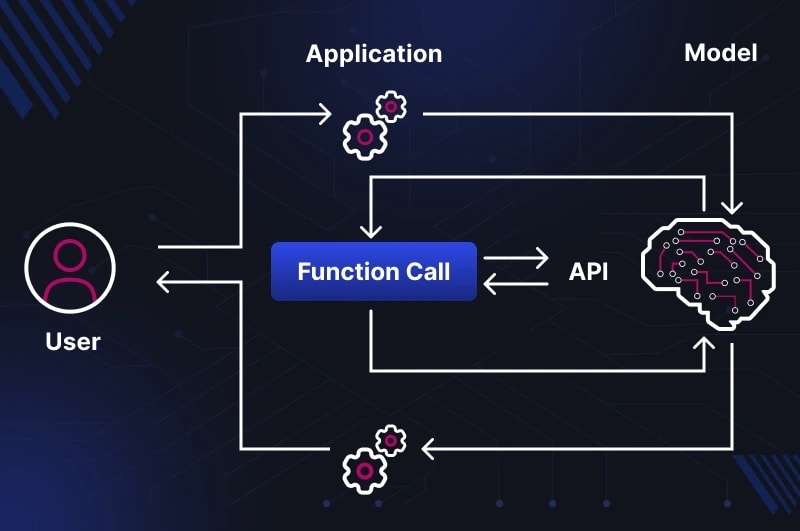
When a developer first sees an LLM "calling a function" — an intuitive error arises:
it seems like the model itself executed a database or API request.
This is not the case, and it is precisely this error that generates a whole class of architectural bugs.
Spoiler: The LLM only returns a structured JSON with the function name and arguments —
all execution happens in your code.
⚡ In a nutshell
- ✅ LLM is an orchestrator, not an executor: the model forms a JSON request, your code executes it
- ✅ Function Calling = Tool Use: different names from OpenAI and Anthropic for the same mechanic
- ✅ tool_choice: auto — the model decides itself; required — forced call; none — text only
- ✅ RAG and Tool Use are different abstraction levels: RAG can be one of the tools in a Tool Use system
- 🎯 You will get: a clear understanding of the function calling mechanic and where it intersects with your RAG pipeline
- 👇 Below are detailed explanations, code examples, and tables
📚 Table of Contents
⸻
What is Function Calling — The Model as an Orchestrator, Not an Executor
The fundamental principle that is constantly confused:
The LLM does not execute the function itself.
It only analyzes the context, determines which function to call and with which arguments —
and returns a structured JSON request. Execution happens at runtime in your application.
To understand why this is the case, we need to look at the architecture from the right angle.
An LLM is a stateless text transformer. It has no sockets, cannot open a database connection,
cannot make an HTTP request. All it does is take tokens as input and generate tokens as output.
Function calling is simply an agreement on the format of these output tokens:
instead of natural text, the model generates structured JSON,
which your code interprets as an instruction to act.
The Full Call Cycle
Symflower (2025)
describes it this way: the LLM asks Agent Scaffolding to perform a tool call on its behalf.
Comet (2026)
details the cycle through the TAO pattern — Thought → Action → Observation:
1. User message → LLM
   ↓
2. LLM analyzes context (Thought)
   → returns JSON with function name and arguments
   ↓
3. Agent Scaffolding parses JSON (Action)
   → executes the function in your code
   → receives the result
   ↓
4. Result is passed back to LLM as tool result (Observation)
   ↓
5. LLM generates the final response to the user
Note: between step 2 and step 4 — the LLM is not involved at all.
It "waits" for your code to do the work and return the result.
This is why errors in tool calls most often occur not in the model,
but between steps 3 and 4 — in your result processing code.
This architecture is called Agent Scaffolding — a layer between the LLM and the external world,
which manages the call cycle. In simple cases, it's a few lines of Python.
In complex ones — full-fledged frameworks like LangGraph or AutoGen.
But the principle remains the same: the model decides what to do, the code executes.
Terminology Reference: Function Calling vs Tool Use
Both terms describe the same mechanic — but from different perspectives:
-
Function Calling — the original OpenAI term (appeared in GPT-4, June 2023).
The focus is on the model "calling a function" — hence the name.
The model returns an object with
function.name and function.arguments.
-
Tool Use — a broader term by Anthropic and a general industry standard for 2024–2025.
The focus is on the model "using a tool" — emphasizing that it's just one of the means,
not an end in itself. It covers custom functions + built-in tools (code interpreter, web search, file reading).
As noted by
Martin Fowler (2025):
"tool calling" is a more general and modern term; both terms coexist for historical reasons.
It's also worth noting: in Anthropic's documentation, any is used instead of required,
and the tool descriptions themselves are passed via input_schema instead of parameters —
minor syntactic differences with identical logic.
Why the Model Can Do This at All
Function calling is not a built-in "ability" of the LLM in a hardware sense.
It is the result of fine-tuning on synthetic examples where the correct answer is JSON, not text.
As described by
Simplicity is SOTA (2025),
providers generate thousands of examples of prompt → tool call with a Chain-of-Thought reasoning trace,
where the model learns not just to generate JSON,
but to justify why a specific tool is needed in a specific context.
The quality of tool calling directly depends on the quality of tool descriptions.
The model is trained to recognize intent through descriptions — if a description is vague or missing,
the model will either not call the tool, or call the wrong one.
More on this in How an LLM Model Decides When to Search — The Decision-Making Mechanic.
Parallel Calls: When One Tool Isn't Enough
Modern models support parallel tool calls in a single turn —
when multiple independent sources are needed simultaneously for a response.
For example, a request "compare terms of contracts A and B" might trigger two parallel calls
to search_documents with different parameters instead of two sequential ones.
# Model response with parallel tool calls:
{
  "tool_calls": [
    {
      "id": "call_001",
      "function": {
        "name": "search_documents",
        "arguments": "{\"query\": \"terms of contract A\", \"top_k\": 3}"
      }
    },
    {
      "id": "call_002",
      "function": {
        "name": "search_documents",
        "arguments": "{\"query\": \"terms of contract B\", \"top_k\": 3}"
      }
    }
  ]
}
Your code must process both results and pass them back in the next message
as two separate tool_result blocks.
If you return only one — the model will receive incomplete context and may hallucinate the second part of the answer.
⚠️ Pitfall #1: The Invisible Error Between Step 3 and 4
The most common error in the architecture: the developer believes the model "executed a database query,"
when in reality it only formed a JSON request, and the execution might not have happened at all
due to an error in the tool call processing code.
The LLM, meanwhile, receives an empty or erroneous result — and continues generating a response
as if nothing happened, often hallucinating instead of admitting the problem.
Minimum checklist for a reliable cycle:
- Log the entire cycle: tool call request → execution → result → model response
- Verify that
arguments were successfully deserialized via json.loads() before execution
- Handle exceptions if the function returned an error — and explicitly pass that error back to the LLM
- For parallel calls — always return results for all
tool_call.id
What a Call Looks Like Technically: JSON Schema, tool_choice auto/required/none
For the model to know about tools, they need to be described in JSON Schema format and passed in the API request.
The syntax differs depending on the provider — and this difference is practical:
code written for OpenAI will not work with the Anthropic API without editing one key field.
OpenAI vs Anthropic Syntax: Where the Code Breaks
The main difference: OpenAI uses the parameters key,
Anthropic uses input_schema. The rest of the structure is identical.
# OpenAI / OpenAI-compatible API
tools = [
    {
        "type": "function",
        "function": {
            "name": "search_documents",
            "description": "Searches for relevant fragments in the corporate knowledge base",
            "parameters": {          # ← OpenAI: "parameters"
                "type": "object",
                "properties": {
                    "query": {
                        "type": "string",
                        "description": "The text of the search query"
                    },
                    "top_k": {
                        "type": "integer",
                        "description": "Number of fragments (default 5)"
                    }
                },
                "required": ["query"]
            }
        }
    }
]

# Anthropic Claude API (native)
tools = [
    {
        "name": "search_documents",
        "description": "Searches for relevant fragments in the corporate knowledge base",
        "input_schema": {            # ← Anthropic: "input_schema", without the "function" wrapper
            "type": "object",
            "properties": {
                "query": {
                    "type": "string",
                    "description": "The text of the search query"
                },
                "top_k": {
                    "type": "integer",
                    "description": "Number of fragments (default 5)"
                }
            },
            "required": ["query"]
        }
    }
]
If you use LiteLLM or LangChain — they abstract this difference
and convert the format automatically. When working directly with the Anthropic SDK — only input_schema.
What the Model Returns and How to Pass the Result Back
Most tutorials stop at how the model returns a tool call.
But most often, developers get stuck at the next step —
how to correctly pass the execution result back in the next message.
Step 1. The model returns a tool call instead of text:
# Model response (stop_reason: "tool_use")
{
  "content": [
    {
      "type": "tool_use",
      "id": "toolu_01XFDUDYJgAACTvYkLMeDRVQ",   # ← id is needed for the next step
      "name": "search_documents",
      "input": {
        "query": "terms of contract termination",
        "top_k": 5
      }
    }
  ],
  "stop_reason": "tool_use"
}
Note: in the Anthropic API, the field is called input (already an object),
not arguments (a string as in OpenAI). Deserialization via json.loads()
is only needed when working with the OpenAI format.
Step 2. Your code executes the function and forms the next request:
import anthropic, json

client = anthropic.Anthropic()

# First request
response = client.messages.create(
    model="claude-opus-4-6",
    max_tokens=1024,
    tools=tools,
    messages=[{"role": "user", "content": "What are the terms of contract termination?"}]
)

# Get the tool call from the response
tool_use_block = next(b for b in response.content if b.type == "tool_use")
tool_result = search_documents(**tool_use_block.input)  # your function

# Second request — pass the result back
follow_up = client.messages.create(
    model="claude-opus-4-6",
    max_tokens=1024,
    tools=tools,
    messages=[
        {"role": "user", "content": "What are the terms of contract termination?"},
        {"role": "assistant", "content": response.content},   # ← the entire model response
        {
            "role": "user",
            "content": [
                {
                    "type": "tool_result",
                    "tool_use_id": tool_use_block.id,          # ← id from step 1
                    "content": json.dumps(tool_result, ensure_ascii=False)
                }
            ]
        }
    ]
)
Three critical details of this cycle:
-
The
tool_use_id in the result must exactly match the id from the tool call —
otherwise the API will return a validation error.
-
The entire model response (
response.content) is passed in messages,
not just the text — the model needs to see its own tool call in context.
-
For parallel calls (multiple tool calls in one response) —
you need to return a
tool_result for each id,
otherwise the next request will return an error.
The tool_choice Parameter
The tool_choice parameter controls the decision-making mode for tool invocation.
Official Anthropic documentation
defines four options:
| Value |
Behavior |
When to Use |
⚠️ Pitfall |
auto |
The model decides itself: text or tool call |
Typical conversational scenario. Default if tools are provided. |
The model might not call a tool if the description is unclear or it "knows" the answer from its own knowledge — even if the data is outdated. |
any / required |
The model is obligated to call at least one tool |
Structured output, mandatory logging, forced external API request |
Calls a tool even for "Hello" — extra tokens and latency. Incompatible with extended thinking in Claude (HTTP 400). |
none |
The model does not call any tool, generates only text |
Response exclusively from provided context; final step after receiving all results |
If you pass none along with tool_result in messages — the API will return an error: tool definitions must be present. |
{"type": "tool", "name": "..."} |
Forced call of a specific tool |
Testing a single tool, deterministic pipeline |
Incompatible with extended thinking. The model does not generate text before the tool call — even if explicitly asked. |
Note on terminology: OpenAI uses required,
Anthropic uses any to indicate "must call at least one tool."
LiteLLM converts between formats automatically.
This is not just a conceptual difference – it's a difference in who controls the flow.
In a RAG pipeline, the decision to search is hardcoded into the architecture.
In Tool Use, the model is an active participant in this decision.
Understanding this boundary determines what problems you'll encounter in production and where to look for them.
Classic RAG: Deterministic Pipeline
User query
  → Query embedding         ← transforming text into a vector
  → Vector DB search (always, unconditionally)
  → Results reranking
  → Context formation (prompt stuffing)
  → Passing to LLM
  → Response
Each step happens independently of the query's content.
If a user asks "what is 2+2" – the pipeline will still perform embedding,
go to Qdrant, retrieve the top 5 chunks, and pass them to the model's context.
The model will receive unnecessary context and be forced to ignore it.
The first step of this pipeline – embedding – deserves special attention:
this is where text is converted into a numerical vector that carries semantic meaning, not just keywords.
How it works technically –
Embeddings in Simple Terms: How AI Understands Meaning, Not Just Words
.
More on the full mechanics of a RAG pipeline from chunking to reranking:
RAG in 2026: From PoC to Production – A Complete Guide
.
On the fundamental difference between the capabilities of a "pure" LLM and a RAG system –
LLM vs RAG in 2026: Why They Are Not the Same Thing
.
This is not a bug – it's a conscious architectural cost for predictability.
Tool Use: Model as an Active Agent
User query
  → LLM analyzes context and intent
  → Decision: respond from own knowledge / call tool / call multiple tools in parallel
       ↓ if tool call
  → Which tool? With what parameters?
  → JSON → Agent Scaffolding → execution → result → LLM
  → Final response
The model doesn't just generate text – it makes decisions about the flow.
For the query "what is 2+2," it will respond directly without touching any tools.
For the query "what are the contract termination conditions" – it will call search_documents.
For the query "compare contracts A and B" – possibly two parallel calls to the same tool
with different parameters.
Where the Real Boundary Lies
Key analogy: RAG is a librarian who always goes to the shelf before answering.
Tool Use is a consultant who thinks first, and only then decides if they need to look at documents.
The consultant is more effective – but their decisions are less predictable.
| Characteristic |
RAG Pipeline |
Tool Use |
| Who decides "to search or not to search" |
Architecture – always searches |
Model – depends on context |
| Number of data sources |
Usually one (vector DB) |
Any number of tools |
| Predictability of behavior |
High – same path always |
Lower – depends on model's decision |
| Latency |
Stable and predictable |
Variable: from 0 to N tool calls |
| Cost per query |
Fixed |
Depends on the number of calls |
| Efficiency on simple queries |
Low – unnecessary retrieve always |
High – model skips unnecessary steps |
| Debugging complexity |
Low – one deterministic path |
Higher – need to log the entire decision cycle |
| Risk of "not finding" needed information |
Only if the retriever is poor |
Also if the model decides not to search |
RAG within Tool Use: What It Offers and What It Costs
A RAG pipeline can be implemented as one of the tools in a Tool Use system –
meaning search_knowledge_base(query) becomes a tool that the model calls when needed.
This offers a real advantage: unnecessary embedding queries and searches don't happen,
and tokens aren't wasted on forming context.
But there's a cost:
-
New failure points.
In classic RAG, retrieval is guaranteed. In Tool Use, the model might decide not to search
for a query where searching is critically needed. This is especially dangerous when the model is "confident"
in an answer from its own knowledge, but that knowledge is outdated.
-
Tool description quality becomes critical.
If the
description is vague or doesn't cover the scenario, the model won't call the tool.
In classic RAG, the description doesn't affect the search decision at all.
Details on how to write descriptions are in TU-2.
-
Observability is more complex.
In a RAG pipeline, there's always a log of the retrieve query and its result.
In Tool Use, you need to separately log the model's decision (called/not called),
call parameters, and the result – to understand where the response went wrong.
Practical Conclusion: When to Choose What
Stick with classic RAG if:
the sole data source is a corporate document base,
all queries require searching,
predictability and ease of debugging are critical,
SLA for latency is strict.
Switch to Tool Use if:
there are multiple different data sources (DBs + APIs + files),
some queries don't require external data at all,
the ability for parallel queries to different systems is needed,
you are building an agentic system where retrieval is just one of the scenarios.
⚠️ Pitfall
The most dangerous scenario in "RAG via Tool Use":
the model responds confidently and coherently, but without calling a tool –
because it decided it already knows the answer.
In a corporate context (contracts, prices, regulations), this means an answer
that might be correct in form but outdated in content.
Always log the stop_reason: if it's "end_turn" without a preceding
"tool_use" – the model did not search. Decide if this is acceptable for your scenario.
Where RAG and Tool Use Intersect — and Where They Diverge
The previous section showed the difference in architectural logic.
Here's the practice: how these two approaches interact in real systems,
which combination patterns work, and where the boundary between them is intentionally blurred.
Three Combination Patterns
Pattern 1: RAG as a Standalone Pipeline (without Tool Use)
The classic approach. Retrieval always happens, and the model automatically receives context.
Suitable when all queries require search and predictability is more important than efficiency.
AskYourDocs
in its basic configuration is precisely this pattern.
Pattern 2: RAG as One of the Tools in a Tool Use System
The model receives search_knowledge_base(query) as a tool and decides when to call it.
Simple queries ("what is PDF?", "hello") are handled without retrieval.
Complex or specific ones trigger a search.
This increases efficiency but adds a new point of failure: the model might not call the tool when it should.
Pattern 3: Multiple Specialized Tools + RAG as One of Them
The most powerful and most complex option.
The model has access to multiple tools simultaneously:
tools = [
    search_knowledge_base(query),      # RAG on corporate documents
    get_contract_status(contract_id),  # query to CRM/ERP
    calculate_deadline(date, days),    # date calculation
    send_notification(user_id, text),  # action in an external system
]
Here, RAG is no longer the entire pipeline but one specialized tool among others.
The model itself decides the combination: for example, first search_knowledge_base
to find the contract terms, then get_contract_status to check the current status,
and finally generate a response based on both results.
Where the Boundary Blurs: RAG with Internal Selection Logic
There's an intermediate option that is often underestimated:
a classic RAG pipeline with pre-retrieval routing within it.
Before going to the vector database, a lightweight classifier or prompt decides
whether retrieval is needed for this query at all.
# Simplified pre-retrieval routing logic
def should_retrieve(query: str) -> bool:
    # Simple heuristic classifier
    factual_keywords = ["contract", "terms", "price", "regulation", "deadline"]
    return any(kw in query.lower() for kw in factual_keywords)

def answer(query: str) -> str:
    if should_retrieve(query):
        context = retriever.search(query)
        return llm.generate(query, context=context)
    else:
        return llm.generate(query)  # without retrieve
This is not "pure" Tool Use — the code makes the decision, not the model.
But it's also not "pure" RAG — retrieval doesn't always happen.
This hybrid offers the predictability of a classic pipeline
plus some of the efficiency of the Tool Use approach.
The cost is maintaining the classifier and the risk of false positives.
Pattern Comparison
| Pattern |
Who Decides Retrieval |
Complexity |
Best For |
| RAG Pipeline |
Architecture (always) |
Low |
Single knowledge base, all queries require search |
| RAG + Pre-retrieval Routing |
Classifier in code |
Medium |
Mixed queries, predictability needed |
| RAG as a Tool in Tool Use |
LLM (based on context) |
Medium |
Primarily document queries + small percentage of "pure" LLM |
| Multiple Tools + RAG as One |
LLM (based on context) |
High |
Agent systems, multiple data sources, complex workflows |
Where Exactly They Intersect: Common Components
Regardless of the pattern, both approaches rely on the same fundamental components:
-
Embedding Model — needed in RAG for vector search,
and may be needed in Tool Use for tool retrieval when there are 50+ tools.
How embeddings turn text into a semantic vector is explained in
Embeddings in Simple Terms: How AI Understands Meaning, Not Just Words
.
-
Vector Database — in RAG, it stores document chunks;
in Tool RAG systems, it stores tool descriptions for semantic search within the tool registry.
-
Reranker — in RAG, it re-evaluates the relevance of chunks;
in Tool Use, it can re-evaluate tool relevance with a large registry.
-
Observability Layer — in both cases, it's crucial to log
what was found/called and what went into the model's context.
⚠️ Pitfall #3: The Illusion of Choice
The most common architectural mistake when transitioning from RAG to Tool Use:
the developer is convinced that "the model is smart and will decide when to search itself" —
and doesn't spend time on a quality description for the tool.
As a result, the model either fails to call the tool for queries where it's needed,
or calls it for queries where it's redundant.
A tool without a clear description is like a library without a catalog:
technically accessible, but practically unreachable.
Details on the mechanics of this decision and how to write descriptions are in
TU-2: How the Model Decides When to Search.
This is one of the most common terminological mix-ups in 2026. Upon seeing a model call get_weather() or search_documents(), developers say "I've built an agent." In reality, they've built an LLM with a tool — an important step, but not agency.
What is an Agent, Really?
Comet (2026) defines an agent by three mandatory components:
- Loop: An agent doesn't make one call and stop. It operates in a loop: think → act → observe → think again. The number of steps is not predetermined.
- Memory: An agent remembers what it has already done, what results it obtained, and uses this for subsequent decisions. Not just dialogue history — but intermediate execution results.
- Planning: An agent can break down a complex goal into subtasks, determine the order of actions, and change the plan if something goes wrong.
Tool Use without these three components is simply LLM with RPC calls. Technically, it's no different from how a regular program calls a function. The only difference is who decides which function to call: the programmer (code) or the model (prompt).
Spectrum of Complexity: From Simple Call to True Agent
Agency is not a binary property (either an agent or not), but a spectrum. It's convenient to think in terms of "degree of agency":
| Level | Capabilities | Example | Is it an Agent? |
| L0: Single Tool Call | One call, one result, then the answer | "What's the weather in Kyiv?" → get_weather → answer | ❌ No, regular tool use |
| L1: Sequential Tool Calls | Multiple calls in sequence, without feedback between them | "Find document A and document B" → two calls in order | ❌ No, just a pipeline |
L2: Conditional Tool Calls | The result of the first call affects the second | "Find the contract → if it's active, then check the terms" | ⚠️ Partially — nascent planning |
| L3: ReACT-style Agent | Full loop: Thought → Action → Observation → repeat | "Schedule a meeting: find available slots → choose the best one → send invitation" | ✅ Yes, classic agent |
| L4: Autonomous Agent | Like L3 + long-term memory + independent subtask planning | "Prepare a monthly report" → decides itself what data to collect, in what order, and does it | ✅ Yes, a full-fledged agent |
Key takeaway: Tool Use appears at level L0. But true agency — the loop + planning — only emerges at L3.
Why This Understanding is Important
Developers who confuse tool use with agents make three typical mistakes:
- They don't add a loop. They make one call, get a result — and think it's an agent. But if two tools are needed for the answer, the system fails.
- They don't pass execution context. An agent should receive back not only the function's result but also meta-information: whether it executed successfully, how long it took, what errors occurred. Without this, the agent is "blind."
- They expect magic. "I added tools — why isn't the model building a complex plan itself?" Because planning is a separate capability that requires either proper prompting or specialized frameworks (LangGraph, AutoGen, CrewAI).
What a Minimal Agent Loop Looks Like
Here's the fundamental difference between a one-time tool call and a looped agent:
# ❌ This is NOT an agent — it's tool use response = client.messages.create( tools=[search_documents], messages=[{"role": "user", "content": "find documents about the contract"}] ) result = execute_tool(response.tool_call) final = client.messages.create( messages=[..., tool_result] ) # ✅ This is a MINIMAL agent — with a loop max_iterations = 5 while iterations < max_iterations and not finished: response = client.messages.create( tools=tools, messages=conversation_history ) if response.stop_reason == "tool_use": for tool_call in response.tool_calls: result = execute_tool(tool_call) conversation_history.append(tool_result(tool_call.id, result)) continue # ← loop! return to the model with the result # stop_reason == "end_turn" — the agent decided the answer is ready finished = True return response.content
The difference is one line — continue. But it's this line that creates the loop, allowing the model to take multiple steps, see the results of its actions, and make subsequent decisions based on what it has observed. Without a loop, it's just RPC. With a loop, it's the seed of an agent.
⚠️ Pitfall #4: An Agent Isn't Always Better
Agents sound cool. But they come with a real cost:
- Unpredictable number of calls. One query might generate 1 tool call, and another might generate 10 — depending on complexity and prompt quality. Token costs and latency become non-deterministic.
- Risk of infinite loops. Without protective mechanisms, an agent can get stuck in an endless loop: call tool → get error → call again → error again. Always add
max_iterations and detection of repeating patterns. - Debugging complexity. In regular tool use, you know: one call was made → got a response. With an agent, it's a chain of N steps, each of which could have gone wrong. Observability tools (langfuse, helicone, arize) become not an option, but a necessity.
Practical advice: start with L0 (single tool call) or L1 (sequential). Add a loop and planning only when a simple pipeline truly hits limitations. An agent is a tool for complex tasks, not a default architecture.
In Short: Remember the Formula
Tool Use = LLM decides which tool to call.
Agent = Tool Use + loop + memory + planning.
If you only have the first line — you don't have an agent. And that's okay. Most tasks don't require full agency. But calling things by their proper names is important for setting correct expectations with the team and stakeholders.
From RAG Pipeline to Tool Use: What's Next
If you came from the
RAG Hub
,
your current stack looks something like this: documents → chunking → embed → Qdrant → BM25 + rerank → LLM.
This is a classic RAG pipeline — deterministic, predictable, well-debugged.
The Tool Use Hub, which you are currently reading, describes what happens around this pipeline:
- How the model decides when to initiate a search at all → How LLM Models Decide When to Search — Decision-Making Mechanics
AskYourDocs
is a specific product example where the RAG pipeline is one of the tools in a broader system:
hybrid search over corporate documents, complete data isolation on the client's server,
without vendor lock-in at the LLM provider level.
❓ Frequently Asked Questions
What's the difference between Function Calling and Tool Use?
Function Calling is the original OpenAI term. Tool Use is a broader term from Anthropic,
which also includes built-in tools (web search, code interpreter).
The mechanics are the same: the model returns JSON, your code executes it.
Does the LLM execute the function itself?
No. The model generates a structured JSON request with the function name and arguments.
Execution is always on your application's side.
How does RAG differ from Tool Use?
RAG is a deterministic pipeline where retrieval always occurs.
Tool Use is a mechanism where the model itself decides if calling a tool is necessary.
RAG can be implemented as one of the tools in a Tool Use system.
When to use tool_choice: required?
Only in deterministic pipelines — structured output, mandatory logging.
In conversational mode, it leads to unnecessary tool calls and token costs.
Also: required / any are incompatible with extended thinking in Claude.
✅ Conclusions
- Function Calling and Tool Use are the same mechanics with different names. The model generates JSON, your code executes it.
tool_choice offers three control modes: auto (default), required (forced), none (text only).- RAG pipelines and Tool Use exist at different levels of abstraction — the former is deterministic, the latter is adaptive.
- RAG can be a tool within a Tool Use system — but this increases unpredictability and requires precise tool descriptions.
- The classic RAG remains the best choice for products with a single knowledge base and strict predictability requirements.
Next step: how exactly the model decides whether to call a tool or not —
and how the tool's description affects this — we'll cover in
TU-2: How the Model Decides When to Search.
Sources
Symflower — Function calling in LLM agents (2025) ·
Martin Fowler — Function calling using LLMs (2025) ·
Anthropic Docs — How to implement tool use ·
Prompt Engineering Guide — Function Calling with LLMs ·
Simplicity is SOTA — How LLMs are trained for function calling (2025) ·
Berkeley BFCL V4 (2025) ·
Comet — Agent Orchestration (2026)