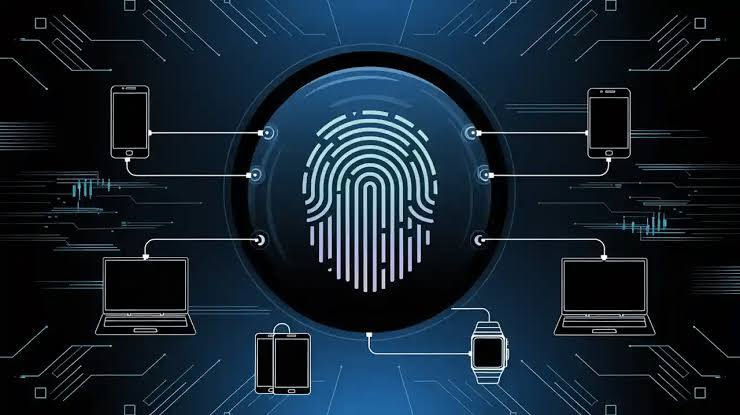
🕵️♂️ You open incognito, turn on VPN, disable JavaScript, delete all cookies (🍪 here's how to do it correctly) — and think: 'They definitely can't see me'.
👁️ But the website is already 100% sure it's you.
🔍 Not by IP, not by cookies, not by login — but by four 'invisible' technologies that work in 2025–2026 even when you try your hardest to hide. 🛡️
⚡ Summary
- ✅ In 2025–2026, only four things provide the main uniqueness: Canvas, WebGL, Audio, and TLS
- ✅ Three of them work via JavaScript, one (TLS) — entirely without it
- ✅ That's why incognito + VPN + cookie blockers are almost no help anymore
🎯 You will learn how this works in simple terms, where you are being caught right now, and what really saves you in 2025
Contents
- 📌 1. Four 'invisible' technologies that replaced cookies in 2025
- 📌 2. Canvas — when your computer draws a unique image
- 📌 3. WebGL — the website reads your graphics card's passport
- 📌 4. Audio — the computer 'sings' silently
- 📌 5. TLS — the handshake you can't fake (works without JS)
- 💼 6. How this forms a single code that gives you away
- 💼 7. Where you are being caught right now (2025–2026)
- 💼 8. Check yourself in 10 seconds + what really works
- ❓ FAQ
- ✅ Conclusions
1. Four 'invisible' technologies that finally buried cookies in 2025–2026 ⚰️
🍪 Cookies are dying. 💀 In 2025–2026, websites will recognize you not by small files in your browser, but by how your computer draws invisible images, 'sings' silently, displays its graphics card, and shakes hands with the server. 🤝
🧬 Imagine human DNA: even in twins, it differs by several thousand base pairs. Similarly, your digital footprint is your 'digital DNA'.
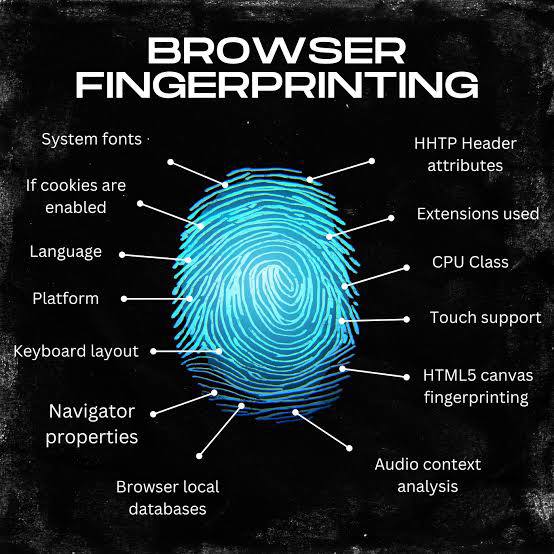
🔍 Since 2025, out of hundreds of parameters, 90% of uniqueness is provided by only four technologies:
- 🎨 Canvas — your computer draws a unique image (like a painter's handwriting or fingerprint)
- 🎮 WebGL — the website reads your graphics card's 'passport' (like the police once checked the series and number of graphics cards in gamers)
- 🔊 AudioContext — the computer generates a sound you don't hear, but its 'timbre' is unique (like a human voice)
- 🤝 TLS-handshake — the first 'handshake' with the server, which works even when JavaScript is completely disabled (like a person's gait — you can't hide it under new clothes)
📌 Example that works specifically via Canvas + WebGL + TLS (2025–2026, Binance case):
You try to manage two accounts on Binance from **one laptop** (Windows 11 + Chrome).
First, register the main account → complete KYC. ✅
A week later, you open another browser on the same device (e.g., Firefox or an incognito tab in Chrome) for the second account.
Binance sees an **identical Canvas fingerprint** (the same GPU rendering), the **same WebGL passport** (the same graphics card/drivers), and the **same TLS-handshake** (identical browser/OS version) → the system flags it as a multi-account and blocks registration with the message «Suspicious activity detected — contact support». 🚫
(📊 According to Multilogin 2025 data, 70% of Binance bans are due to a stable fingerprint on a single device, even without IP changes.)
🗳️ Or even better: you vote for a petition on the president's website from 20 different incognito tabs → the system sees the same Audio fingerprint → all votes except the first are automatically annulled.
🎯 That's why in 2025–2026, knowing these four technologies is more important than knowing how to clear cookies or turn on a VPN.
👇 Next, we'll break down each of them so even your grandma can understand. 👵
2. Canvas — when your computer draws a unique image you'll never see 🎨
👨🎨 Two artists were given identical paints, brushes, and canvas, and asked to draw the same thing. The paintings turned out similar, but not identical — each had their own 'handwriting'. Canvas Fingerprinting works exactly the same way. ✍️
🖥️ When you visit a website (Rozetka, OLX, Google, YouTube — practically any large site), a tiny script runs in the background. It does three simple things:
- 🎨 Creates an invisible 'canvas' 300×200 pixels in size (no one sees it on the screen).
- 🖌️ Draws a pre-prepared set of elements on it: text in various fonts, gradients, curves, shadows, fills, geometric shapes, and even a bit of random noise.
- 🔢 Converts this canvas into a long string of characters (base64) and sends it to the server.
🎯 Here's why this string is unique for almost every device:
- 🎮 The graphics card smooths corners and edges differently — NVIDIA, AMD, and Intel do it quite differently.
- 🔤 Fonts are rendered with different subpixel positioning — even identical Windows 11 on two laptops will draw the letter 'г' 0.1–0.3 pixels differently.
- 💻 The operating system adds its 'signature' way of processing graphics: Windows, macOS, Linux, Android, iOS — all draw the same image in their own way.
- ⚙️ Graphics card drivers, browser version, screen scaling settings (100%, 125%, 150%) — all of this affects the final result.
📊 The result is a string 20–40 thousand characters long, which matches between two random people with a probability of less than 1 in a million. 🎯 This is the most powerful and widespread fingerprint in 2025–2026.
📌 Real-life examples
- 🏠 You look at an apartment on OLX in incognito mode → a week later, on a completely different website, you are shown mortgage ads from the same bank that was in the listing. Canvas again. 🔄
⚠️ Most interestingly: even if you completely disable JavaScript — Canvas won't work, but 90% of websites will still get your fingerprint through other methods (including TLS, discussed below). 🔒 And if JavaScript is enabled — Canvas always works, even in private mode and even if you use a VPN. 🌐
🏆 Therefore, in 2025–2026, Canvas is the main 'digital fingerprint' that is hardest to fake and easiest to collect. 🔍
3. WebGL — when the website reads your graphics card's full passport 🎮🛂
🏦 It's like you go to a bank, and instead of your face, the guard asks you to show your graphics card's technical passport with all the driver serial numbers. 📄
🕹️ WebGL is a technology used by games and 3D editors directly in the browser. But websites have long learned to use it not for aesthetics, but for tracking. 👁️
📋 What exactly is collected:
- 🖥️ Exact graphics card name: «NVIDIA GeForce RTX 5090», «Apple M3 Max», «Intel Arc A770», etc.
- 📦 Driver version (e.g., 551.23 or 32.0.15)
- 🧩 List of all supported 3D features (over 200 parameters)
- 🔺 How exactly the graphics card draws a simple triangle or cube (renders a test frame and takes a 'fingerprint')
🎮 For gamers and designers, this is almost always 100% unique. Even two identical laptops with the same RTX 4070 and identical drivers will yield different results if one updated the driver 2 weeks later. ⏳
⚠️ Most interestingly — WebGL works even when you disable hardware acceleration in the browser. 🔧 The browser simply switches to software rendering — and the fingerprint becomes even more unique. 🔍
4. Audio — your computer 'sings' a unique melody you'll never hear 🎵🔇
😱 This is the scariest for an ordinary person: it works even if the microphone is physically disabled or completely absent. 🎤❌
🎼 The website asks the browser to create a sound wave (e.g., a pure 440 Hz tone), run it through dozens of built-in audio filters, reverberations, and compressors, and then return the result as a set of 5000–10000 numbers.
🔧 These numbers depend on:
- 💻 Processor (Intel 14th generation, Apple Silicon, AMD Ryzen 9000)
- 🔊 Sound subsystem (Realtek, Intel HD Audio, Apple AAC)
- 📦 Audio drivers
- 🖥️ Operating system and even whether sound virtualization is enabled
🔑 The result is a unique 'timbre' of the computer. Two identical motherboards with identical processors will yield different results if one has driver version 6.0.1.9234 installed, and the other has 6.0.1.9240.
⚠️ In 2025–2026, Google and Meta have already started adding 'noise' to AudioContext to reduce uniqueness, but this currently only works in Chrome and only partially.
5. TLS-handshake — the handshake that cannot be faked (works without JavaScript) 🤝🔐
🕺 It's when a bouncer at a club doesn't look at your face or ask for documents, but simply remembers exactly how you shook their hand.
🌐 When your browser first starts connecting to a website, the initial 'handshake' (TLS Client Hello) occurs. At this moment, the browser sends the server:
- 🔒 A list of all ciphers it supports (can be 30–50 of them)
- 📝 The order of these ciphers (this is the most important!)
- 🧩 A list of extensions (ALPN, SNI, status_request, etc.)
- 🛡️ TLS version (1.3, 1.2)
🌍 Chrome 130, Firefox 132, Safari 18, Edge, Brave, Tor Browser — each has its own unique order and set. This 'handshake style' is called JA3 or JA4 hash.
📌 Real-life examples 2025–2026:
- 🕶️ You accessed via Tor or the most expensive proxy → Cloudflare still sees 'Chrome 130 on Windows 11' and presents a captcha.
- 💳 You try to log into Binance via VPN → the system sees that the TLS-handshake does not match previous logins → requests full re-verification.
- 🚫 You open a website where JavaScript is completely disabled (e.g., via NoScript) — Canvas, WebGL, and Audio do not work, but TLS still recognizes you.
🎯 In 2025–2026, TLS is the main weapon of Cloudflare (which stands before half the internet), Google, banks, and crypto exchanges. A regular VPN is absolutely powerless here. 💪