Doubling dimensionality (1536 → 3072) doubles RAM, storage, and latency, but yields only ~3–5% MTEB Retrieval score improvement for OpenAI models.
On financial documents, BM25 outperforms text-embedding-3-large in Precision@5. Lexical search remains important.
Hybrid retrieval + reranker achieves Recall@5 = 0.816 compared to 0.587 for pure dense retrieval — a +39% increase without changing embedding dimensionality.
By 2026, text-embedding-3-large is no longer the leader: Qwen3-Embedding-8B (75.22 MTEB) and Gemini Embedding 2 (67.71 MTEB Retrieval) surpass it.
For most RAG scenarios: start with hybrid retrieval + reranker, measure results, and only then consider changing the model.
Parameter
1536 (text-embedding-3-small)
3072 (text-embedding-3-large)
Vector size
~6 KB
~12 KB
RAM per 1M chunks
~6.1 GB
~12.2 GB
ANN search speed
Faster
~1.5–2× slower
Embedding API cost
$0.02 / 1M tokens
$0.13 / 1M tokens (6.5×)
MTEB Retrieval (nDCG@10)
0.5108
0.5544 (+8.5%)
pgvector HNSW index
✅ Supported
⚠️ Not supported in GCP
Suitable for most RAG
✅ Yes
⚠️ Not always justified
When a team builds a RAG pipeline and retrieval returns irrelevant results, the typical first reaction is: "we need a larger embedding model." The logic is understandable: more dimensions → more information → better search. But the data says otherwise.
This article is a technical breakdown for developers designing RAG under specific constraints of RAM, cost, and quality. We look at the numbers: MTEB benchmarks, storage costs, latency, and compare alternatives — particularly reranking, which in most scenarios provides a greater increase in retrieval quality at a lower cost than switching to a 3072-dimensional model.
What is an embedding vector and what does its dimensionality mean
An embedding model converts text into a numerical vector — a list of fixed-length numbers. This vector is the "coordinate" of the text in an n-dimensional semantic space. Texts with similar meanings have close vectors (high cosine similarity); texts with different meanings are far apart.
Vector dimensionality is the number of numbers in this list. text-embedding-3-small returns 1536 numbers per input text. text-embedding-3-large returns 3072.
What dimensionality measures
Dimensionality
What it theoretically provides
What it means in practice
Higher (3072+)
A larger "alphabet" for encoding semantic differences
Potentially better separation between similar but distinct concepts
Lower (768–1536)
A less detailed space
Sufficient for most practical queries; twice as cheap to store and search
Very low (256–512)
Compressed representation
Fast and cheap; quality degrades on complex semantic tasks
Important: dimensionality is a property of the model's architecture and training, not simply "more is better." Research on production RAG systems shows that reducing from 1536 to 384 dimensions in some scenarios does not result in a measurable drop in retrieval accuracy — while halving latency and reducing storage by 75%.
The cost of choosing dimensionality: specific numbers
100,000 chunks
1536 dimensions → ~600 MB RAM
3072 dimensions → ~1.2 GB RAM (+2×)
1,000,000 chunks
1536 dimensions → ~6.1 GB RAM
3072 dimensions → ~12.2 GB RAM (+2×)
10,000,000 chunks
1536 dimensions → ~61 GB RAM
3072 dimensions → ~122 GB RAM — a different server tier, a different budget
The growth is linear: double the dimensionality, double all storage and search costs.
The formula is simple: N chunks × dimensionality × 4 bytes (float32)
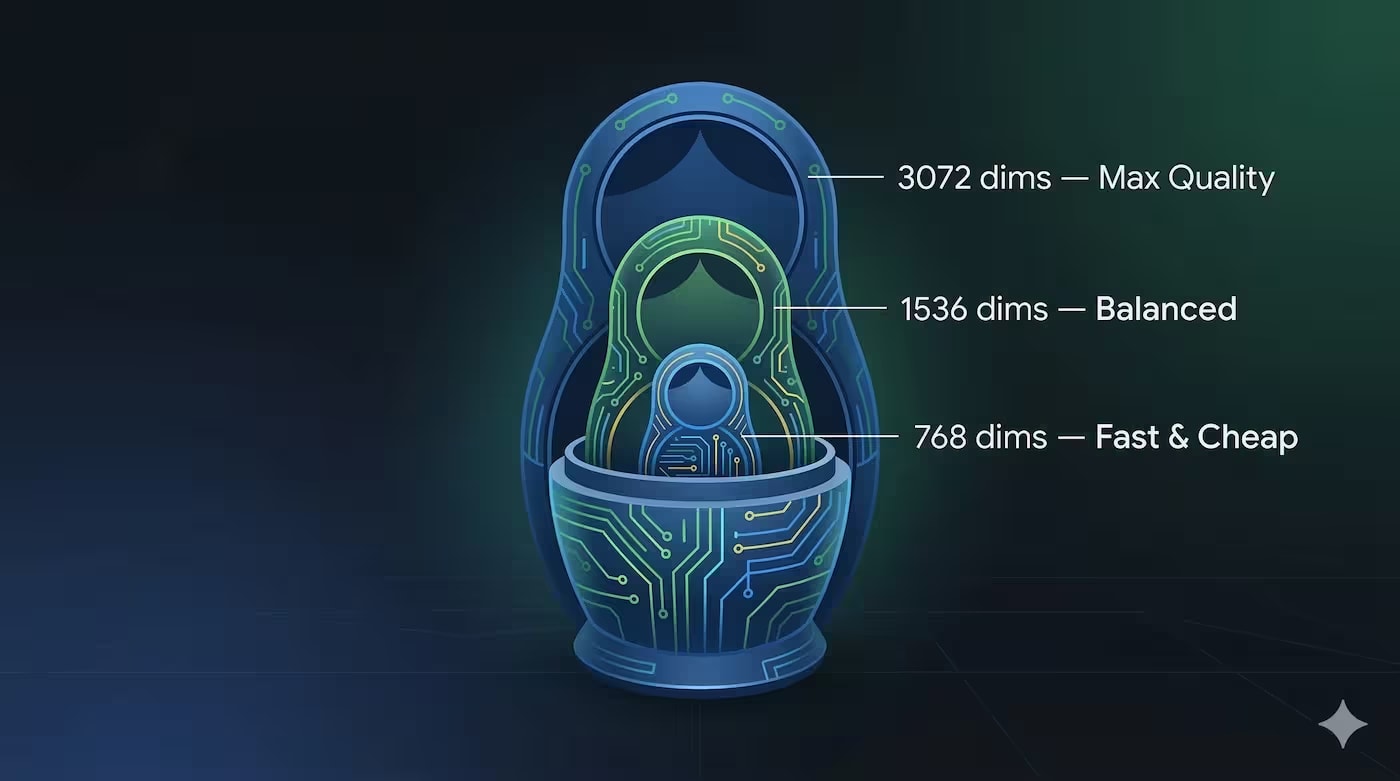
Matryoshka Representation Learning (MRL): use large, store less
text-embedding-3-large and text-embedding-3-small support MRL — an approach
where the first dimensions of the vector carry the most general semantic signal,
and each subsequent one adds detail. This allows "truncating" the vector after
generation without full retraining of the model.
In practice: you generate a 3072-dimensional vector via API, but store only the first
256, 512, 1024, or 1536 dimensions using the dimensions parameter.
Quality does not drop proportionally — it's non-linear:
Stored dimensionality
MTEB Retrieval (nDCG@10)
Relative to full 3072
RAM per 1M chunks
3072 (full)
0.5544
100%
~12.2 GB
1536
0.5453
98.4%
~6.1 GB (−50%)
1024
0.5390
97.2%
~4.1 GB (−66%)
512
0.5233
94.4%
~2.0 GB (−83%)
256
0.4969
89.6%
~1.0 GB (−92%)
Reducing from 3072 to 1536 dimensions provides a −50% RAM reduction with only a 1.6% quality loss.
Down to 1024 — a −66% RAM reduction with a −2.8% quality loss. This is the most practical compromise for most scenarios.
Important: MRL only works with models explicitly trained with this technique
(OpenAI's text-embedding-3-*, some Cohere and Nomic models).
Simply "truncating" a vector from an arbitrary model will result in degradation without guarantees.
How dimensionality affects semantic search quality
The theoretical advantage of higher dimensionality is not always realized uniformly. The impact depends on three factors: the nature of the documents, the type of queries, and the presence of other pipeline components.
Where dimensionality truly matters
Scenario
Why higher dimensionality helps
Practical effect
Subtle semantic differences
"Termination of contract" vs "cessation of contract" — similar words, different legal meaning
Fewer false positives in retrieval on legal documents
Multilingual content
Larger space for encoding cross-lingual semantic relationships
Better cross-lingual retrieval
Technical documentation with narrow terminology
Technical terms are often OOV or rare; a larger space provides a better position
Slight improvement on specialized corpora
Where dimensionality hardly matters
Scenario
Why dimensionality doesn't solve it
FAQs and short answers
Queries and documents are semantically straightforward; 768 dimensions are more than sufficient
Texts corrupted by OCR artifacts
Noise in the text shifts the vector regardless of dimensionality; the problem lies in the input data
Precise numerical queries
"Amount of 47,500 UAH" — dense retrieval is inferior to BM25; dimensionality won't help here
Very small collections (< 10,000 chunks)
With a small collection, the difference between models is negligible — any will find the correct chunk
text-embedding-3-small (1536) vs text-embedding-3-large (3072): real differences
MTEB benchmark: the numbers
MTEB (Massive Text Embedding Benchmark) is a standard benchmark for comparing embedding models. For RAG, the most relevant metric is MTEB Retrieval (nDCG@10).
An 8.5% nDCG@10 increase is a real difference, but it's important to understand the context: this is a benchmark on a general set of tasks. On your specific corpus, the difference may be larger or smaller. And for 6.5× higher embedding cost plus 2× higher storage cost.
Qwen3-Embedding-0.6B with 1024 dimensions (70.70 MTEB) surpasses text-embedding-3-large with 3072 dimensions (66.43 MTEB) — with lower dimensionality and full self-hosted availability. This echoes the main message of the article: dimensionality ≠ quality.
Practical difference on real tasks
Task
small (1536)
large (3072)
Difference in practice
Direct FAQ queries ("what is the price of X?")
Good
Good
Negligible
Semantic queries on legal texts
Satisfactory
Better
Noticeable, but inferior to BM25 on exact terms
Technical documentation, narrow terminology
Satisfactory
Noticeably better
Real difference in deep technical retrieval
Precise numerical queries
Poor
Poor
Both are inferior to BM25; dimensionality doesn't solve it
Multilingual content (uk/en mix)
Satisfactory
Better
Noticeable for cross-lingual queries
Impact on RAM, Disk Space, and Search Speed
The cost of storing vectors is linear with dimensionality. Each float32 takes 4 bytes. 1536 dimensions × 4 = 6,144 bytes (~6 KB) per vector. 3072 dimensions is exactly double.
According to Vector DB Costs 2026 analysis, one embedding call to text-embedding-3-large generates a 3072-dimensional vector — 10M documents yield 120 GB of raw vector data before indexing. Management costs for Pinecone for 10M vectors with 3072 dimensions are ~$70–120+/month versus $35–65 for 1536 dimensions.
Dot product of 3072 float32s is twice as expensive
HNSW index build time
Baseline
~1.5–2× longer
Larger graph; more memory during build
Query latency (p95, 1M vectors)
~5–15 ms
~10–30 ms
Approximate estimates; depends on hardware and index params
Embedding generation (API call)
Baseline
~1.2–1.5× longer
Larger API response; larger payload
Practical Advice: pgvector and 3072 Dimensions
If you are using pgvector, pay attention to an important limitation: GCP PostgreSQL does not allow creating HNSW indexes for vectors with >2000 dimensions. text-embedding-3-large with 3072 dimensions on pgvector in GCP means brute-force search without an index — a catastrophic degradation of latency on collections of 100,000+ chunks. Either reduce to 1536 via the API's dimensions parameter, or switch to Qdrant/Weaviate.
Comparison on Typical RAG Scenarios: Legal Documents, Technical Documentation, FAQs
Scenario 1: Legal Documents
Legal texts are a complex case for dense retrieval. They contain both precise numerical values (sums, dates, articles) and subtle semantic differences (responsibility vs. obligation).
"What are the consequences of breaching the contract terms?"
Dense (1536 or 3072) + reranker
Semantic query; dense better understands synonyms and paraphrasing
"Customer's liability in a construction contract"
Hybrid (BM25 + dense) + reranker
Combination of precise terms and semantics; hybrid provides the best Recall
Key takeaway for legal documents: the difference between 1536 and 3072 in the dense component is minimal compared to the effect of adding BM25 in a hybrid pipeline. Research on financial documents from T2-RAGBench (2026) shows that hybrid + reranker yields Recall@5 = 0.816 versus 0.587 for pure dense retrieval with text-embedding-3-large — a +39% improvement without changing the embedding model.
Scenario 2: Technical Documentation
Technical documentation (API references, specifications, RFCs) contains highly specialized terminology. Here, a 3072-dimensional model provides a more noticeable effect — narrow terms are encoded more precisely in a larger space.
However, there's an important nuance here too: if the documentation contains exact names (functions, parameters, versions), BM25 or hybrid remains the better option for precise queries. The dense component helps with "how to do X" queries.
For FAQs, the optimal strategy is to start with text-embedding-3-small or even BGE-small (384 dimensions), measure Recall@5 on a test set of questions, and only if there's a measurable deficit, move to a larger model.
Overall Table by Scenario
Scenario
Recommended Model
Reranker Needed?
BM25 Important?
FAQ / helpdesk (< 50K chunks)
text-embedding-3-small or BGE-small (384)
Optional
No
General corporate documents
text-embedding-3-small (1536)
Yes, recommended
Yes, hybrid
Legal documents
text-embedding-3-small + hybrid + reranker
Mandatory
Yes, mandatory
Technical documentation (narrow terminology)
text-embedding-3-large (3072) or Qwen3-8B
Yes
Yes for precise queries
Multilingual archive (uk + en)
text-embedding-3-large or Qwen3-Embedding (multilingual)
Why Model Quality Matters More Than Dimensionality
Comparing text-embedding-3-small (1536) and text-embedding-3-large (3072) is a comparison of two products from the same vendor. But the real picture is broader: there are models with lower dimensionality and higher quality.
The already mentioned Qwen3-Embedding-0.6B (1024 dimensions, MTEB 70.70) outperforms text-embedding-3-large (3072 dimensions, MTEB 66.43) on the overall MTEB benchmark with lower dimensionality. Apache 2.0, fully self-hostable.
Factors Determining Embedding Quality Beyond Size
Factor
Impact
What to Do
Quality of model's training data
Critical — determines where vectors "live" in space
Check if the model was trained on domain-specific data (legal, medical, etc.)
Quality of input text
Critical — OCR artifacts shift the vector regardless of dimensionality
Post-processing text before embedding — higher priority than model selection
Chunk length and chunking strategy
Significant — too large a chunk dilutes the signal; too small loses context
Test 256, 512, 1024 tokens with overlap on your data
Presence of hybrid retrieval (BM25 + dense)
Significant — hybrid + reranker provides >30% Recall increase compared to pure dense
Implement hybrid before switching to a larger model
Reranker
Significant — cross-encoders are much more accurate than bi-encoders at the same scale
Add a reranker before changing the embedding model
The "FAISS Hybrid Paradox": When a Larger Model is Worse
The "Rethinking Hybrid Retrieval" study (2025) revealed a counterintuitive result: MiniLM-v6 (a compact model) consistently outperforms BGE-Large when integrated with LLM-based reranking in tri-modal hybrid retrieval. The difference: up to 23.1% better nDCG@10 and 36.5% better nDCG@1 in the financial domain — with 93% fewer parameters and 63% smaller embeddings.
The reason is the "FAISS Hybrid Paradox": the embedding space of large models may not align with the relevance criteria of an LLM reranker. A larger model creates a more "stretched" space that the LLM reranker re-ranks less effectively than a compact one.
Conclusion: if your pipeline includes a reranker, it's not guaranteed that a larger embedding model will improve results. Test on your own data.
Reranking as an Alternative to Increasing Dimensionality
A reranker (or cross-encoder) is the second stage of retrieval. In the first stage, an embedding model finds top-k candidates based on cosine similarity (fast, but not precise). In the second stage, the reranker re-ranks these candidates, evaluating each (query, document) pair together (slow, but much more precise).
Why a Reranker is More Precise Than an Embedding
A bi-encoder (embedding model) encodes the query and document independently. This allows for fast ANN search, but means the model does not "see" the query and document simultaneously during encoding.
A cross-encoder (reranker) encodes the (query + document) pair together. Self-attention "sees" both texts simultaneously and can evaluate subtle semantic interactions. This is computationally much more expensive — but also much more precise.
Hybrid + reranker yields Recall@5 = 0.816 versus 0.587 for pure dense — a +39% improvement without changing the embedding model. For comparison, switching from text-embedding-3-small to large provides ~8.5% improvement on MTEB Retrieval.
Strong cross-encoder; integrates with LangChain, LlamaIndex
Self-hosted, GDPR
Qwen3-Reranker-4B
Open-source, self-hosted
+2.6% recall compared to 0.6B version; Apache 2.0
Self-hosted with GPU
Voyage AI Rerank
Cloud API
Competitive with Cohere; various options by cost
Cloud-based systems
When a Reranker Isn't Enough
A reranker only re-ranks what made it into the top-k from the first stage. If a relevant chunk didn't even make it into the top-50 candidates, the reranker won't help. In this case, a better embedding model or hybrid retrieval with a larger k is needed.
Also important: a reranker adds latency (~100–500 ms for 50 candidates). For real-time systems with end-to-end requirements of <500 ms, this can be a limitation.
Switch to text-embedding-3-large or Qwen3-Embedding; test on real data
GDPR / self-hosting mandatory?
Qwen3-Embedding-0.6B / 4B / 8B (Apache 2.0)
text-embedding-3-large or Gemini Embedding 2
FAQ: Frequently Asked Questions About Embedding Dimensionality
Is it worth switching from 1536 to 3072?
In my experience, in most cases, no, at least not as a first step.
Switching from small to large provides ~8.5% MTEB Retrieval gain but costs 6.5×
more via API and twice as much for storage. Before changing the model,
I always check first: is hybrid retrieval (BM25 + dense) implemented,
is there a reranker. These two components together provide +39% Recall@5 — without changing
the dimensionality at all. If the quality deficit remains after this —
then yes, switching to 3072 or a better model is justified.
How much does RAM consumption increase?
Exactly double — the dependency is linear. 1M chunks at 1536 dimensions occupy
~6.1 GB RAM, at 3072 — ~12.2 GB. For 10M chunks, this is already the difference between
61 GB and 122 GB — effectively a different server tier and a different infrastructure budget.
For small collections (up to 100K chunks), the difference is not critical: 600 MB vs 1.2 GB
fits into any modern instance. But at scale,
it becomes the first limitation.
Does dimensionality affect pgvector speed?
It does, and there's an important practical pitfall. Firstly, higher dimensions mean
more operations when calculating cosine similarity — query latency increases.
Secondly, and this is critical: GCP PostgreSQL does not support creating HNSW indexes
for vectors with more than 2000 dimensions. If you use text-embedding-3-large
(3072) with pgvector on GCP — you get brute-force search without an index,
which on collections of 100K+ chunks leads to catastrophic latency degradation.
Solution: either reduce to 1536 via the dimensions parameter in the API,
or switch to Qdrant or Weaviate.
Are 3072 dimensions needed for small RAG?
No. For collections up to 50K chunks, the difference between 1536 and 3072 is practically unnoticeable —
any model will find the correct chunk in a small index.
I recommend starting with text-embedding-3-small or even BGE-small (384 dimensions),
measure Recall@5 on a test set of questions, and only then make a decision.
Most teams I've worked with found that the problem wasn't dimensionality,
but the quality of the input text or the lack of a reranker.
What is more important: model or dimensionality?
The model is always more important. The best example: Qwen3-Embedding-0.6B
with 1024 dimensions scores 70.70 MTEB, while text-embedding-3-large
with 3072 dimensions scores 66.43. Smaller dimensionality, better result.
In my experience, the priority order for RAG optimization looks like this:
first, input text quality, then chunking strategy,
then hybrid retrieval and reranker — and only after that
choosing or changing the embedding model. Dimensionality is the last variable
worth tweaking.
Conclusions
The choice between 1536 and 3072 dimensions is not the main decision when designing a RAG pipeline. It ranks much lower in priority than input data quality, chunking strategy, and the presence of hybrid retrieval with a reranker.
Key Takeaways
Thesis
Detail
Higher dimensionality ≠ better retrieval
Qwen3-Embedding-0.6B (1024 dimensions, MTEB 70.70) outperforms text-embedding-3-large (3072 dimensions, MTEB 66.43). Architecture and training quality matter more than the number of dimensions.
Hybrid + reranker > model change
Hybrid RRF + Cohere Rerank: Recall@5 = 0.816 vs 0.587 for pure dense (+39%). This is a greater effect than a small → large switch (~8.5% MTEB).
3072 dimensions cost 2× more in storage and latency
1M chunks: 6 GB RAM (1536) vs 12 GB (3072). Managed vector DB: ~2× higher tier. At scale > 1M chunks, this is a decisive factor.
text-embedding-3-large is no longer the leader in 2026
The model has not been updated since January 2024. Gemini Embedding 2 (67.71 MTEB Retrieval), Qwen3-Embedding (Apache 2.0, self-hosted) are better alternatives.
Priority order for RAG optimization
1. Input text quality → 2. Chunking → 3. Hybrid retrieval → 4. Reranker → 5. Embedding model selection/change.
How these principles are implemented in the product
At AskYourDocs, we apply a hybrid approach: hybrid retrieval (BM25 + dense), post-processing of OCR text before indexing, and routing complex documents to Vision OCR. The choice of embedding model and dimensionality is tailored to the specific archive type — not as a fixed constant, but as a parameter measured on the client's real data.