On February 12, 2026, OpenAI released GPT-5.3-Codex-Spark — and most developers immediately asked the same question: "Is this a new app? Do I need to reinstall something?" No. Spark is a model within the Codex App that you already have. Just another model in the model picker — but with a fundamentally different operating principle.
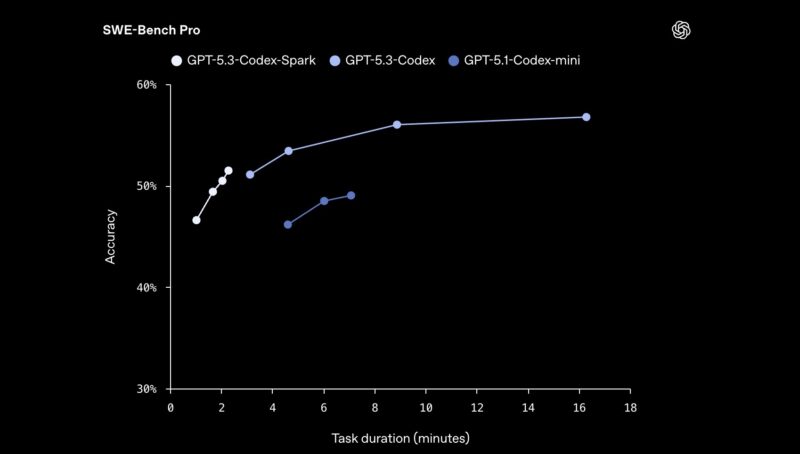
In short: regular Codex thinks deeply, but slowly. Spark thinks faster and responds instantly — over 1000 tokens per second. This is about 15 times faster than GPT-5.3-Codex. The difference is not just in numbers — it changes the very nature of interaction with the model.
In short: Spark is not a replacement for GPT-5.5 nor a "better" model. It's a different mode of operation: a real-time pair programmer instead of an autonomous agent working for hours.
📚 Table of Contents
📌 Section 1. What is Codex-Spark and where is it located
Short answer: GPT-5.3-Codex-Spark is a separate model within the Codex ecosystem, optimized for real-time interaction. Not a new app, not an update — just another model in the model picker of the same Codex App.
Here's what the entire ecosystem looks like from the inside:
Codex App / CLI / VS Code / JetBrains
              ↓
         [model picker]
              ↓
  GPT-5.5           ← default (most powerful)
  GPT-5.4           ← 1M context
  GPT-5.4 mini      ← for subagents
  GPT-5.3-Codex     ← specialized coding
  GPT-5.3-Codex-Spark  ← THIS IS SPARK (real-time)
This means that Codex App is the tool (interface). Spark is the model that runs under the hood when you select it. Analogy: ChatGPT is the interface, GPT-5.5 is the model inside. It's the same here.
Officially: according to OpenAI, GPT-5.3-Codex-Spark is a smaller version of GPT-5.3-Codex, optimized for near-instant responses. It was released on February 12, 2026, as a research preview for ChatGPT Pro. The first milestone of the OpenAI × Cerebras partnership.
Key figures immediately:
- Speed: >1000 tokens/sec (≈15x faster than GPT-5.3-Codex)
- Context: 128k tokens
- Hardware: Cerebras Wafer-Scale Engine 3 (not GPU)
- Access: ChatGPT Pro (research preview)
- Modalities: text-only
Section conclusion: If you have Codex App and a Pro plan — Spark is already available. Just open the model picker and select it. No need to install anything extra.
📌 Section 2. Why OpenAI created a separate real-time model
Short answer: Because autonomous agents solved one problem but created another. Codex learned to perform complex tasks independently — but the developer was "out of the loop."
According to Cerebras: "Agentic coding has fundamentally changed development. For the first time, machines can operate autonomously for hours or days without supervision. But this mode leaves developers out of the loop — with long waits and fewer opportunities to direct the work."
The problem that wasn't noticed until Spark
Development is an iterative process. You write code, see the result, correct it, check again. The cycle needs to be short. But when the model takes 3-6 seconds to respond to a simple task — something imperceptible happens: you subconsciously start batching requests. Instead of "fix this line," "now rename the variable," "and now add a check" — you combine everything into one large prompt to "not waste time" waiting.
The result: you stop thinking with the model and start using it like a search engine. You formulate a question, wait, read, apply — instead of a live dialogue. This is not a problem if the task is complex and requires deep reasoning. But if the task is simple — you pay a cognitive overhead for waiting that provides no value.
From my experience: when you wait 5-15 minutes for an autonomous task — it's normal, you're busy with something else. But when you wait 5 seconds for a simple "rename this variable" or "explain what this method does" — it becomes annoying and breaks the flow. And you either tolerate it or go back to searching on Google.
Latency as a systemic problem of AI tools
This is not a new problem — it exists in all AI coding tools. GitHub Copilot solved it through inline autocomplete: the model is smaller, responds faster, but its capabilities are more limited. Cursor and other IDE tools balance quality and speed. But none of them could offer a full-fledged coding model with frontier-level capabilities and instant response.
According to Technobezz, Spark beta users confirmed: the model effectively helps with design decisions, testing strategies, and development cycles precisely because the developer remains in the process, not waiting on the sidelines. This is not about raw speed — it's about how speed changes the nature of interaction.
Two modes of operation — and why both are needed
OpenAI concluded that developers need two fundamentally different modes, and one does not replace the other:
-
Autonomous mode (GPT-5.3-Codex / GPT-5.5): delegate the task → go do something else → come back to review the PR. The model thinks deeply, plans steps, independently runs tests, and checks the result. Response time is not critical — the quality of the final result is important.
-
Interactive mode (Spark): you are in active dialogue with the code. Prompt → response in seconds → next prompt. You direct, the model executes, you correct. Like a pair programmer sitting next to you and instantly reacting to your every comment.
An important nuance: these two modes do not exclude each other throughout the day. In the morning, you do a code review in interactive mode with Spark. Then you delegate the implementation of a new feature to GPT-5.5 in autonomous mode and go to a meeting. You return — you review the PR. They complement each other.
Analogy with construction
The most accurate analogy I've encountered: GPT-5.3-Codex is a senior architect who sits down, thinks for an hour, designs a system, and provides a detailed plan. Codex-Spark is a carpenter who boards up a wall in four minutes while you stand next to them and say, "a little lower here, straighten it out there." Both are needed on a construction site. The question is not "who is better" — it's "what needs to be done now."
Section conclusion: Spark exists not because GPT-5.5 is "not good enough." It exists because there is a whole class of tasks — quick debugging, refactoring, code review, contextual questions — where the developer needs an instant answer, not deep reasoning. Spark closes exactly this gap.
💼 Section 3. Technical specifications — Spark vs GPT-5.3-Codex vs GPT-5.5
Short answer: Spark wins on speed, loses on context and depth. GPT-5.5 is the most powerful but slowest. The choice depends on the task, not on "which one is newer."
Data is current as of May 2026. Source: official Codex documentation and OpenAI announcement from February 12, 2026.
| Parameter |
GPT-5.3-Codex-Spark |
GPT-5.3-Codex |
GPT-5.5 |
| Speed |
>1000 tokens/sec (≈15x faster) |
~65 tokens/sec |
≈ GPT-5.4 latency |
| Time-to-first-token |
-50% (WebSocket optimization) |
Standard |
Standard |
| Context |
128k tokens |
400k tokens |
— |
| Hardware |
Cerebras WSE-3 |
NVIDIA GPU |
NVIDIA GPU |
| Terminal-Bench 2.0 |
Above GPT-5.1-Codex-mini |
77.3% |
— |
| Runs tests itself |
❌ (only if asked) |
✅ |
✅ |
| Edit style |
Minimal, targeted |
Extensive |
Extensive |
| Multimodality |
❌ text-only |
✅ |
✅ |
| API model string |
gpt-5.3-codex-spark ¹ |
gpt-5.3-codex |
gpt-5.5 ² |
| Access |
Pro (research preview) |
Pro / Business / Enterprise |
Plus / Pro / Business |
¹ API access for Spark is only for select design partners at the time of release. OpenAI plans to expand broad API access gradually.
² GPT-5.5 is not available via API key — only through ChatGPT OAuth.
What these numbers mean in practice
The figure "1000+ tokens/sec" itself doesn't tell most developers anything. Here's what it means specifically:
- GPT-5.3-Codex (~65 tps): a typical code completion takes 3-6 seconds. You formulate a prompt, press Enter, wait, read the response.
- GPT-5.3-Codex-Spark (>1000 tps): the same task takes less than half a second. According to ZDNet testing, this is about 15x faster. The response appears before you can even shift your attention.
Practical effect: at this speed, you stop batching requests. Instead of one large prompt with five questions, you make five separate instant requests. Each is targeted, each with a specific result. This changes the nature of work more than any other characteristic.
128k context — enough or not?
128k tokens is approximately 3,000-4,000 lines of code. This is sufficient for most tasks in real work:
- ✅ One large file or several related classes
- ✅ Spring Boot Controller + Service + Repository + tests — fits
- ✅ Full context of the current module
- ❌ An entire medium-sized repository — does not fit
- ❌ Analyzing dependencies across multiple modules simultaneously — for that, use GPT-5.4 (1M)
Key takeaway: 128k is context for focused tasks, not for analyzing the entire project. If you know where to look — Spark will handle it. If you need "look through all the code" — use GPT-5.4.
What is Cerebras WSE-3 — and why OpenAI moved beyond NVIDIA
Spark is OpenAI's first production model deployed not on NVIDIA GPUs. This is a strategic decision, not just a technical choice.
Cerebras Wafer-Scale Engine 3 is a single silicon wafer with an area of 46,225 mm² with 4 trillion transistors and 125 petaflops of computing power. For comparison: a standard GPU is a few hundred mm². On the WSE-3, the entire state of the model is stored on-chip — data doesn't move between chips through slow connections, which provides minimal latency.
But hardware is only part of the story. According to Technobezz, OpenAI also re-engineered the entire inference stack:
- Persistent WebSocket connection — reduced overhead by 80%
- Response API optimization — time-to-first-token reduced by 50%
- Cerebras and GPUs can be combined within a single workload — flexibility for future tasks
Strategic context: according to eWeek, OpenAI has entered into a compute capacity agreement with Cerebras worth over $10 billion and plans to increase Cerebras capacity to 750 megawatts by 2028. This is not an experiment — it's a long-term diversification from NVIDIA with concrete figures.
Section conclusion: Spark is 15 times faster — and this is not a marketing figure, but a measurable difference that changes the nature of work. However, the 128k context and lack of auto-testing mean it's suitable for focused interactive tasks, not for autonomous work on large repositories. These are two different tools for two different moments of the day.
💼 Section 4. When to use Spark, and when to use regular Codex
Short answer: Spark is for active dialogue with code. GPT-5.5 / GPT-5.3-Codex is for delegation and autonomous execution. The difference is not in quality, but in the mode of operation.
✅ Choose Spark when:
-
Active debugging with a known stack trace — there's a specific error, and you want an answer in seconds, not minutes. A NullPointerException with a line and class — Spark will figure it out instantly. Deep reasoning isn't needed here, speed is.
-
Quick refactoring of a single method or class — rewrite, rename, simplify, break down into private methods. The scope is clear, the context is small — Spark is ideal. If the refactoring affects multiple modules — then it's GPT-5.5.
-
Real-time code review — you ask questions about a specific line and get an immediate answer. "Why is Optional used here instead of a null check?", "Is there a thread safety issue in this method?" — Spark answers while you're still thinking about the next question.
-
Exploring implementation options — you want to quickly see 2-3 approaches and choose. "Show me how this can be done using Stream API, using a for-loop, and using recursion" — three answers in seconds, you choose.
-
Frontend iterations — change layout, adjust styles, check how a component looks. Spark handles pinpoint edits in CSS and JSX well where extensive context isn't required.
-
Contextual questions about the codebase — "what does this function do", "where is this method called from", "what parameters does this endpoint accept". Navigating code where a quick answer is needed, not analysis.
-
Boilerplate and template code — getters/setters, constructors, toString, equals/hashCode, basic CRUD methods. Tasks where the outcome is predictable and doesn't require deep planning.
-
Writing documentation and comments — Javadoc for a method, a comment for a complex block, a README section. Spark generates this instantly while you're still in the code context.
✅ Choose GPT-5.5 or GPT-5.3-Codex when:
-
A task that takes hours or days — autonomous feature implementation where the model has to plan steps, make intermediate decisions, and execute without your involvement.
-
Context >128k is needed — large repository, analyzing dependencies between multiple modules, searching the entire codebase. GPT-5.4 with 1M context is the only option for truly large repositories.
-
The model needs to run tests itself and verify the result without additional prompts — GPT-5.3-Codex and GPT-5.5 do this automatically, Spark does not.
-
Multi-step tasks with planning — complete implementation of a new endpoint: controller → service → repository → DTO → tests → documentation. Spark is not suitable — too little context and no auto-planning.
-
Complex debugging where the cause is not obvious — race conditions, memory leaks, non-obvious interactions between components. This requires deep reasoning, which Spark has less of due to a shortened chain-of-thought.
-
Architectural decisions — what structure to choose, how to break into modules, which pattern to use. Quality is more important than speed, and mistakes can be costly.
-
Tasks involving images or screenshots — showing a UI bug in a screenshot, recreating a design from Figma. Spark is text-only — GPT-5.5 is needed for this.
⚠️ Where Spark can falter — an important nuance
This is a point that most reviews gloss over. As noted in a detailed review, Spark's speed is partly achieved by shortening the chain-of-thought reasoning. For simple and predictable tasks, this is not a problem. But for non-trivial tasks, the model might produce code that looks correct but is subtly incorrect.
Specific risk: a fast, confident answer creates an illusion of correctness. When an answer comes in 0.3 seconds and looks logical, it's easy to accept it without thorough verification. This is where Spark can be more misleading than a slower model: a slow answer involuntarily forces you to read more carefully.
Rule of thumb: always review the diff before accepting changes — even if the answer came instantly and looks obviously correct. Git discipline is even more important with Spark than with GPT-5.5.
Decision table — a quick cheat sheet
| Task |
Model |
Why |
| NullPointerException with known stack trace |
Spark |
Fast, clear scope |
| Rename variables by convention |
Spark |
Simple, predictable outcome |
| Javadoc for a method |
Spark |
Instant, while in context |
| Complete implementation of a new Spring endpoint |
GPT-5.5 |
Multi-step, requires planning |
| Analyze the entire repository |
GPT-5.4 |
1M context |
| Race condition in multi-thread code |
GPT-5.5 |
Deep reasoning, cause not obvious |
| 3 implementation options to choose from |
Spark |
Fast iterations, you choose |
| Recreate UI from a screenshot |
GPT-5.5 |
Spark is text-only |
| Write tests with auto-run |
GPT-5.3-Codex |
Automatic test cycle |
Section Conclusion: Rule of thumb: if the task takes less than 15 minutes, the scope is within a single file or method, and doesn't require running tests — use Spark. If it's longer, or requires autonomous work, or the cause of the problem is not obvious — use GPT-5.5. And always: review the diff before accepting changes, regardless of the model.
📌 Section 5. How to get access and run Spark
Short answer: You need a ChatGPT Pro plan. Then, update the app and select the model in the picker. No additional subscriptions or installations required.
According to the official changelog: "If GPT-5.3-Codex-Spark is not appearing in your picker — update your CLI, IDE extension, or Codex App to the latest version."
Requirements
- Plan: ChatGPT Pro ($100 or $200/month) — Plus and Free do not have access to Spark
- Authorization: ChatGPT OAuth (not API key) — Spark is not available via API key auth
- App version: latest — update if you don't see Spark in the picker
Method 1: Codex App (macOS) — the easiest
- Open the Codex App
- Create a new thread or open an existing one
- Find the model picker in the composer — below the input field
- Select GPT-5.3-Codex-Spark from the list
- If you don't see it — go to
Help → Check for Updates and restart
Method 2: Codex CLI
Run with Spark as a one-time choice:
# Start a new thread with Spark
codex --model gpt-5.3-codex-spark

# Change the model in the active thread
/model gpt-5.3-codex-spark
Set Spark as the default model via config.toml:
# ~/.codex/config.toml
model = "gpt-5.3-codex-spark"
After this, each new codex launch will use Spark without a flag. To revert to default: delete the line or replace it with model = "gpt-5.5".
Method 3: VS Code extension
- Open the Codex panel in VS Code
- Model selector — below the input field in the composer
- Select GPT-5.3-Codex-Spark
Settings synchronize with the CLI via a shared config.toml — if you set Spark in config.toml, it will also be picked up in VS Code.
Method 4: JetBrains extension
Similar to VS Code: model selector below the composer in the Codex panel. The same config.toml — settings are unified across all surfaces.
Rate limit — what's important to know
Spark has a separate rate limit — using Spark does not count towards the standard Codex limit of your Pro plan. This means you can use Spark in addition to your regular limit. During the research preview, at peak loads, a queue is possible — access may temporarily slow down.
Check current status and remaining quota:
Troubleshooting — common issues
-
Spark does not appear in the picker → update the app to the latest version. If it's still not there — check that you are authorized via ChatGPT OAuth, not API key.
-
"Model not available" error → research preview has a separate rate limit. Wait a few minutes or check
/status.
-
Spark is in the App but not in the CLI → update the CLI:
npm update -g @openai/codex or brew upgrade codex.
-
Queue on launch → normal for research preview during peak loads. Spark runs on Cerebras infrastructure which is still scaling.
Section Conclusion: If you have a Pro plan and an updated app — Spark is available immediately. For continuous use, it's more convenient to set the model in config.toml than to select it in the picker every time.
📌 Section 6. Limitations and Risks — What to Know Before You Start
Short answer: Spark is a powerful tool with real limitations. Knowing them in advance is better than stumbling upon them during work — especially if you're already used to GPT-5.5.
🔴 Technical Limitations
128k context — and it shows
128k tokens is approximately 3,000–4,000 lines of code. It's enough for most focused tasks: one service, one module, one class with tests. But it's important to understand the limits:
- ✅ Spring Boot Controller + Service + Repository + DTO — fits
- ✅ One large file of 2,000 lines with context — fits
- ❌ A whole medium-sized repository — doesn't fit
- ❌ Analyzing dependencies between 5+ modules simultaneously — doesn't fit
Practical consequence: if your prompt contains large blocks of code or you want Spark to "look at the entire project" — it will silently truncate the context or give an incomplete answer. For such tasks — GPT-5.4 with 1M context.
Text-only — no images or screenshots
Spark only accepts text and code. This means:
- ❌ Showing a UI bug screenshot and asking to fix it
- ❌ Uploading a Figma mockup and asking to reproduce it in code
- ❌ Attaching an architecture diagram and discussing it
For all of the above — GPT-5.3-Codex or GPT-5.5 where multimodality is available.
Does not run tests automatically
Unlike GPT-5.3-Codex and GPT-5.5, Spark makes minimal point edits by default and does not initiate a test cycle without an explicit request in the prompt. If your workflow involves "the model writes code and then verifies that tests pass" — Spark is not suitable for this. Use GPT-5.3-Codex for auto-verification.
🟡 Operational Limitations
Research preview — instability is inherent
Spark is officially a research preview, and this is not just a disclaimer. In practice, this means:
- Queues during peak loads — access may temporarily slow down
- Rate limits may change without notice as OpenAI calibrates load
- OpenAI has not announced a general availability date
- Functionality may change between versions
For critical production tasks requiring guaranteed availability — Spark is an unreliable choice. For daily development where a 5-minute interruption is not critical — it's quite acceptable.
Pro plan only — and the cost
Plus ($20/month) and Free do not have access to Spark. The minimum plan is Pro $100/month. If you are already on Pro for increased limits — Spark comes free as part of the plan. If you are on Plus and want Spark — you'll have to upgrade to Pro, which will increase costs fivefold.
API not widely available
As of May 2026, Spark via API is only available to select design partners — there is no broad API access. For your own integrations via API key, use gpt-5.2-codex or gpt-5.4. Keep an eye on the official changelog — access will expand gradually.
🔴 Unexpected Risks
Speed ≠ accuracy — the most dangerous nuance
This is Spark's most significant risk, and it's rarely spoken about frankly. Speed is achieved by shortening chain-of-thought reasoning. For simple tasks — it's not a problem. But for non-trivial tasks, the model can produce code that looks correct but is subtly incorrect.
The danger isn't that Spark gives wrong answers — it's that a fast, confident answer lowers your vigilance. When an answer comes in 0.3 seconds and looks logical — it's psychologically harder to stop and re-read carefully. GPT-5.5, which thinks for 8 seconds, involuntarily forces you to read the answer twice.
The rule that saves: Git commit before every session with Spark + git diff after every change. Not "sometimes" — always. Especially on tasks where the scope seems obvious.
Single-vendor dependency on Cerebras
Spark runs exclusively on Cerebras WSE-3 — there is no GPU fallback. If Cerebras has capacity issues, technical problems, or pricing changes — OpenAI cannot instantly move Spark to NVIDIA infrastructure. For the developer, this means: do not make Spark the sole tool for critical tasks with deadlines. Always have GPT-5.5 as a backup option.
Summary Table of Limitations
| Limitation |
Criticality |
Workaround |
| 128k context |
🟡 Medium |
GPT-5.4 for large repositories |
| Text-only |
🟡 Medium |
GPT-5.5 for tasks with screenshots |
| No auto-tests |
🟡 Medium |
GPT-5.3-Codex for auto-verification |
| Research preview instability |
🟡 Medium |
Not for critical tasks with deadlines |
| Pro plan only |
🟡 Medium |
Evaluate ROI vs Plus |
| API not widely available |
🔴 High (for integrations) |
gpt-5.2-codex or gpt-5.4 via API |
| Speed ≠ accuracy |
🔴 High |
Git commit + diff before every change |
| Single-vendor Cerebras |
🟠 Low (for now) |
GPT-5.5 as a backup option |
Section Conclusion: Spark's limitations are real — but none of them are blockers if you understand where and how to use it. The most important thing to remember: Git discipline with Spark is more critical than with any other model precisely because speed reduces vigilance.
💼 Section 7. From My Experience — First Weeks with Codex-Spark
I tested Spark on the WebsCraft project (Spring Boot + PostgreSQL + RAG pipeline) and here's what I can honestly say — without marketing on either side.
What's Truly Impressive
The feeling of instant response is not a marketing phrase. When you type a prompt and get an answer before you've even released Enter — it changes the very nature of work. You start thinking along with the model, not waiting for its solution.
For tasks like "explain what this method does," "rename these variables according to convention," "fix this NullPointerException on line 42" — Spark is ideal. The answer comes while you're still in the context of the task, before you've had time to switch to something else. This is its main value.
Where Spark Excels — and Where It Doesn't
The most accurate analogy I've found after several weeks of work: Spark is a calculator for an accountant. Indispensable for quick calculations, it frees up the mind from routine, provides an instant answer. But if the accountant asks the calculator to compile a quarterly report considering the tax laws of three countries — the calculator won't cope. Not because it's bad. It's just not its job.
So it is with Spark: for simple, clearly defined tasks — it's an excellent tool. But for something complex, it doesn't understand context very well. And it's not just about the 128k limit — it's about the fact that shortened reasoning leads to a superficial understanding of the task. Spark sees what you're asking for, but doesn't always understand why and in what larger context it's happening.
A specific example from practice: I asked Spark to refactor a method in a Spring Boot service. The result was technically correct, but without understanding that this method interacts with three other layers and changing the signature would break the contract. GPT-5.5 in the same task first asked about related dependencies, and then proposed a refactoring. The difference is noticeable.
Where I Returned to GPT-5.5
As soon as the task went beyond a single file or a single method — Spark's context and reasoning depth started to be insufficient:
- Refactoring a Spring Boot service considering Repository and DTO layers — GPT-5.4
- Any task where the model needs to run tests itself and verify the result — GPT-5.3-Codex
- Debugging where the cause is not obvious and requires "looking wider" — GPT-5.5
- Tasks where it's important that the model understands the architectural context of the entire project — GPT-5.5
Practical Workflow That Emerged
- Morning, code review → Spark. Quick questions about code, explanations of logic, "what's going on here."
- Spot edits and refactoring of one method → Spark. Clear scope, instant answer.
- Debugging with a known stack trace → Spark. NullPointerException with line number — answer in seconds.
- New feature or large refactoring → GPT-5.5. Delegate, go to a meeting, come back and check the PR.
- Debugging where the cause is not obvious → GPT-5.5. Requires deep reasoning and contextual understanding.
- Analyzing dependencies between modules → GPT-5.4. 1M context is indispensable.
Honest Summary
Spark is a good tool for its class of tasks. But it's important not to overestimate its capabilities. I've seen developers try to use Spark for complex architectural tasks and get disappointed — not because Spark is bad, but because they expected it to do things it didn't promise.
If you give Spark a simple task with a clear scope — it will perform better and faster than GPT-5.5. If you give it something complex that requires a deep understanding of the entire project's context — it will provide an answer, but the answer will be superficial. Like a calculator: it calculates great, but it won't replace an accounting education.
Main takeaway from practice: Spark doesn't replace GPT-5.5 — it fills the gap between "too slow for a simple task" and "too difficult for autocomplete." This is precisely the gap that was missing in previous versions of Codex. If you understand where this gap is in your specific workflow — Spark will become a useful daily tool.
❓ Frequently Asked Questions (FAQ)
What is GPT-5.3-Codex-Spark and how does it differ from regular Codex?
GPT-5.3-Codex-Spark is a smaller, faster version of GPT-5.3-Codex, optimized for real-time interaction. The main difference is speed: >1000 tokens/sec (≈15x faster) thanks to Cerebras WSE-3 hardware instead of GPUs. Regular Codex (GPT-5.5 / GPT-5.3-Codex) thinks deeper and is suitable for autonomous tasks lasting hours. Spark is for active dialogue where an instant response is crucial.
Do I need a separate application for Codex-Spark?
No. Spark is a model within the same Codex App, CLI, or VS Code extension you already have. Simply update the app to the latest version and select GPT-5.3-Codex-Spark in the model picker. No additional installation is required.
How do I enable Codex-Spark in Codex App?
Open Codex App → create or open a thread → find the model picker below the input field → select GPT-5.3-Codex-Spark. In CLI: codex --model gpt-5.3-codex-spark or the command /model gpt-5.3-codex-spark in an active thread. If Spark is not visible — update the app.
Will Codex-Spark replace GPT-5.5 as the main model?
No — and that's not the goal. Spark and GPT-5.5 solve different problems. GPT-5.5 remains the default for complex autonomous tasks. Spark is for interactive work where an instant response is needed. OpenAI directly positions them as two complementary modes, not competitors.
When will Codex-Spark be available via API and for the Plus plan?
As of May 2026 — API access is limited to select design partners, with no broad access announced. The Plus plan has also not received access — only Pro. OpenAI plans to expand access gradually as Cerebras infrastructure scales, but has not provided specific dates. Keep an eye on the official changelog.
✅ Conclusions
- 🔹 GPT-5.3-Codex-Spark is not a new app or an update to Codex App. It's a separate model in the model picker, running on Cerebras WSE-3 hardware instead of GPUs and delivering >1000 tokens/sec.
- 🔹 Spark solves a specific problem: developers "drop out of the loop" when working with autonomous agents. Real-time responses bring them back into active dialogue with the code.
- 🔹 Key limitations — 128k context, text-only, Pro plan only, research preview status — clearly define where Spark is suitable and where GPT-5.5 is better.
- 🔹 The most effective workflow: Spark for active debugging and short iterations, GPT-5.5 for autonomous tasks lasting hours. Not "either/or" — but "when what."
- 🔹 From my experience: Spark fills a real gap between "too slow for a simple task" and "too difficult for autocomplete." This is precisely what was missing in previous versions of Codex.
Main thought: Spark is the right answer to the right problem. But like any tool, it's useful only to the extent that you understand when to pick it up and when to leave it on the shelf.
📚 Sources