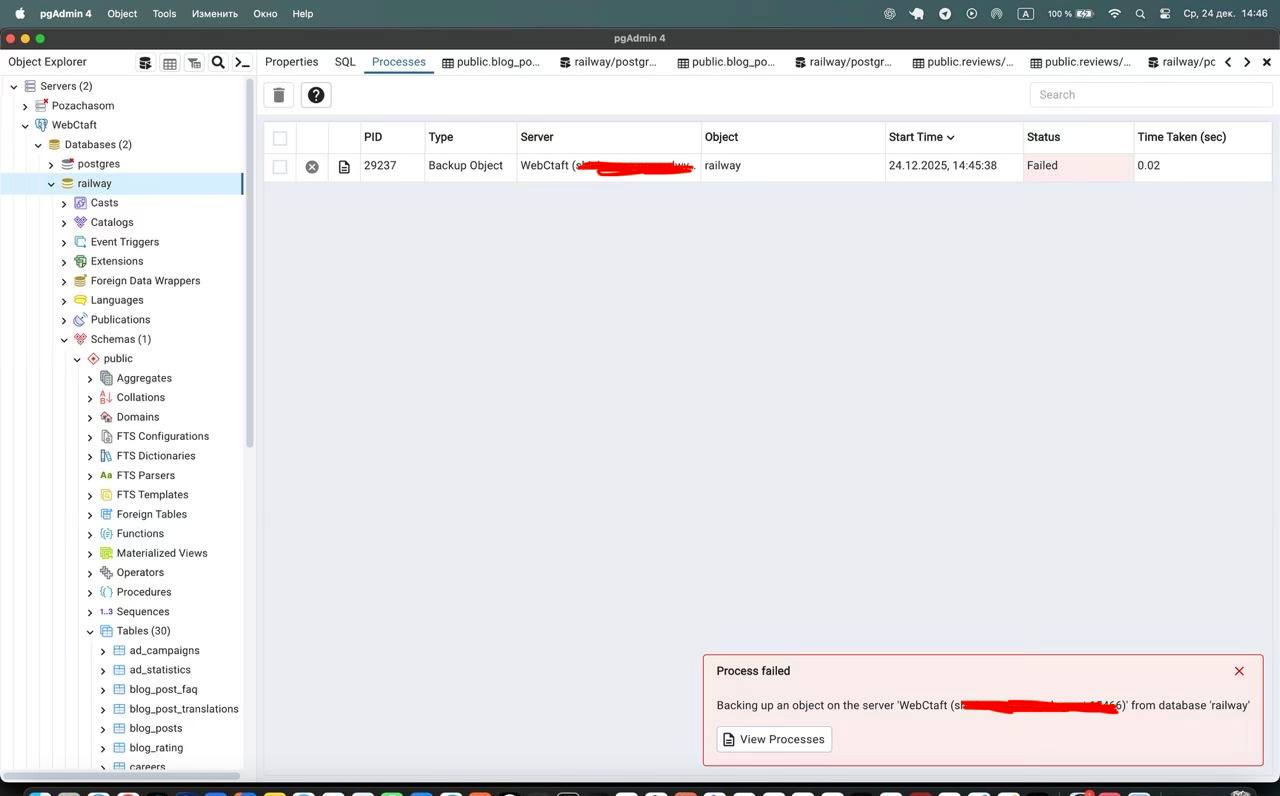
I clicked the Backup button, the process instantly completed with a status of "Failed" (Exit Code: 1) in 0.01 seconds, and no file appeared. I only saw the real reason in the Dashboard -> Process Watcher window.
The first thing I realized: pgAdmin is a rather "silent" program. When a backup is interrupted, you don't see explanations in the main window. I found a solution — you need to open the Dashboard tab, find the active process in the list, and click on the "eye" icon (Details).
In the logs, I saw that the system was trying to run the command:
This was the main clue — the program was trying to use the built-in version 15 utility for a PostgreSQL 17 database on Railway. Error code 1 in this case means a critical failure due to version incompatibility.
📌 The --large-objects Trap: Where I Stumbled
I received the error "unrecognized option --large-objects". This happened because my local pg_dump didn't recognize the new commands sent by the pgAdmin interface.
My experience: Even if you have a fresh pgAdmin, it might be using old built-in scripts.
I solved this simply: in the backup settings, I went to the Data Options tab and disabled Blobs. This removed the unnecessary flag from the command, and the process continued, but... a new obstacle awaited me.
📌 Version Conflict: Server mismatch (17 vs 15)
My server on Railway runs PostgreSQL 17.6, while the local pg_dump utility was version 15.4. The Postgres safety rule is simple: the copying tool must be the same version as the server, or newer.
Here I encountered a strict rule of the PostgreSQL ecosystem: backward compatibility works only one way. You can use a newer utility to back up an older database, but never the other way around. Since modern cloud hostings (like Railway) update automatically, my local software simply became outdated while I was sleeping.
What this error looks like in the logs:
If you saw similar text, then you fell into the same trap as I did:
pg_dump: error: aborting because of server version mismatch
pg_dump: error: server version: 17.6; pg_dump version: 15.4
Why this is important to understand
In each new version of PostgreSQL, new data types or system catalogs appear. The old pg_dump simply doesn't know about their existence and "panics" to avoid creating a corrupted backup file.
✔️ Correct: pg_dump v17 + Server v15 (Works)
❌ Incorrect: pg_dump v15 + Server v17 (Mismatch error)
Conclusion: Don't try to "convince" an old program to work with a new database — simply update your local tools to the current version.
📌 Installing the latest PostgreSQL on Mac M1
My method:
I didn't reinstall the entire PostgreSQL server. For backup, we only need client utilities. I simply installed the current package via Homebrew with the command brew install postgresql@17.
How I did it
Open your terminal and follow these steps:
Install the package:brew install postgresql@17
Check for file existence: After installation, make sure the file exists at the path: ls /opt/homebrew/opt/postgresql@17/bin/pg_dump
For Macs based on Apple Silicon (M1/M2/M3), this is an ideal option, as Homebrew uses the /opt/homebrew/ path, which runs natively and does not conflict with older Intel system files.
Possible installation issues:
Problem
How to solve
brew: command not found
Homebrew is not installed on your system. Install it from the official website brew.sh.
Permission denied error
Try running sudo chown -R $(whoami) $(brew --prefix)/* or check permissions for the /opt/homebrew folder.
Version 17 not found
Run brew update to refresh the list of available packages.
📌 Configuring Binary Paths: where the magic happens
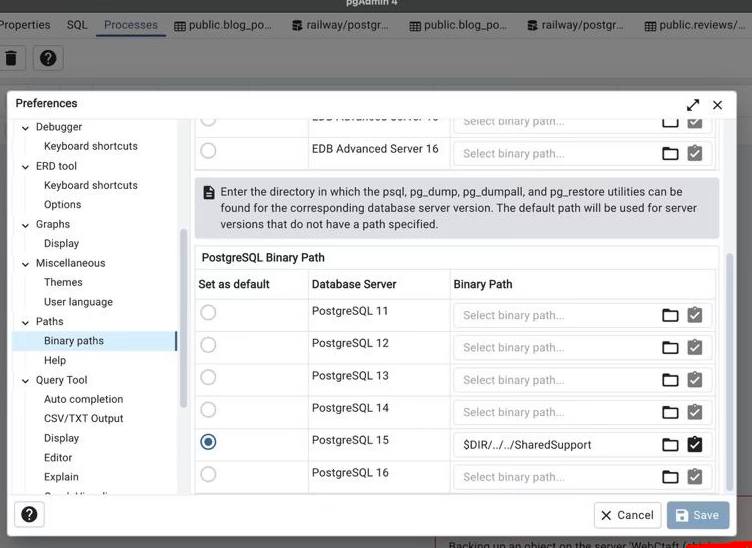
I specified the path to the new binary files /opt/homebrew/opt/postgresql@17/bin in pgAdmin's settings (Preferences -> Paths -> Binary paths).
This was the moment of truth. Even after installing new software, pgAdmin continued to use the old pg_dump, "hardcoded" within the application. I manually pointed it to version 17.
Important configuration nuances:
✔️ Set as default: In the settings window, I clicked the radio button to the left of version 17. Without this blue circle, pgAdmin wouldn't understand that this path is now primary.
✔️ Restart: After clicking "Save", I closed the backup creation window and reopened it for the settings to take effect.
Tip: If there's no row for PostgreSQL 17 in the list, simply type the path into the row for PostgreSQL 16 or into the very top field — pgAdmin will still run the file located at the specified path.
💼 My checklist for a perfect backup
My algorithm:
To ensure the backup runs without "Permission denied" or "Format error" messages, I follow three rules: the correct Custom format, manually specifying the path, and disabling conflicting options in Data Options.
Which format to choose? (My guide)
pgAdmin offers several data output options. Here's how I choose the right one:
Format
When to use
My verdict
Custom (.backup)
For regular copies and quick restoration via pgAdmin/Restore.
⭐ Best choice. It compresses data, allows selecting individual tables during restoration, and works fastest.
Plain (.sql)
If you want to open the file as text, read SQL code, or migrate the database to another SQL type (MySQL, etc.).
Good for learning, but difficult to restore large databases via the console.
Tar (.tar)
For very specific architectures or older systems.
Outdated, not recommended for modern projects.
My personal checklist:
✔️ File name: I always click the folder icon and manually enter the file name, adding the date: db_backup_2025_12_24.backup.
✔️ Permissions: I save the file to the "Documents" folder or Desktop. If a system folder is chosen, pgAdmin will simply throw an error without explanation.
✔️ Data Options: I ensure the Blobs toggle is off (grayed out) to avoid "catching" the syntax error I mentioned earlier.
💼 Is my file alive? How I checked the result
I opened the file with VS Code. Since I chose the Custom format, I saw a lot of binary "junk". But among it were clear names of my tables — and that's the main sign of success.
Many people get scared when they open a .backup file and see incomprehensible characters. Don't panic! This is a characteristic of the compressed format. If you want to see clean SQL text (table names, INSERT commands), you should have chosen the Plain format before starting the procedure.
What I look for in the file:
Even in a binary file, you can press Cmd + F (or Ctrl + F) and find keywords:
🔍 Your table names: For example, public.users or public.posts.
🔍 System commands: Look for ALTER TABLE or CREATE INDEX.
My conclusion: If you found the names of your entities among the "junk" — congratulations, your data is successfully packaged and ready for restoration at any moment!
💼 How I set up free auto-backup
My life hack:
Railway offers automatic backups only on the Pro plan ($20+ per month). I set up a free alternative: my Mac connects to the server every night and downloads a current copy of the database using a script.
Why pay for a feature your Mac can perform on its own? All we need is the built-in Automator application and one powerful terminal command.
Step 1. Password preparation (.pgpass file)
To prevent the script from asking for a password every time, it needs to be saved in a secret file. Open the terminal and type:
nano ~/.pgpass
Paste your database details in the format: host:port:database:username:password. Save (Ctrl+O) and close (Ctrl+X). Then, be sure to set the permissions:
chmod 0600 ~/.pgpass
Step 2. Automator setup
I created a "Calendar Alarm" in Automator and added a "Run Shell Script" action. Here's the command I use:
✔️ Automation: The script automatically adds the date to the file name (e.g., db_20251224.backup).
✔️ Reliability: Thanks to the --no-password flag and the .pgpass file, the process runs without any clicks from my side.
✔️ Flexibility: You can set any time in the "Calendar" app (e.g., 3:00 AM).
Tip Make sure your Mac doesn't "sleep" at the scheduled time, or set permission in energy saver settings for a brief wake-up to perform tasks.
❓ Frequently Asked Questions (FAQ)
1. What to do if the path /opt/homebrew/ is not found?
Most likely, you either don't have Homebrew installed, or you are using an older Intel-based Mac.
Tip:
Try running the command which pg_dump in the terminal. It will show the exact path
where your utility is located. If you are on Intel, the path will usually be
/usr/local/bin/pg_dump.
If you are on M1/M2 and the path is missing — simply reinstall the package
postgresql@17.
2. Can I restore a database from a version 17 backup to a server with version 15?
No, PostgreSQL does not support "downgrading" via backups.
You cannot deploy a file created in a newer version on an older server.
Tip:
Always keep your local version the same as on the server, or one step ahead.
If you need to transfer data to an older database, use the
Plain (SQL) format instead of Custom.
3. Why did automatic backup via Automator not work?
The most common reason is that your Mac went into "deep sleep".
Tip:
In macOS settings (Battery or Energy Saver), enable the option
“Wake for network access”.
Also, check the permissions for the folder where the backup is saved.
4. Is it safe to store the password in a .pgpass file?
Yes, if you have correctly set the access permissions
chmod 0600 ~/.pgpass.
This means that only your user can read this file.
Tip:
This is standard practice for servers and automation.
The main thing is — never add this file to Git repositories.
5. Which is better: Custom format or Plain SQL?
For daily backups — definitely Custom.
It is smaller in size and allows restoring individual tables.
Tip:
Use Plain only when you need to manually
edit the SQL before restoring.
✅ Conclusions
🔹 Experience:
"Silent" pgAdmin errors are a signal to check
Binary Paths, not a reason for panic.
🔹 Flexibility:
Homebrew + postgresql@17 resolve 90% of compatibility issues.
🔹 Savings and Control:
Your own automation instead of paid services — reliable and free.
Main idea
Don't be afraid to "get your hands dirty" in the terminal —
sometimes it's the only way to make software work the way
you need it to in 2026.