🤔 Google Antigravity: will this IDE replace programmers in 2026?
🚨 Answer: No, it won't — and the Antigravity 2.0 saga has only confirmed how unstable this direction is. 📅 Google Antigravity was released on November 18, 2025, along with Gemini 3 Pro as an agent-first IDE based on a VS Code fork. 💥 But on May 19, 2026, at Google I/O, Google released Antigravity 2.0 — not an update, but a complete rebuild of the product: instead of an "IDE that helps you code," it's an agent orchestration platform with five components (desktop application, CLI, SDK, Managed Agents API, enterprise path via Cloud) based on the new Gemini 3.5 Flash model. 🌙 An overnight auto-update replaced the development environments of thousands of developers with a barebones chatbot — without a terminal, file tree, or visual diff, without warning and without rollback. The old familiar IDE didn't disappear but became a separate product — "Antigravity IDE," which needs to be downloaded separately, and the two applications conflict during installation. 🔧 Google admitted they failed in communication: a few days later, they added an "Open IDE" button in the new interface and reset weekly quotas as an apology. 💰 At the same time, the entire tariff grid changed, and quotas on paid plans tripled. 🤖 New models (Claude Sonnet 4.6, Claude Opus 4.6) and the Browser Subagent feature appeared.
The positioning has changed drastically: previously, Google sold Antigravity as a smart code editor, now it's a "command tower" for overseeing multiple autonomous agents simultaneously. The problem is that some users were forcibly moved to the new philosophy without a choice.
🌐 Official Access
https://antigravity.google/ — now there are three separate downloads: Antigravity 2.0 (agent platform), Antigravity IDE (classic editor), and Antigravity CLI (terminal tool replacing Gemini CLI, which officially shuts down on June 18, 2026) 🚀
⚡ In Brief (Realistically)
- ✅ Autonomy: increased — subagents, parallel task execution, and background operation have appeared, but human control is still needed for complex tasks
- ⚠️ IDE Scandal: forced auto-update removed the editor without warning — it's now a separate product, not a mode within 2.0
- ✅ Quotas: tripled on paid plans after a wave of complaints, plus a new Ultra plan for $100/month with five times larger limits
- ✅ Models: Gemini 3.5 Flash by default (Google claims ~289 tokens/sec), plus Claude Sonnet 4.6, Claude Opus 4.6, GPT-OSS 120B
- 🔴 Enterprise: still no JetBrains support (only VS Code fork), only Open VSX marketplace (no official MS Marketplace), no SOC 2 / GDPR documentation
- 👇 More details below — the 2.0 architecture, what exactly changed under the hood, and whether it's worth migrating now
📑 Article Contents:
🎯 What is Google Antigravity 2.0 and why did the launch turn into a scandal 🤔
Google Antigravity launched on November 18, 2025, as an agent-first IDE — a VS Code fork rebuilt for autonomous AI agents, with access to the editor, terminal, and built-in browser. It was a product for those who wanted a "smart editor," as close to Cursor as possible.
On May 19, 2026, at Google I/O, everything changed. Google introduced Antigravity 2.0 — and it's no longer an editor update, but a completely new product built from five parts:
- 🖥️ Antigravity 2.0 (desktop) — a new standalone application with multi-agent orchestration, parallel agents, and background tasks
- ⌨️ Antigravity CLI — a terminal tool written in Go, replacing Gemini CLI (which officially shuts down on June 18, 2026, for all plans except enterprise Gemini Code Assist)
- 🧩 Antigravity SDK — programmatic access to the same agent "harness" that Google uses internally
- ☁️ Managed Agents API — a single API call spins up an agent in an isolated Linux environment that remembers context between calls
- 🏢 Enterprise Path via Google Cloud — separate integration for companies
The idea itself is logical: to move from "editor hints" to a system where agents perform multi-step tasks independently, and humans primarily coordinate. But the execution of the launch became a separate story 😬.
What went wrong:
- 🌙 Silent Forced Replacement: an overnight auto-update on May 19 rewrote the installation paths so that the old IDE and the new 2.0 could not coexist on the same machine. Developers opened their usual shortcut — and saw a barebones chatbot instead of the editor.
- 📉 Loss of Working Context: the terminal, file explorer, visual error indicators disappeared, and Git integration was reduced to manual commands in the console. Some lost chat history and settings without a rollback option.
- 🔀 Three Products Instead of One: now you have to choose between Antigravity 2.0 (agent orchestration), Antigravity IDE (classic editor, downloaded separately), and Antigravity CLI — and when installed together, they conflict at the OS level.
- 🗣️ Wave of Criticism: the subreddit and Google AI Developers forum were flooded with complaints within hours; some developers began rolling back to version 1.23.2 and disabling auto-updates manually.
- 🩹 Quick (but not complete) Fix: within a few days, Google added an explicit "Open IDE" button in the 2.0 interface, confirmed they didn't plan to remove IDE support, and reset Gemini weekly quotas as a gesture of apology.
Section Conclusion 🚨: Technically, Antigravity 2.0 is a step forward: multi-agent capabilities, background tasks, much more generous quotas, a new faster model. But the release method — a forced overnight update without warning and without rollback — is a textbook example of how not to release a product for paid users. Trust has been damaged more than any individual bug.
📊 Technical Architecture and Models: Three Products Instead of One 🛠️
Antigravity's architecture now branches into three separate usage paths, and your experience depends on your choice.
Antigravity IDE (classic, November 2025) remains a VS Code fork with an Editor View and Manager Surface — the same approach as before, with its own data directory (antigravity-ide/), separate from 2.0.
Antigravity 2.0 is the new flagship. Instead of a single editor, it's a command tower for agents: it supports parallel execution of multiple agents simultaneously, dynamic subagents for task parallelization, background scheduled tasks, and native integration with AI Studio, Firebase, and Android development. It runs on Gemini 3.5 Flash by default — Google claims a speed of about 289 tokens/sec, roughly four times faster than competitors (a figure from Google itself, not independently verified).
A new feature that wasn't present in November is the Browser Subagent: a separate agent that independently opens Chrome, clicks on the UI, and verifies the result live, not just via screenshots.
Multi-model support has expanded: in addition to Gemini, Claude Sonnet 4.6, Claude Opus 4.6 (via your own API key), and GPT-OSS 120B are available.
What's still unresolved:
- 🚫 No JetBrains support — only VS Code fork
- 🚫 Only Open VSX extension marketplace, no official Microsoft Marketplace
- 🚫 No public SOC 2 / GDPR documentation — enterprise teams are cautious for now
- ⚠️ Security patches continue: the list of "sensitive" paths requiring confirmation is expanding (
.vscode, .cache were added), the mcp_config.json schema is changing
📈 Supported Models Table (as of July 2026)
| Model |
Context |
Speed |
Quality |
Access |
Best For |
Main Headaches 🔴 |
Gemini 3.5 Flash
(default) |
1,000,000 |
Very High
(claimed ~289 tokens/sec) |
Good for orchestrating
multiple agents |
Included in Free/Pro/Ultra |
Background and parallel tasks |
Claimed speed from Google,
not independently verified |
Claude Sonnet 4.6 /
Claude Opus 4.6 |
200,000+ |
Medium |
Most stable for
refactoring and large edits |
Via your own API key
(additional cost) |
Complex legacy code |
Not included in basic subscription |
| GPT-OSS 120B |
128,000 |
Fast |
Stable logic,
no surprises |
Included |
Simple CLI tasks |
Weaker on complex architectural decisions |
📊 Pros vs Cons (Honestly, Without Rose-Tinted Glasses)
| Pros ✅ |
Cons 🔴 |
| Quotas on paid plans tripled |
IDE removed by forced overnight update without warning |
| Multi-agent capabilities and background tasks are a real leap in possibilities |
Now three separate products instead of one, and they conflict during installation |
| Browser Subagent — live UI verification, not just screenshots |
No SOC 2 / GDPR documentation — a risk for enterprise |
| Wider selection of models (Claude Sonnet/Opus 4.6, GPT-OSS 120B) |
No JetBrains support, only Open VSX marketplace |
| Google reacted quickly to criticism (Open IDE button, quota reset) |
Trust has been undermined: users lost chat history and settings without rollback |
Conclusion 🤷♂️: Technically, 2.0 is a significant upgrade in capabilities, especially for those who want to manage multiple agents in parallel. But the release method showed that Google is still testing major architectural solutions on live paid users. If you work in a team, freeze auto-updates (update.mode: manual) and update consciously, not overnight for you.
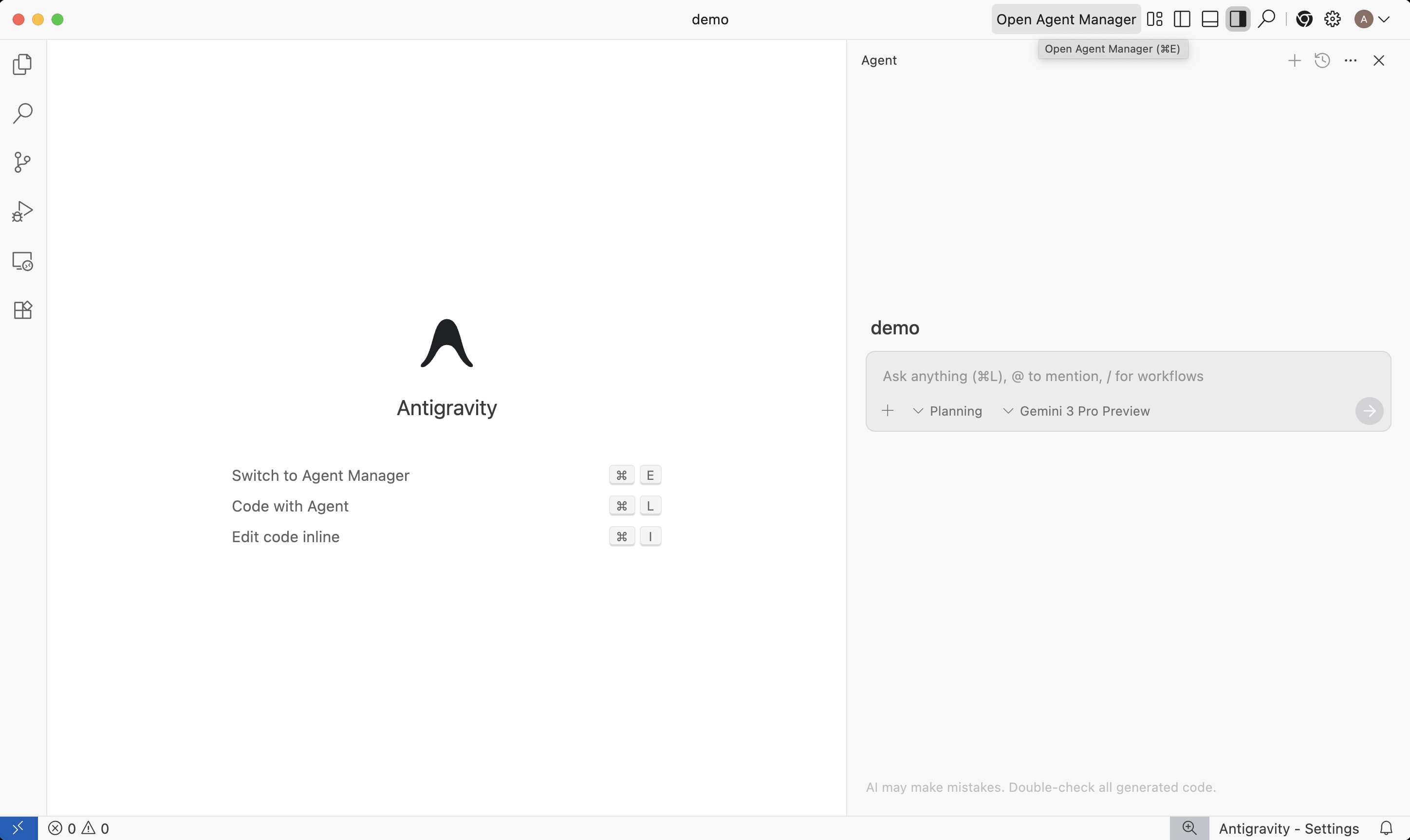
🔧 48+ Hours of Testing: What Changed with the Transition to 2.0
⏱️ Methodology Update: The original 48-hour tests (November 2025) were conducted with the old IDE. After the release of Antigravity 2.0 in May 2026, I re-ran some scenarios on the new version and intentionally left others on the classic Antigravity IDE for comparison.
📊 What I Tested:
-
Number of Prototypes: On Antigravity 2.0, 3 full-fledged prototypes were developed within 48 hours (including a macOS app for GIF compression that worked out of the box). On the classic IDE – 2 prototypes, with one requiring manual refinement due to context loss during the workflow.
-
Best Case on 2.0: Developing a full macOS GIF compression app in 43 seconds – the AI independently applied Web Worker, gifenc, gifuct-js, and implemented an intelligent algorithm to fit within 5 MB.
-
Worst Case on 2.0: Attempting to run a multi-stage scenario with deep architecture audit via
/goal – the agent was interrupted by an HTTP 503 MODEL_CAPACITY_EXHAUSTED error, all session context was lost, and I had to start over.
-
✅ Quotas: I confirm: limits on Gemini 3.5 Flash models have tripled, but tracking the remaining balance requires deep dives into settings – unlike Codex, where the quota is displayed directly in the interface.
-
🌙 Migration and Backup: Auto-updates do indeed erase configuration, but the problem is deeper: the migration master crashes with
EEXIST if mcp_config.json already exists as a symlink, leading to circular references and blocking File Explorer and Terminal. A backup in ~/.gemini/antigravity-backup saves the day but requires manual symlink cleanup.
-
🌐 Browser Subagent: The new feature genuinely opens Chrome and clicks on interfaces – confirmed. However, the community complains about interruptions during long scenarios, especially if the session is forcibly closed (due to logout or power failure) – chats disappear irrevocably.
💡 Key Issues That Remain Open:
-
Product Conflict: Antigravity 2.0 and the IDE are two separate applications that read/write to the same files. Simultaneous installation leads to the language server and Electron GUI competing for
mcp_config.json – the consequence: symlink loops and inability to open projects.
-
Security: JSON Hooks allow arbitrary shell scripts to be executed before/after model calls – this is powerful, but Google continues to expand the list of "sensitive" paths requiring confirmation.
-
Context Loss: The problem persists. On large projects, context between sessions in multi-agent mode is lost – confirmed on forums. One user lost 15 days of work due to the inability to restore chats after inactivity.
-
No Undo: Unlike Codex, Antigravity 2.0 does not support undoing changes – this forces users to hold down permissions and ruins the "continuous agent" experience.
-
Authorization: There's no quick permission mode switcher (like in Codex or Claude Code) – the agent is frequently interrupted by confirmation requests, breaking the workflow.
🎯 Conclusion: The rating increases from 6.5/10 to 7.8/10 due to real performance gains and new features (subagents, asynchronous tasks, JSON Hooks, Browser Subagent). However, migration is painful, and classic pain points (context loss, session interruptions, lack of undo, inconvenient quota management) have not disappeared. 2.0 is a step forward, but not a leap. Google is back at the table, but victory is yet to come.
⚠️ Drawbacks and Pain Points (Updated - July 2026) 🔴
Since the first Antigravity (November 18, 2025) was released, the product has undergone another high-profile release – Antigravity 2.0 (May 19, 2026) – and another public scandal with the removal of the IDE. Some of the November issues have been resolved, some remain, and new ones have emerged.
Here are the key pain points as of July 2026:
🌙 Forced IDE Replacement Without Warning
- • The overnight auto-update on May 19, 2026, rewrote installation paths such that the old IDE and the new 2.0 cannot coexist.
- • Developers lost chat history, settings, and work context without a rollback option.
- • Google acknowledged the communication error (statements on Reddit and X from employees, including Varun Mohan) and added an "Open IDE" button a few days later.
- • A workaround still used by some of the community: rolling back to version 1.23.2 and manually disabling auto-updates.
🔴 Security – Still Not Fully Resolved
- • Following the November findings (backdoor via mcp_config.json, data exfiltration), Google continues to patch – the list of "sensitive" paths requiring confirmation has been expanded (added .vscode, .cache).
- • Public SOC 2 / GDPR documentation for enterprise is still missing – critical for teams with regulatory requirements.
- • The conclusion remains the same: be cautious with projects containing sensitive data and secrets.
⏳ Quotas – Improved, But Not Unlimited
- • Limits on paid plans tripled after a wave of complaints in spring 2026.
- • "model provider overload" still occurs, according to user feedback, though less frequently than in autumn 2025.
- • The Free tier remains very limited – approximately 20 requests per day, not suitable for real daily work.
🔀 Product Fragmentation
- • Now three separate tools instead of one: Antigravity 2.0 (agent orchestration), Antigravity IDE (classic editor), Antigravity CLI (replaced Gemini CLI, which is shutting down on June 18, 2026).
- • No JetBrains support – only a VS Code fork.
- • Only the Open VSX extension marketplace, no official Microsoft Marketplace.
💸 Price is Now Known (And It's Not Cheap on the Top Tier)
- • Free – limited (~20 requests/day).
- • Pro – $20/mo, triple the limits compared to November 2025.
- • Ultra (new) – $100/mo, 5 times the limits of Pro, plus 20TB of Google storage.
- • The top enterprise tier has become cheaper – from $249.99 to $200/mo.
My Personal Conclusion on This Section 😓
As of July 2026, Antigravity is no longer a raw November beta, but a product clearly trying to mature: quotas are more generous, multi-agent functionality has been added, and pricing is transparent. However, the release method of 2.0 (forced overnight update, data loss, three conflicting products) is a new type of problem, no less serious than bugs. [TODO: update rating 4.5/10 → your new rating].
Security remains pain point #1 – Google is still patching, not definitively closing the issue. Trust in the update process is #2, and this is a new point that wasn't present in November. If you work in a team, keep update.mode: manual and update consciously, don't wait for Google to do it for you overnight.
🚀 Comparison with Competitors (Updated)
| 📊 Parameter | ⭐ Antigravity 2.0 |
|---|
| 🚀 Agent Autonomy | Significantly increased – multi-agent, parallel tasks, background execution 📈 |
| ⚡ Stability | Better with quotas, but a new risk – conflicts between 2.0 and IDE, interruptions during migration 🐛 |
| 🛡️ Security | Patches are ongoing, no critical vulnerabilities found again yet, but no SOC2/GDPR 🟡 |
| 💎 Artifacts | Plus Browser Subagent – live UI testing in Chrome, not just video recording ⭐ |
| 📊 Parameter | 🚀 Cursor | 🤖 Claude Code |
|---|
| 🚀 Agent Autonomy | High and stable ⭐ | Best refactoring quality on large codebases ⭐ |
| ⚡ Stability | Very high ⭐ | High, without major release scandals |
| 🛡️ Security | More stable reputation 🟢 | Stable reputation 🟢 |
| 💎 Artifacts/Logs | Good logs 📝 | Good logs, less visual than Artifacts |
Conclusion on Comparison: Antigravity 2.0 has improved technically – multi-agent functionality and Browser Subagent are genuinely strong features not found in competitors at this price point. However, if you need predictable stability without the risk of "waking up without an editor," Claude Code for complex refactoring and Cursor for daily work remain safer choices. Antigravity 2.0 is worth considering if you are already in the Google Cloud/Firebase ecosystem or want to experiment with multi-agent workflows – but update consciously, manually, and have a backup.
📉 The Future of Development: Realistic Forecasts for 2026–2028 🔮
Part of the November forecasts has already been validated by reality. Antigravity indeed did not replace programmers — but it also didn't remain a niche experiment as could have been the scenario. Instead, Google made a much more aggressive bet than expected: instead of "fixing bugs by March," they completely reassembled the product into a multi-agent platform by May 2026, at the cost of a loud scandal involving the removal of the IDE.
Updated forecast considering what has already happened:
- 📈 Confirmed: agent-first tools are indeed taking over simple prototypes, MVPs, and routine CRUD tasks — and Antigravity 2.0 is now competing much more seriously here thanks to multi-agent capabilities and triple quotas, rather than remaining an outsider due to limitations.
- 🛡️ Confirmed: for enterprise and security-critical products, the barrier remains high — the lack of SOC 2 / GDPR documentation in 2.0 confirms that serious companies are still waiting, not migrating en masse.
- 🔀 Not predicted in November: the release process of large AI tools itself turned out to be a risk separate from code quality — the forced overnight update without rollback showed that vendor lock-in and control over update cadence have become a new pain point for teams building processes around such tools.
- ⌨️ New: Google is simultaneously pushing the CLI direction — Gemini CLI is closing on June 18, 2026, in favor of Antigravity CLI, signaling a broader consolidation of the ecosystem around agents, not just IDEs.
- ⚠️ Risks for 2027–2028: regulatory pressure (EU AI Act) around agents with broad access to the file system and browser; increased competition from Claude Code and Codex, which have so far avoided loud release scandals; possible further consolidation — a merger of IDE and 2.0 into a single product is not ruled out if user rebellion continues.
Section Conclusion 🤔: The evolution turned out to be faster and sharper than expected in November — but not towards stability, but towards a more ambitious architecture at the cost of user trust. Who wins in the long run still depends on whether Google learns to release major changes without overnight surprises for paid clients.
✅ Conclusions and Recommendations (Updated — July 2026)
Google Antigravity has gone from a raw November beta to a full-fledged multi-agent platform in less than six months. Technically, it's already a different product: multi-agent capabilities, parallel tasks, Browser Subagent, triple quotas, a wider selection of models (Claude Sonnet/Opus 4.6, GPT-OSS 120B). But the release method of 2.0 — a forced overnight update that removed the familiar IDE without warning and without rollback — added a new type of risk that wasn't present in November: the unpredictability of the vendor process itself.
My final rating: 6.4/10 (was 5.3/10 in November 2025)
- +3 points for the real technical leap — multi-agent capabilities, parallel and background tasks, Browser Subagent with live UI verification
- +1.5 points for triple quotas on paid tiers — the main November frustration is significantly mitigated
- +1 point for a wider and fairer selection of models and a transparent pricing grid (Free/Pro $20/Ultra $100)
- –2.5 points for the IDE scandal: forced overnight replacement, loss of settings and user trust without a rollback option
- –1.5 points for fragmentation into three products that conflict with each other during installation (2.0, IDE, CLI)
- –0.9 points for security, which is still not fully resolved — patches are ongoing, SOC 2 / GDPR documentation for enterprise is still missing
A fact that is definitely worth noting regardless of the final score: Google has demonstrated a willingness to react quickly to criticism (the "Open IDE" button, resetting quotas within a few days), but the very fact that it had to "put out fires" is already a signal about the quality of internal release testing.
Recommendations Right Now 🚀
- 🔒 Freeze auto-updates (
update.mode: manual) for any Antigravity installation — the May 2026 experience showed that this is not paranoia, but a necessity
- 💾 Always have a backup of your configuration before updating — the official recovery path after a forced update:
~/.gemini/antigravity-backup → manual rsync to ~/.gemini/antigravity, excluding mcp_config.json
- 🔀 Choose consciously between the three products: Antigravity IDE — if you need a familiar editor; Antigravity 2.0 — if you are ready to work with multi-agent workflows; do not install both simultaneously, they conflict
- 🔒 Still do not open sensitive projects and API keys without carefully checking the agent's access rights
- ⌨️ If you use Gemini CLI — migrate to Antigravity CLI by June 18, 2026, the old tool is officially closing
- 🛠️ Alternatives that remain a stable choice: Claude Code (best refactoring quality on large codebases), Cursor (balance of speed and stability)
Final Verdict: Antigravity 2.0 has grown from an experimental toy into a serious technical product — this cannot be denied when looking at its multi-agent capabilities, quotas, and Browser Subagent. But Google has still not learned to release major changes without surprises for paid users, and this is a new, separate reason for caution — not because of code quality, but because of the unpredictability of the update process itself. For daily production work, it's still not a replacement for Cursor or Claude Code, but it's already a fully functional tool for those who are ready to maintain manual control over updates and are not afraid of multi-agent workflows.
