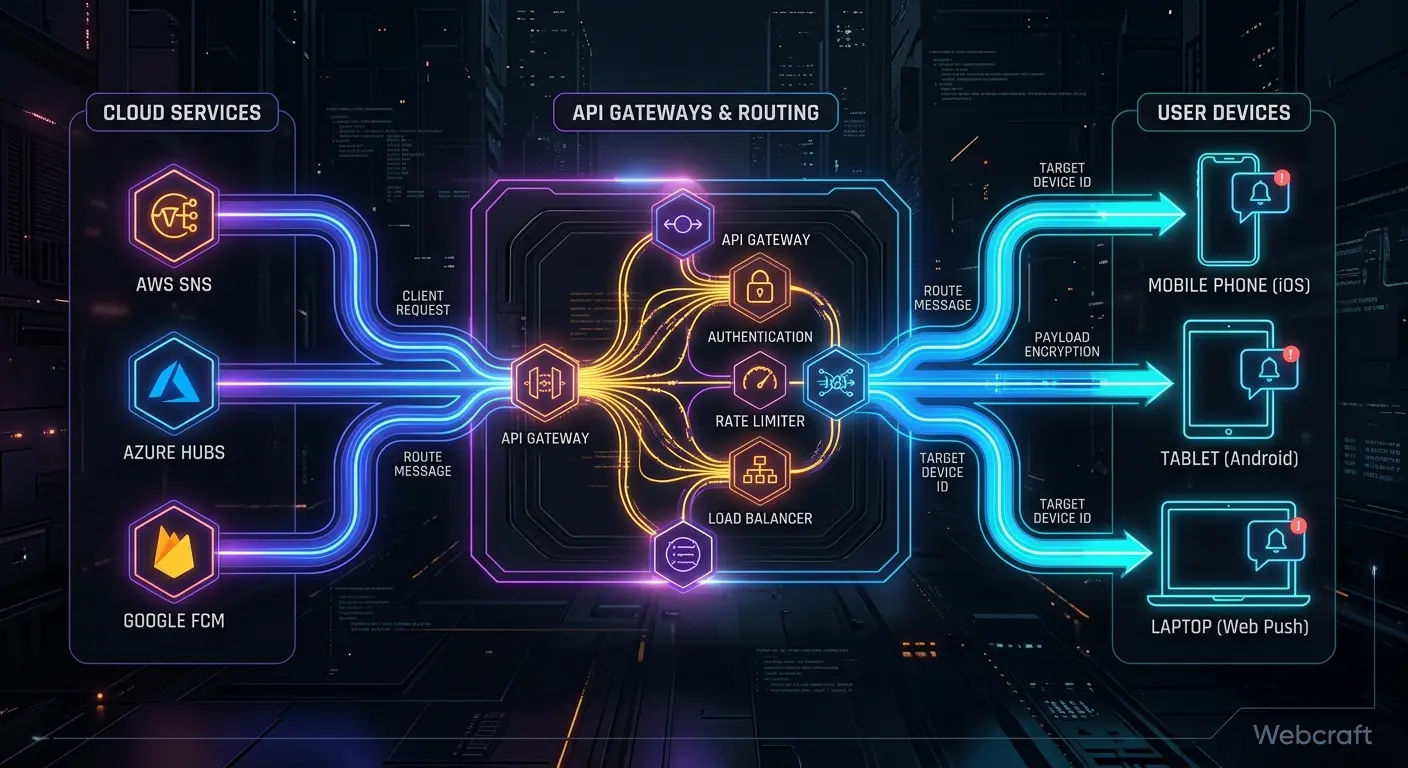
When I was exploring Web Push for PWA on iOS, everything was built on a custom backend: VAPID keys, subscription storage, and sending via a Spring Boot library. The natural next question is: can we delegate this part to a ready-made service? Here, I compare five of the most popular options: OneSignal, FCM, Pushwoosh, WonderPush, and Braze. An important disclaimer: I haven't integrated them into production, so this comparison is based on official documentation and vendor pages as of October 19, 2026.
⚡ In Short: How These Services Differ
- ✅ These are different classes of solutions. FCM is Google's delivery infrastructure, OneSignal, Pushwoosh, and WonderPush are push notification platforms, and Braze is an enterprise customer engagement platform (CEP).
- ✅ All five, according to their documentation, support iOS web push for PWAs added to the home screen.
- ⚠️ No service removes iOS limitations: home screen installation and permission requests upon click remain.
- ⚠️ All require their own Service Worker or integration of their library into yours, so you'll have to combine them with your own caching and push handler.
| Service |
Type |
Feature According to Documentation |
| Firebase Cloud Messaging (FCM) |
Delivery Infrastructure |
Requires a firebase-messaging-sw.js file in the site's root; VAPID keys are generated in the Firebase console |
| OneSignal |
Push Notification Platform (SaaS) |
Mandatory OneSignal Service Worker; it can be combined with your own worker |
| Pushwoosh |
Push Notification Platform (SaaS) |
VAPID keys are generated by the service for some browsers; a Website Push ID is required for Safari and iOS |
| WonderPush |
Push Notification Platform (SaaS) |
Plans start from €1/month (according to the vendor page); notifications are text-based on iOS |
| Braze |
Customer Engagement Platform (CEP) |
Requires a Service Worker with the Braze library; pricing is individual |
📚 Table of Contents
🧭 How I Compare: Methodology and Disclaimers
What this comparison is about. I am writing about these services based on their official documentation, product pages, and pricing, not from my own tests. Therefore, the article contains no ratings, "best" choices, or claims about speed or delivery rates. Where I couldn't find confirmation, it is explicitly stated.
Criteria for comparison:
- service type;
- iOS web push support according to documentation;
- how the service is connected (Service Worker, SDK, keys);
- how to send from your own backend;
- payment model (only from official pages and with dates);
- what to pay attention to before choosing.
Conditions, pricing, and features change, so always check the vendor's documentation before making a decision.
🧱 Three Types of Services: Infrastructure, Push Platforms, CEP
The terms "Push Provider Platform" or "push notification platform" do not have a single standard definition, so for clarity, I divide them as follows:
- Delivery Infrastructure (FCM). Google's service that delivers messages. You build campaign logic, segmentation, and analytics yourself or through other Firebase tools.
- Push Notification Platforms (OneSignal, Pushwoosh, WonderPush). SaaS with a campaign dashboard, segmentation, analytics, and an API for sending from the backend.
- Customer Engagement Platform, CEP (Braze). Collects behavioral data from websites, apps, and backends into user profiles and triggers automated messages via push, email, SMS, and other channels. This is a solution for large teams and complex scenarios.
Therefore, comparing FCM and Braze "head-to-head" is incorrect: they are different levels of abstraction.
⚙️ How Web Push Works and Where the Service Fits In
In standard Web Push, there are three participants: your website (Service Worker and subscription), the browser's push service, and your backend, which sends messages to the subscription endpoint. On iOS, the endpoint typically leads to Apple's infrastructure (I wrote about this in the article on iOS Push), and the Web Push support itself for web apps from the home screen is described in the WebKit blog.
A ready-made service integrates into this chain from two sides:
- on the client: its own SDK and Service Worker instead of (or along with) yours;
- on the backend: storing subscriptions and sending via its API, rather than through your Web Push library.
🍎 iOS and PWA: What No Service Solves
The documentation for the reviewed services describes the same iOS limitations:
- Installation on the Home Screen. For FCM for iOS and iPadOS, this is a mandatory requirement. OneSignal requires iOS 16.4+, adding the site to the home screen, and opening the app from there. Pushwoosh describes iOS web push as working through PWAs from the home screen (Safari 16.4+).
- Permission Request Upon User Action. Braze states that permission for Safari iOS can only be requested after adding the site to the home screen, and only in response to an action, such as clicking a button. If the user has responded (accepted or declined), the app must be deleted and re-added for a repeat request.
- Subscription Instability. OneSignal's documentation explicitly states that for some developers, iOS web push works initially and then suddenly stops.
- Not in Regular Tabs and In-App Browsers. Pushwoosh, in its blog on iOS push, notes that web push does not work in in-app browsers (WKWebView).
Declarative Web Push: A New iOS 18.4 Feature
Declarative Web Push is worth noting separately. According to the WebKit blog, it allows requesting subscriptions and displaying notifications without a Service Worker, and on iOS and iPadOS 18.4, this method is available for home screen apps. I have not checked if the SDKs of the reviewed services support this: this is something to clarify in the documentation of your chosen vendor.
🔍 Breakdown of Each Service
For each service below, one diagram. This is a description according to the documentation, not a quality assessment.
Firebase Cloud Messaging (FCM)
- Type: Google's message delivery infrastructure.
- iOS web push: Yes. FCM supports Safari, and on iOS and iPadOS (16.4+), the app must be on the home screen.
- Integration: According to FCM documentation for Web, you need to connect the Firebase JS SDK, generate a VAPID key in the Web Push certificates section of the Firebase console, and call
getToken() with this key. A firebase-messaging-sw.js file is required in the domain root.
- Payment model: Check the Firebase product page: I did not find official confirmation of pricing conditions in the reviewed sources.
- What to consider: The worker file has a specific name and location. If you already have your own Service Worker, its code will need to be combined.
OneSignal
- Type: Push notification platform (SaaS), registration is free.
- iOS web push: Yes. iOS/iPadOS 16.4+, added to the home screen from Safari, Chrome, or Edge. The OneSignal Service Worker for iOS is mandatory.
- Integration: The
OneSignalSDKWorker.js file is looked for by default in the site root. It can be placed in a subdirectory or by adding an importScripts line to an existing worker.
- Sending from backend: The documentation mentions the Create message API.
- Payment model: Check the pricing conditions on the official OneSignal page.
- What to consider: The documentation explicitly states that the OneSignal worker with root scope can conflict with PWA, in which case a separate worker or merging files is recommended.
Pushwoosh
- Type: Push notification platform (SaaS).
- iOS web push: Yes. On the product page, it is stated that on iOS and iPadOS, web push works via PWA from the home screen (Safari 16.4+).
- Integration: JS code, npm package, or Google Tag Manager. The Service Worker must be placed in the site root. For Chrome, Edge, Firefox, Opera, and Samsung Internet, Pushwoosh generates VAPID keys itself, while for Safari and iOS, you need to register a Website Push ID (the service collects the push package). Creating a Website Push ID likely requires an Apple Developer account: check the documentation.
- Own worker: SDK documentation describes the
serviceWorkerUrl parameter and connecting the Pushwoosh worker via importScripts to your file.
- Payment model: [CHECK on the official Pushwoosh pricing page].
WonderPush
- Type: Push notification platform (SaaS). The website indicates that WonderPush is now a Brevo company.
- iOS web push: Yes. Compatibility with iOS 16.4 was announced on the day of iOS 16.4 release, March 24, 2023. According to documentation, a manifest with
"display": "standalone" is required (if you don't have your own, the service adds its own), and notifications on iOS are text-only, without images or buttons. The page has not been updated for a long time, so check for relevance.
- Sending from backend: Management API, where HTTP calls to
management-api.wonderpush.com allow performing actions from the backend that are available in the panel.
- Payment model: According to the official pricing page, from €1 per month for 1–1000 subscribers and +€1 for each additional thousand, without a credit card (as of the review date; conditions may change).
- Data: The homepage states that through the API, you decide how long your data is stored on their servers.
Braze
- Type: Enterprise Customer Engagement Platform (CEP). Web push is just one of the channels alongside email, SMS, in-app, and others.
- iOS web push: Yes. Documentation requires a manifest, a Service Worker that imports the Braze library, adding to the home screen, and requesting permission after a user action.
- Sending from backend: REST API (e.g., the
/messages/send endpoint), the host depends on your instance's region.
- Payment model: I did not find an official public pricing page. According to third-party reviews, prices are individual and depend on the number of active users and channels. Clarify conditions with Braze.
- What to consider: This is a solution for large teams and complex scenarios. For simple new publication broadcasts, it might be overkill (this is my assessment, not a documentation requirement).
📊 Comparison Table
| Criterion |
FCM |
OneSignal |
Pushwoosh |
WonderPush |
Braze |
| Type |
Infrastructure |
Push Platform |
Push Platform |
Push Platform |
CEP |
| iOS web push (home screen) |
Yes |
Yes |
Yes |
Yes |
Yes |
| Own Service Worker |
firebase-messaging-sw.js file in root |
Mandatory; can be combined via importScripts |
Can be combined via importScripts |
WonderPush worker loader |
Worker with Braze library |
| Sending from backend |
Firebase Admin SDK / API (see FCM documentation) |
Create message API |
[CHECK] |
Management API |
REST API |
| Payment |
Check on Firebase page |
Free registration; rates on website |
[CHECK] |
From €1/mo (as of review date) |
Individual |
| iOS Specifics |
Requires "Add to Home Screen" |
Subscription stops possible (per documentation) |
Requires Website Push ID for Safari |
Text only on iOS (per documentation) |
Reinstallation required after refusal |
🧭 Which Option to Consider: Conditional Scenarios
This is not a rating or a statement that one service is better than another. It's a practical guide: what to consider first depending on your task.
| If you need… |
What to consider |
What to check first |
| Delivery control and custom logic |
FCM or a custom Web Push implementation (as in the article on iOS Push) |
Are you prepared to build segmentation, analytics, and invalid subscription cleanup yourself. For FCM: how to combine the firebase-messaging-sw.js file with your Service Worker |
| Ready-made campaigns and segmentation without development |
OneSignal and Pushwoosh (compare them) |
What campaign and segmentation capabilities are available in your required plan, how the service's worker combines with yours, what are the payment terms for your subscriber count |
| Web Push as part of multi-channel communication (email, SMS, in-app) |
Braze |
Is an enterprise platform justified for your scale; clarify payment terms with Braze |
| You are considering WonderPush |
WonderPush |
Additionally, check the relevance of documentation and terms after the transition under the Brevo brand (the iOS web push page has not been updated for a long time). In terms of scenario, it is close to the previous group: the official pricing page claims segmentation and automation |
In any scenario, the iOS conditions remain the same: the site must be on the home screen, and the permission request is shown upon user action.
☕ Sending from the backend: what the documentation says
A custom backend on Spring Boot with the Web Push library (as in my article on iOS) stores subscriptions and calls the endpoint of each subscription itself. In ready-made services, the role is different: subscriptions are stored with them, and your backend sends them a command to "send this message to these users" via REST API. The documentation mentions such options: Create message API in OneSignal, Management API in WonderPush, and Braze's REST API. For Java, these are ordinary HTTP calls, and for specific request fields, see the service's documentation. I haven't written or tested this code, so there are no examples here.
⚖️ Build vs buy: when to use a custom backend and when to use a service
This is my assessment based on experience with a custom backend.
A custom backend remains a reasonable choice if:
- the scenario is simple ("new publication", "reminder"), as in projects where I used custom sending;
- it's important that subscriber data does not leave your infrastructure;
- you need minimal dependencies and full control over the sending logic.
A service makes sense if:
- there are no resources to maintain custom sending and clean up invalid subscriptions;
- segmentation, analytics, and campaigns managed by marketing without developers are needed;
- notifications are needed simultaneously from the web and native applications. In this case, it is also useful to read the comparison of PWA and native applications.
🛡️ Risks: Service Worker, vendor lock-in, and data
- Service Worker conflict. All services require their own worker or library in yours. If you already have caching and a push handler, they need to be carefully combined. OneSignal's documentation directly describes that the root worker can conflict with PWA, and FCM requires a file with a specific name. I discussed typical PWA caching errors in the article "8 critical errors when integrating PWA".
- Vendor lock-in. Subscriptions are stored in the service. Switching to another provider or a custom backend may mean re-subscribing some users. This is my assumption based on the specifics of Web Push: check it for your case. Some services describe subscriber import: this is in the WonderPush documentation (sections on import and migration).
- Data and privacy. Check where subscriber data is stored, for how long, and how it aligns with your privacy policy.
- Uncertainty with new features. Whether the service's SDK supports Declarative Web Push needs to be checked separately in the documentation.
✅ Checklist for selection
- ☐ What percentage of your users are on iPhones? (check your own analytics)
- ☐ Do you need segmentation, campaigns, and analytics, or is simple sending enough?
- ☐ Do you also need native applications?
- ☐ Who will support sending: developers or marketing?
- ☐ Do you have your own Service Worker (caching, push handler) and how will you combine it with the service worker?
- ☐ What are the payment terms for your number of subscribers (according to the official page as of today)?
- ☐ Where is subscriber data stored and is it acceptable according to your policy?
- ☐ Can subscriptions be exported if you decide to leave?
- ☐ Does the SDK support Declarative Web Push and is it important to you?
- ☐ Has it been decided how you will encourage users to add the PWA to their home screen (without this, no service will help)?
❓ Frequently Asked Questions (FAQ)
Do I need a service like OneSignal for PWA Push to work on iOS?
No. Web Push on iOS works without third-party services: a Service Worker, VAPID keys, and a backend library are sufficient. The service takes over part of the backend work but does not remove the iOS conditions (home screen, permission request on click).
OneSignal or FCM: which to choose?
These are different classes: FCM is a delivery infrastructure, while OneSignal is a platform with a campaign panel. The choice depends on whether you need out-of-the-box segmentation and analytics, or if you are willing to build them yourself. Without my own tests, I cannot say which one is more stable on iOS.
Does Braze work for simple PWA notifications?
Technically yes: the documentation has a separate instruction for Safari on iOS. However, it is an enterprise platform with custom pricing, and it may be overkill for simple distribution (my assessment).
Is FCM free?
I did not find confirmation of pricing terms in official sources, so check them on the Firebase product page.
Can I combine my Service Worker with the service worker?
According to the documentation, yes: OneSignal and Pushwoosh describe connection via importScripts, and Braze requires the worker to import its library. FCM requires the file firebase-messaging-sw.js. Details depend on the service.
🏁 Conclusions
- 🔹 Five services belong to three classes: infrastructure (FCM), push platforms (OneSignal, Pushwoosh, WonderPush), and CEP (Braze).
- 🔹 According to the documentation, all support iOS web push, but none remove the iOS conditions: home screen, click-to-request, subscription instability.
- 🔹 The main technical risk is combining your Service Worker with the service worker.
- 🔹 For simple scenarios, a custom backend remains a reasonable alternative, while a service excels where segmentation, analytics, and multiple channels are needed.
- 🔹 This comparison is based on documentation as of October 19, 2026. Terms and capabilities change, so check them with the vendor before choosing.
📎 Sources
Important: service terms, rates, and capabilities change. Check the vendor's current documentation before choosing. The material is current as of October 19, 2026, and is based on documentation.